# OpenDeepResearchに学ぶDeepResearchの設計思想と実務適用のポイント
1. はじめに
OpenAIが2025年2月にDeepResearchの機能を発表し、その後、Claude, Gemini, PerplexityやGenSparkなど、各社相次いでDeepResearchの機能を公開しました。今となってはDeepResearch機能は標準装備という形で、一般ユーザーの間でも利用も広がっています。
DeepResearchによって、今までであれば、何日もかけて調べていたような事、コンサルティングファームであればジュニアコンサルが一週間近くかけてまとめていたようなリサーチ業務を高品質かつ数分~数十分程度で代替してくれるようになりました。私も自分の周辺分野や、あまり詳しくない業界の動向調査などで日々活用し、もうDeepResearchがない頃には戻れないなという感覚になっています。
かなり一般利用が進んできたDeepResearchですが、毎回GUI上から指示を出すのも面倒であり、通常業務で利用しているチャットや社内アプリにそのまま組み込んで業務プロセスの中で使いたいというニーズもあるかと思います。そのニーズに答える形で、2025年6月にOpenAIがDeepResearchのAPIを発表し、2025年12月にGeminiもDeepResearchのAPIを発表しました。
データソースとして、ベクトルストアや共有ドライブ、メールアプリ等に加え、MCPも指定できるようになっており、今後は公開情報をベースとした一般的なリサーチに留まらず、社内外の情報を横断した用途としてDeepResearch機能が拡張されていくのではないかと思います。
今後の更なる拡張が期待されるDeepResearchですが、DeepResearchと一言で言っても、リサーチ業務自体にそもそも1つの正解はありません。各社によってその設計思想は当然様々で、同じ指示内容でもレスポンスの内容は大きく異なります。私も普段は、特定の製品だけでなく、複数の製品で並行してDeepResearchを回し、結果を比較するようにしています。
2023年や2024年頃は、技術的な目新しさもあり、とりあえずChatGPTを社内に展開する事が1つの目標とされていましたが、2025年からのAIエージェントの台頭を皮切りに、今後は「実際の業務でどう付加価値を出すか」という事が真に問われるフェーズに移行しています。
DeepResearchについても同様で、重要な事は、最新のDeepResearchをとりあえず使うという事ではなく、自分達が出したい付加価値や実際のユースケースに合わせて、いかにDeepResearchを設計していくかという事になります。
ユースケースは組織や業務によって様々で、例えば以下のようなケースが考えられます。
<ユースケース例>
スピード重視型
出先や移動中にも使うため、とにかくレスポンスを速くしたい。詳細な文章よりも、要点をまとめたスライド形式でのアウトプットを重視する。
コスト最適化型
部署全体で高頻度に利用する前提のため、1回あたりの品質はある程度割り切り、コストを最優先で抑えたい。アウトプットもシンプルなテキストで良い。
品質優先型
月に数回しか使わないが、内容の正確性と網羅性を最重視する。1回の実行に長時間かかっても問題なく、コストも制約としない。
ファクト厳格型
部会・経営会議向けの参考資料として利用するため、一次情報で裏付けられる事実のみを出力対象とし、推測・示唆・意見は一切含めない(出典重視)。
示唆探索型
意思決定や企画検討の壁打ち用途として、網羅的な事実整理よりも、新しい切り口や論点の発見を重視する。異業種・海外事例なども積極的に含めたい。
当然ながら、全ての要件を満たす1つのDeepResearchは存在しません。プロンプトの指示である程度調整はできますが、これはコンテキストエンジニアリングも含む設計レイヤーの話になります。
各社のDeepResearchは当然ブラックボックスのため、具体的な実装内容はわかりません。一方、オープンソースのプロジェクトとしてLangChainから「OpenDeepResearch」というリポジトリが公開されています。
https://github.com/langchain-ai/open_deep_research
今後、各社のDeepResearch機能の動向は追いつつも、DXやAI活用を推進する立場の人達は、DeepResearchの単なる利用者ではなく、もう一歩踏み込んだ視点でDeepResearchの全体像を理解しておくことが今後の実務適用、及び実際のUX設計において重要になるのではないかと思います。
私自身、上記のソースコードを一通り読んだ学びが非常に大きかったので、今回は上記のリポジトリを一つの題材として、DeepResearchの設計思想のポイントと、実務で利用する際の検討ポイントを中心にまとめていきたいと思います。
2. OpenDeepResearchとは
OpenDeepResearchの概観を理解するには、以下のLangChainのブログがわかりやすいです。
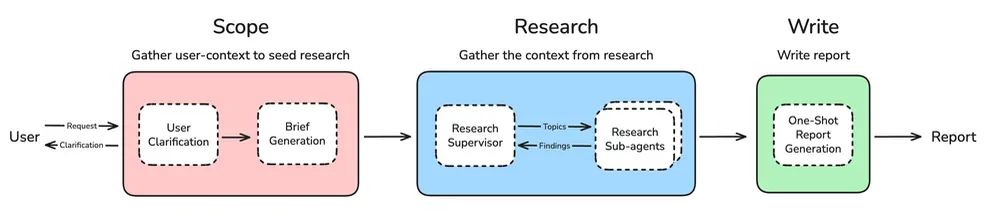
全体の流れとしては大きく、スコープ定義 ⇒ リサーチ ⇒ レポート生成になります。
調査の質はそもそものスコープ定義が非常に重要であるため、ユーザー確認(User Clarification)のレイヤーが明示的に設けられています。ここで不明点があればユーザーに聞き返すという事が繰り返されます。
そしてリサーチにおいては、管理者(Supervisor)とリサーチ用のサブエージェントを分離した構成になっています。Supervisorがリサーチのトピックを生成し、各サブエージェントがトピック毎に並列して調査を実行する事でレスポンスの速度を上げつつ、コンテキストの逼迫を防ぐ構成となっています。
特に、調査内容が広範囲に渡るケースの場合は、このサブエージェントの最大並列実行数を上げる事で高速化が期待できるでしょう。
そして最後に、レポート生成のモジュールがあります。ここで「One-Shot Report Generation」となっているのが非常に重要なポイントで、私も過去に実際のプロジェクトで大きくハマってしまったので、ここについてはまた後で詳しく触れます。
ここまでの説明で「なるほどね」となんとなくわかった気になってしまいがちですが、「では実際にこれをどうやって実装するのか?」といざ考え始めてみると、設計における検討ポイントがあまりにも多い事がわかります。
この図をベースに、10人のエンジニアに実装を依頼すれば、各人の設計思想に基づき、似て非なる10個のDeepResearchが開発されるでしょう。
実際このオープンソースも、公開当初のアーキテクチャは既にレガシー扱いになっており、現行のアーキテクチャとは大きく異なります。つまり、DeepResearchというタスク自体に共通の正解がないので、どのDeepResearchの実装がベストかという事は誰にもわかりません。結局のところ、ユースケースに合わせてDeepResearchの幅や深さ、速度やコストも含めて柔軟に使いこなせる組織が最も強いという事になります。
共通の正解はないものの、オープンソースで現在ではデファクトに近い、LangChainのエンジニア達のDeepResearchの設計思想は大きな学びになるため、今回は実際のプロンプトやグラフ、ステート設計などの実装レベルまで深堀りしていきます。
3. 全体アーキテクチャ
リポジトリのREADMEに以下のグラフがあります。実際に、QuickStartの手順通りにローカルサーバーを立ち上げると、このグラフが表示されます。
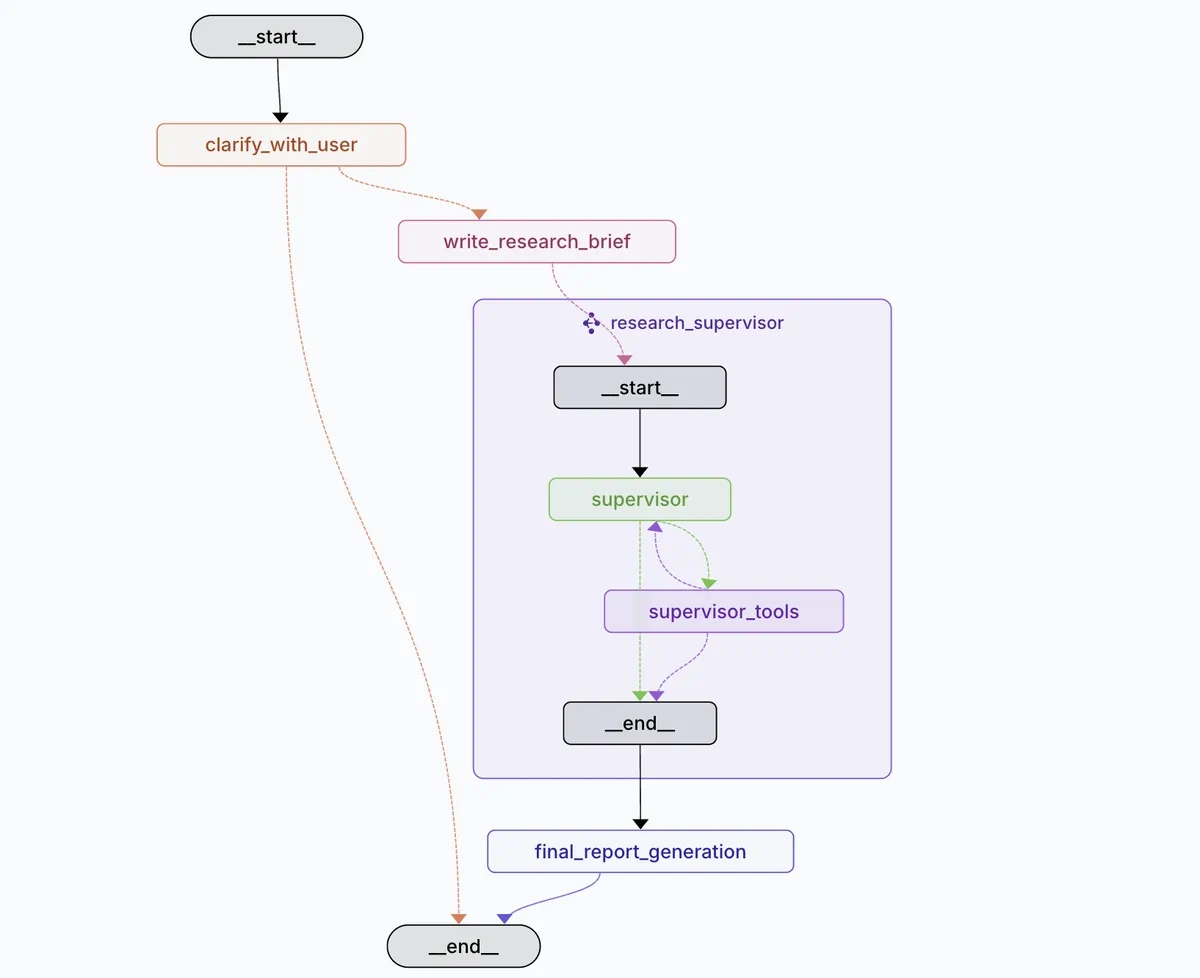
パッと見わかりやすく見えるものの、「これ実際のリサーチはどこでやっているの?」と特にresearch_supervisorのところで迷子になります。
上の図はあくまで第一階層までしか示しておらず、実際のコードでグラフの全体像を見てみると、LangGraph上で3つのグラフ構造が定義されています。
=========================
1. DeepResearch全体のグラフ定義
=========================

# Main Deep Researcher Graph Construction
# Creates the complete deep research workflow from user input to final report
deep_researcher_builder = StateGraph(
    AgentState,
    input=AgentInputState,
    config_schema=Configuration
)

# Add main workflow nodes for the complete research process
deep_researcher_builder.add_node("clarify_with_user", clarify_with_user)              # User clarification phase
deep_researcher_builder.add_node("write_research_brief", write_research_brief)        # Research planning phase
deep_researcher_builder.add_node("research_supervisor", supervisor_subgraph)          # Research execution phase
deep_researcher_builder.add_node("final_report_generation", final_report_generation)  # Report generation phase

# Define main workflow edges for sequential execution
deep_researcher_builder.add_edge(START, "clarify_with_user")                       # Entry point
deep_researcher_builder.add_edge("research_supervisor", "final_report_generation") # Research to report
deep_researcher_builder.add_edge("final_report_generation", END)                   # Final exit point

# Compile the complete deep researcher workflow
deep_researcher = deep_researcher_builder.compile()

=========================
2. Supervisorのサブグラフ
=========================

# Supervisor Subgraph Construction
# Creates the supervisor workflow that manages research delegation and coordination
supervisor_builder = StateGraph(SupervisorState, config_schema=Configuration)

# Add supervisor nodes for research management
supervisor_builder.add_node("supervisor", supervisor)              # Main supervisor logic
supervisor_builder.add_node("supervisor_tools", supervisor_tools)  # Tool execution handler

# Define supervisor workflow edges
supervisor_builder.add_edge(START, "supervisor")  # Entry point to supervisor

# Compile supervisor subgraph for use in main workflow
supervisor_subgraph = supervisor_builder.compile()

=========================
3. リサーチエージェントのサブグラフ(並列化対象)
=========================

# Researcher Subgraph Construction
# Creates individual researcher workflow for conducting focused research on specific topics
researcher_builder = StateGraph(
    ResearcherState,
    output=ResearcherOutputState,
    config_schema=Configuration
)

# Add researcher nodes for research execution and compression
researcher_builder.add_node("researcher", researcher)                 # Main researcher logic
researcher_builder.add_node("researcher_tools", researcher_tools)     # Tool execution handler
researcher_builder.add_node("compress_research", compress_research)   # Research compression

# Define researcher workflow edges
researcher_builder.add_edge(START, "researcher")           # Entry point to researcher
researcher_builder.add_edge("compress_research", END)      # Exit point after compression

# Compile researcher subgraph for parallel execution by supervisor
researcher_subgraph = researcher_builder.compile()
実際には、supervisor_toolsの中でresearcher_subgraphが呼ばれ、この中で各リサーチが行われます。そして、各リサーチエージェントからの返答内容が十分とsupervisorが判断したタイミングで、最終レポートの生成に移ります。
実はこれだけを見ると、supervisorをサブグラフに分ける必要は必ずしもありません。supervisorはシリアルに呼ばれるため、サブグラフにせずに全体でそのまま表現してしまっても良いからです。
しかし、フェーズ境界の明確化やステートの分離、また、supervisor自体の差し替えや並列化など、今後の拡張を見据えて分離しておくのがベターという判断なのだと思います。この辺りも開発者の設計思想が強く出ているなと感じる箇所の一つです。
各モジュールの解説の前に、グラフに沿って全体の処理の流れをざっと追っておきましょう。
<全体の処理の流れ>
- ユーザーがDeepResearchへ調査をリクエスト(クエリ)
- clarify_with_userノードでユーザーからのクエリを受け取り、調査内容が明確であれば次へ。調査内容が不明瞭でユーザーへ質問が必要な場合は、ユーザーへの質問を返して一旦終了(次のターンで回答を受け取り、調査内容が明確になるまで質問を繰り返す)。
- 調査に対する質問が完了したら、write_research_briefノードで、調査方針(何をどこまでどう調べるか)を生成
- 調査方針をsupervisorに渡し、supervisorが具体的な調査計画と、調査に必要なトピックを生成。この時、各トピックは独立に調査可能な単位で生成される
- 各トピック単位でresearcherが立ち上がり、自身に与えられた検索ツールを用いて調査を実施
- 対象トピックに対する調査が十分と判断したタイミングで、調査結果をサマリしてsupervisorに戻す(不十分な場合は調査を繰り返す)
- supervisorは各トピックの調査結果を確認し、クエリに対するレポート生成に必要な内容が含まれているか確認。調査が十分な場合は次へ、不十分な場合は、追加の調査を再度実施(最大回数まで繰り返し可能)
- 調査が完了したら、final_report_generationノードで調査結果をもとに最終レポートを生成。結果をユーザーへレスポンス
supervisorと各リサーチャーがそれぞれ独立に動く形にする事で、コンテキストの肥大化を防ぐ設計になっています(共通コンテキストに調査結果をただただ蓄積していく訳ではない)。また、ユーザーへの質問や追加の調査などはループ構造になっているため、どこで終わらせるかのプロンプト設計が非常に重要になります。この定義次第でDeepResearchの速度やコスト、レポート品質が大きく変わります。
このような多段階のプロセスである事を踏まえると、トレーサビリティの重要性が強く認識されます。というのも、最終レポートの内容がいまいちだった時に、そもそもユーザー確認の段階に問題があるのか(clarify_with_user)、リサーチのやり方問題があるのか(supervisor-research)、それとも、調査内容は十分であるものの、最終レポートの作り方に問題があるのか(final_report_generation)など、どこが真のボトルネックなのかを正しく理解していないと、打ち手が改善に繋がらないという事になりかねないためです。
AIエージェントでは情報が生成・加工されながらフローの形で流れていくので、LangSmithのようなトレースツールでトレーサビリティは担保しつつも、どこで問題が発生しているのか把握し、適切な対策が取れるように、処理自体も正しく把握しておく必要があります。
それでは、更に深掘る形で、モジュール単位でのステートやプロンプト、ツールの設計を見ていきましょう。
ここからは非常に細かい話(開発者レベルの話)になるため、「実装まではちょっと、、」という方は「5. 設計ポイントまとめ」まで読み飛ばしてもらっても大丈夫です。
4. モジュール解説
clarify_with_user_instructions
まず最初のモジュールですが、これはユーザーへの調査内容の確認モジュールになります。
リサーチ業務においてある種最も重要なのは、このリサーチ開始時における依頼者との認識の擦り合わせであると言えます。
これはAIでも例に漏れず、調査内容と方針・アウトプットのイメージが、依頼者(ユーザー)と調査者(AI)の間において高い解像度で擦り合わせができている場合は高品質なレポート生成に繋がります。
一方、ざっくりとした指示とあいまいな確認状態のまま調査を進めてしまった場合は、調査者がどれだけ時間と労力をかけてレポートを作成したとしても、無用の長物になりかねません。
皆さんも、自分が部下としてタスクを進めた立場、また上司としてタスクを依頼した立場においても、擦り合わせ不足による手戻りの経験があるのではないでしょうか。
このモジュールにおけるシステムプロンプトは以下のようになっています。
clarify_with_user_instructions="""
These are the messages that have been exchanged so far from the user asking for the report:
<Messages>
{messages}
</Messages>

Today's date is {date}.

Assess whether you need to ask a clarifying question, or if the user has already provided enough information for you to start research.
IMPORTANT: If you can see in the messages history that you have already asked a clarifying question, you almost always do not need to ask another one. Only ask another question if ABSOLUTELY NECESSARY.

If there are acronyms, abbreviations, or unknown terms, ask the user to clarify.
If you need to ask a question, follow these guidelines:
- Be concise while gathering all necessary information
- Make sure to gather all the information needed to carry out the research task in a concise, well-structured manner.
- Use bullet points or numbered lists if appropriate for clarity. Make sure that this uses markdown formatting and will be rendered correctly if the string output is passed to a markdown renderer.
- Don't ask for unnecessary information, or information that the user has already provided. If you can see that the user has already provided the information, do not ask for it again.

Respond in valid JSON format with these exact keys:
"need_clarification": boolean,
"question": "<question to ask the user to clarify the report scope>",
"verification": "<verification message that we will start research>"

If you need to ask a clarifying question, return:
"need_clarification": true,
"question": "<your clarifying question>",
"verification": ""

If you do not need to ask a clarifying question, return:
"need_clarification": false,
"question": "",
"verification": "<acknowledgement message that you will now start research based on the provided information>"

For the verification message when no clarification is needed:
- Acknowledge that you have sufficient information to proceed
- Briefly summarize the key aspects of what you understand from their request
- Confirm that you will now begin the research process
- Keep the message concise and professional
"""

ーーーーーーーーーーーーーーーーーーーーーーーーーーーーーーーーーーーーーーー
<日本語訳>

clarify_with_user_instructions="""
以下は、レポートを依頼してきたユーザーとのこれまでのやり取りのメッセージです:
<Messages>
{messages}
</Messages>

本日は {date} です。

追加の確認質問をする必要があるか、またはユーザーがすでに調査を開始するのに十分な情報を提供しているかを判断してください。

重要:
メッセージ履歴の中ですでに確認質問をしている場合、ほとんどのケースでは新たに質問する必要はありません。
本当に必要な場合にのみ、追加の質問をしてください。

略語・頭字語・不明な用語がある場合は、ユーザーに確認してください。

質問が必要な場合は、以下のガイドラインに従ってください:
- 必要な情報を過不足なく、簡潔に集めること
- 調査タスクを実行するために必要な情報を、簡潔かつ構造化して収集すること
- 分かりやすさのため、必要に応じて箇条書きや番号付きリストを使用すること
  ※Markdown形式を使用し、Markdownレンダラーで正しく表示されるようにすること
- 不要な情報や、すでにユーザーが提供している情報を尋ねないこと
  ※すでに提供されている情報は、再度質問しないこと

以下の正確なキー名持つ、有効なJSON形式で返答してください:
"need_clarification": boolean,
"question": "<レポートのスコープを明確にするためにユーザーへ尋ねる質問>",
"verification": "<これから調査を開始することを伝える確認メッセージ>"

確認質問が必要な場合は、以下を返してください:
"need_clarification": true,
"question": "<確認のための質問>",
"verification": ""

確認質問が不要な場合は、以下を返してください:
"need_clarification": false,
"question": "",
"verification": "<提供された情報をもとに、これから調査を開始することを伝えるメッセージ>"

確認質問が不要な場合の verification メッセージについて:
- 調査を進めるのに十分な情報があることを明示する
- ユーザーの依頼内容について理解している要点を簡潔に要約する
- これから調査を開始することを明確に伝える
- 簡潔かつプロフェッショナルな文面にする
"""
ここでまず一つ面白いポイントは、冒頭で今日の日付が渡されている事です。
当然ながらLLM自体は特定のタイミングにおけるスナップショットなので、今日がいつなのかはわかりません。AIエージェントのアプリケーションを自分で開発した事がある人は、最初の頃あまり意識せずに「今日の日付をファイル名につけて」とプロンプトで指示して、誤った日付(過去の日付)でファイルが生成されていたという経験をした事があるかと思います。
LLM自体は今日の日付を取得するという手段を直接持っていないため、なんらかの形で日付を渡してあげる必要があります。日付を取得するというツール(シンプルなプログラム)を渡して自由に取得させるという事もできますが、リアルタイムに時刻を取得してログに入れたいという事でもなければ、ツールによるコンテキスト消費の節約にもなるので、このようにシステムプロンプトに含んでしまうほうがリーズナブルでしょう。
では本題のプロンプトの内容ですが、このプロンプトを見てまず気づく事は、「同じ質問や不要な質問をしないように」という内容の指示がかなり強調されている点です。該当の箇所が「IMPORTANT」と強調されている点も印象的です。
当然ですが、ほとんどの依頼者にとっては、同じ事を何度も質問されたり、そもそも不要な質問をされる事は大きなストレスになります。どちらかというと利用者の間口を広げる観点で、このような指示内容になっているのだと思います。一方で、提供される情報については「調査に十分な」という程度の指示に留められています。
つまり、とにかく丁寧に確認するというよりは、繰り返しの質問をとにかく避け、ある程度の情報が揃ったら調査を開始するというプロンプトになっています。
OpenAIのDeepResearchを利用した事がある方はわかると思いますが、OpenAIにおいても同様に、調査を依頼すると、最初に一度調査内容について確認するステップがあります。この点についての感じ方は人それぞれだと思いますが、私が最初に使った時の感覚としては「ほんとに大丈夫?」という印象でした。
というのも、ざっくりと依頼した内容に対して1回だけ確認され、その回答もそれほど詳細でなくてもひとまず調査に進んでしまったからです。実際の仕事だった場合は、「いや、まだざっくりとしか共有できていないから、手戻りのないようにアウトプットの擦り合わせをしよう」と止めていた事でしょう。
この点は完全にデザインの領域になるため正解はなく、ユースケースに依存します。まず社内にDeepResearchという概念を広めたいというフェーズであれば、しつこく質問する設計にすると最初からユーザーに嫌がられるので、このように緩く設定しておいたほうが良いでしょう。
一方で、実際のユースケースで価値のあるレポート生成を行うためには、このような粒度の確認では不十分と言わざるを得ないでしょう。
例えば、リサーチ業務においては、ざっと挙げるだけでも以下のような確認観点があります。
<リサーチ・レポート作成業務における確認観点(一例)>
- アウトプットフォーマット:テキストのみが良いのか、グラフ中心が良いのか、テキストとグラフどちらも含むほうが良いのか(割合はどの程度が望ましいか)
- アウトプットの分量:1ページでサマリしたほうが良いのか、5-10ページ程度が良いのか、網羅性重視で20-30ページ近くあるほうが良いのか
- ファイル形式:PDFが良いのか、Wikiに貼れるようにマークダウンが良いのか、PPTXで編集できる形が良いか、またはHTMLでWebページの形式が良いか
- エグゼクティブサマリ:最初につけた方が良いのか、最後でサマリしたほうが良いのか、そもそも不要なのか。つける場合は分量はどの程度が望ましいのか
- アウトプットの文調:レポート資料として固めの文調が良いのか、読みやすさ重視で柔らかめの文調が良いのか、言い切りは避けたほうがよいのか
- 調査対象期間:歴史の変遷まで考慮するか、直近10年までで良いか、コロナ前後で比較するか、直近1年のみで良いか
- 調査対象地域:海外事例も含むか(含む場合は特定の国を深堀りしたいか、除外したほうが良い国はあるか)、国内のみでよいか(特定の地域を深堀るか)
アウトプットの品質というのは、完全に依頼者の期待値に依存します。絶対値として高品質が存在するわけではなく、高品質かどうかは依頼者の期待値にマッチしているかどうかで決まります。社内会議で簡潔に話す材料として1枚のWord形式でサマリして欲しいというニーズに対して、洗練されたデザインやグラフも含む30ページ近い報告レポートをパワーポイントで作成したとしても、これは低品質であると言えます。
上記のような情報をユーザーがインプットとして丁寧に指示してくれるのであればそれがベストですが、実際のところはなかなか難しいでしょう。プロンプトエンジニアリングが重要という事自体は誰もが認識しているものの、細かくプロンプトを入力したいという人はそもそもいないためです。「良いアウトプットが出ないのは、入力内容の質が低いからです」というのは半分正しいのですが、この主張を繰り返すだけでは誰も使ってくれなくなるだけでしょう。
ここは設計者がなるべく事前に仕込んでおく事が重要で、「このユースケースであれば、このアウトプットがベストではないか」と逆算して、ユーザーのインプットは必要最小限で済むような設計を目指します。そもそも移動中にモバイルで利用するという事であれば、長く詳細なプロンプトを打つのも難しいはずです。
例えば、営業系の部署が面談の前にリサーチ業務で使うという事であれば、企業名だけを選択すれば、事業内容とその組織の観点で欲しい情報が欲しい粒度で手に入るという形にしておくのが望ましいでしょう。調査期間や切り口などをいくつかのプルダウンで選択できるようにしておいても良いかもしれませんし、面談の直前に軽く調べたいというニーズもあるのであれば、数分で結果が得られるライト版も用意しておくのが良いかもしれません。
ユーザー入力の負荷とアウトプットの品質は完全にトレードオフなので、「いかにユーザーの負荷を下げつつ、ユーザーの欲しいアウトプットを返せるか」という相反する要求を満たしていくところがエンジニアの腕の見せ所で、この点がエンジニアリングにおいても業務知識が重要と言われている点です。AIエージェントの開発にどれだけ詳しくても、業務知識がなければこのデザインは到底できませんし、一方、業務ユーザーに「ユースケースをなるべく詳細に教えてください」とだけ依頼しても業務ユーザー側も当惑するだけでしょう。
いわゆる技術の押し売りにならないよう、業務ユーザー側の視点に立ちながら根気強くヒアリングし、早期にアウトプットを見せながらPDCAを回していく事が重要になります。
実務観点で言えば、この標準モジュールをそのまま使うだけでは当然不十分ですし、このような観点からも、フレームワークは再利用しながらも自由に手を入れられるオープンソースの重要性が見えてくるのではないでしょうか。
また上記のプロンプトには「略語・頭字語・不明な用語がある場合は、ユーザーに確認してください」という指示もあります。これ自体は必須ではあるものの、社内の共通用語を毎回AIに確認されるのも利用者側としては面倒なため、社内用語集等を事前に定義しておき、分量が少なければシステムプロンプトに含めてしまうか、分量が多い場合はスキル等に分離してAIが随時参照できるようにしておいたほうが良いでしょう。
オープンソースやAPIはあくまで汎用用途で公開されているという事は念頭において、自社のユースケースに適切に合わせていく必要があります。
このモジュールのレスポンスはどうなっているかというと以下のステートで定義されています。
class ClarifyWithUser(BaseModel):
    """Model for user clarification requests."""

    need_clarification: bool = Field(
        description="Whether the user needs to be asked a clarifying question.",
    )
    question: str = Field(
        description="A question to ask the user to clarify the report scope",
    )
    verification: str = Field(
        description="Verify message that we will start research after the user has provided the necessary information.",
    )
先ほどのプロンプトで出力内容についての指示が含まれていましたが、追加の質問が必要かどうかをBooleanの変数で出力させ、追加の質問が必要な場合はquestionに、不要な場合はverificationに返答を入れて返す仕組みになっています。
ちなみに、このステップ自体をスキップするように設定するコンフィグも用意されています。このモジュールに来る前処理の段階、例えばアプリケーションのUIで必要な選択項目を十分に選ばせる場合や、APIの引数として必要な情報を定義するような場合は、この確認モジュール自体をオフにしたほうが良いでしょう。
# Step 1: Check if clarification is enabled in configuration
configurable = Configuration.from_runnable_config(config)
if not configurable.allow_clarification:
    # Skip clarification step and proceed directly to research
    return Command(goto="write_research_brief")
モジュールとして一言で言ってしまえば「ユーザーへの調査内容の確認」というだけですが、ここだけでもかなりの設計ポイントがある事がわかります。
write_research_brief
続いてのモジュールでは、次のsupervisor(調査マネージャー)への具体的な指示内容を作っていきます。
これまでのユーザーからの入力と確認の一連のやり取りから、具体的なリサーチ方針への変換を行います。
ツール等もなく、LLMの入出力だけなので、システムプロンプトを見てみましょう。
transform_messages_into_research_topic_prompt = """You will be given a set of messages that have been exchanged so far between yourself and the user.
Your job is to translate these messages into a more detailed and concrete research question that will be used to guide the research.

The messages that have been exchanged so far between yourself and the user are:
<Messages>
{messages}
</Messages>

Today's date is {date}.

You will return a single research question that will be used to guide the research.

Guidelines:
1. Maximize Specificity and Detail
- Include all known user preferences and explicitly list key attributes or dimensions to consider.
- It is important that all details from the user are included in the instructions.

2. Fill in Unstated But Necessary Dimensions as Open-Ended
- If certain attributes are essential for a meaningful output but the user has not provided them, explicitly state that they are open-ended or default to no specific constraint.

3. Avoid Unwarranted Assumptions
- If the user has not provided a particular detail, do not invent one.
- Instead, state the lack of specification and guide the researcher to treat it as flexible or accept all possible options.

4. Use the First Person
- Phrase the request from the perspective of the user.

5. Sources
- If specific sources should be prioritized, specify them in the research question.
- For product and travel research, prefer linking directly to official or primary websites (e.g., official brand sites, manufacturer pages, or reputable e-commerce platforms like Amazon for user reviews) rather than aggregator sites or SEO-heavy blogs.
- For academic or scientific queries, prefer linking directly to the original paper or official journal publication rather than survey papers or secondary summaries.
- For people, try linking directly to their LinkedIn profile, or their personal website if they have one.
- If the query is in a specific language, prioritize sources published in that language.
"""

ーーーーーーーーーーーーーーーーーーーーーーーーーーーーーーーーーーーーーーー
<日本語訳>

transform_messages_into_research_topic_prompt = """あなたとユーザーの間でこれまでに交わされた一連のメッセージが与えられます。
あなたの仕事は、これらのメッセージをリサーチの指針となる、より詳細で具体的なリサーチクエスチョンに変換することです。

あなたとユーザーの間でこれまでに交わされたメッセージは以下の通りです:
<Messages>
{messages}
</Messages>

本日の日付は {date} です。

リサーチの指針となる単一のリサーチクエスチョンを返してください。

ガイドライン:
1. 具体性と詳細を最大化する
- ユーザーの既知の好みをすべて含め、考慮すべき主要な属性や側面を明示的にリストアップする。
- ユーザーからのすべての詳細を指示に含めることが重要です。

2. 明示されていないが必要な側面はオープンエンドとして記載する
- 意味のあるアウトプットに不可欠な属性でありながら、ユーザーが提供していない場合は、それがオープンエンドであること、または特定の制約がないことをデフォルトとして明示的に記載する。

3. 根拠のない仮定を避ける
- ユーザーが特定の詳細を提供していない場合は、勝手に作り上げない。
- 代わりに、指定がないことを明記し、リサーチャーがそれを柔軟に扱うか、すべての選択肢を許容するよう導く。

4. 一人称を使用する
- ユーザーの視点からリクエストを表現する。

5. 情報源
- 特定の情報源を優先すべき場合は、リサーチクエスチョンにそれを明記する。
- 商品や旅行のリサーチでは、アグリゲーターサイトやSEO重視のブログではなく、公式サイトや一次情報源(例:公式ブランドサイト、メーカーページ、またはユーザーレビュー用のAmazonなどの信頼性の高いECプラットフォーム)への直接リンクを優先する。
- 学術的・科学的な質問では、サーベイ論文や二次的な要約ではなく、原著論文や公式ジャーナル掲載ページへの直接リンクを優先する。
- 人物については、LinkedInプロフィール、または個人のウェブサイトがあればそちらへの直接リンクを試みる。
- クエリが特定の言語で書かれている場合は、その言語で公開されている情報源を優先する。
"""
ガイドライン1で、具体性と詳細の最大化が指示されており、取りこぼしのないように「すべて」と何度も指示されているのが印象的です。考慮すべき主要な属性や側面も明示的にリストアップする事という記載もあり、ユーザーからのざっくりとした指示内容から幅を広げて調査する意図が読み取れます。
ガイドライン2と3においても、ユーザーからの情報提供がない場合(指定がない場合)は、オープンエンドとして制約がないこと、リサーチにおいては柔軟に扱うか、すべての選択肢を許容するというようにという指示があり、幅を広げて網羅性を重視する意図が伺えます。この辺りがDeepResearchと呼ばれる由縁でしょう。
例えばこの指示内容を「ユーザーから直接明示されてない内容については調査しない事」という形に変更すれば、制約の強いシンプルなリサーチエージェントとしての動きになるでしょう。
またガイドライン5では情報源についての記載があります。なるべく公式情報や論文を辿ること、人物についてはLinkedInプロフィールを優先する事など特定のサービスについて言及されている事も印象的です。
実際のアプリケーション利用では次の2つの点の考慮が重要になるでしょう。
- 不要な情報はとにかく指示の段階で落とす
DeepResearchのメリットでもありデメリットでもありますが、上記のプロンプトでもわかるように、DeepResearchは網羅性が重視されるため、具体的な指示が含まれていない箇所については、属性や側面も含めて取りこぼしのないように調査の幅を広げる動きになっています。
具体的な指示がない箇所についても網羅性を重視してくれるのはいい事ですが、調査の幅が不必要に広がるというのは、トークン消費量(コスト)の増加、レスポンス時間の延長、コンテキスト汚染による品質低下、レポートの肥大化に繋がります。
そこは深掘らなくてもいいんだけどな、、という箇所について深く調査する事は、依頼者・調査者側の双方にとってのデメリットになります。
例えば、「世界の人口動態について知りたい」という依頼の場合、実際は2000年以降のG7主要国とBRICSで十分という場合も、網羅性が重視された場合、ある程度統計が取れるようになった時期からの世界のほぼ全ての国についての調査を開始してしまうかもしれません。
良くも悪くも、不要な情報についてもDeepResearchをしてしまうため、調査を始める前に必要なスコープを絞ってあげる事が重要になるでしょう。
実際のアプリケーションの検証段階においては、生成されたレポートと処理の流れを見ながら、不要な調査を削る指示をプロンプトに含めるPDCAを回す必要があります。
例えば、「国内事例のみ」「直近3年間までの内容」「従業員1万人以上の大企業のみ」「実例を対象としユースケースは除外」というように、不要な範囲を削ってスコープを明確化する指示を入れる事でレポート品質の向上が期待できるでしょう。何を調査させるかという事と同様に、何を調査させないかという設計も重要になります。
頭の使い方がある種逆になるので、プロンプトに「除外対象一覧」という独立のセクションを明示的に含めてしまっても良いかもしれません。手放しの状態で深く網羅的に調べる事が、必ずしも良い事ではないと肝に銘じておく必要があります。
- 情報源についての明示
2点目は独立セクションにもなっている情報源の明示です。そもそも対象にして欲しい情報源があるのであれば、それを明示しておくべきです。今後MCPも含めAIネイティブなニュースサイトやデータソースが拡充していくと思われるので、ユースケースに最適で質の高いデータソースが選べるのであれば、そこに絞ってDeepResearchを実行するのは、品質と信頼性の観点で非常に良いアプローチと言えるでしょう。
ファクトにこだわるという事であれば、SNSの参照は原則禁止とすべきでしょうし、逆にトレンド分析がメインであればSNSを優先的に調査する指示を入れたほうが良いでしょう。
後段のリサーチエージェントの作り込みより、おそらくこのスコープの明確化と情報源の整理が最も品質に直結するのではないかと思います。
そしてここで生成されたリサーチ方針が次のsupervisorに渡されるのですが、注目すべき点は、これまでの一連のやり取りは含めずに、指示プロンプトと生成したリサーチ方針が渡されているという事です。
# supervisorへの遷移(これまでのユーザーとのやり取りは含まない)
return Command(
    goto="research_supervisor",
    update={
        "research_brief": response.research_brief,
        "supervisor_messages": {
            "type": "override",
            "value": [
                SystemMessage(content=supervisor_system_prompt),
                HumanMessage(content=response.research_brief)
            ]
        }
    }
)

# supervisorのState定義
class SupervisorState(TypedDict):
    """State for the supervisor that manages research tasks."""

    supervisor_messages: Annotated[list[MessageLikeRepresentation], override_reducer]
    research_brief: str
    notes: Annotated[list[str], override_reducer] = []
    research_iterations: int = 0
    raw_notes: Annotated[list[str], override_reducer] = []
ここがコンテキストエンジニアリングとして非常に重要なポイントで、これまで生成された情報をただ単に積み上げていくとコンテキストが逼迫されてしまいます。
そのため、ある程度やり取りが溜まった段階で内容を要約し(ユーザーとのやり取りからリサーチ方針を生成)、コンパクトになった要約だけを次に渡す事でコンテキストの逼迫を防ぐという事です。
この考え方は本リポジトリでも随所で出てきており、AIエージェントの設計において非常に重要となります。
あまりやりすぎると必要な情報まで落ちてしまいますが、机の上を定期的に綺麗にしたほうが勉強が捗るのと同様に、LLMの入出力の質を高めるために、コンテキストを時々綺麗にしてあげる事が重要になります。
research_briefは最終レポート生成の時も参照するので、LLMのメッセージに加えて、個別の変数にも保持されています。
supervisor
続いてsupervisorです。このモジュールの動きが、ある種このDeepResearchの肝と言っていいでしょう。
先に頭にいれておくと良いのは、このsupervisorはあくまで判断しか実施しておらず、実際のアクションは次のsupervisor_toolsが全て担っているという事です。
supervisor自体が何か色々とやっているというわけではなく、supervisorは判断のみ(実行ツールの選定)に特化し、supervisor_toolsが指示された処理を実行するという形で明確にレイヤーが分離されています。
実際のsupervisorの処理を見てみましょう。
# Available tools: research delegation, completion signaling, and strategic thinking
lead_researcher_tools = [ConductResearch, ResearchComplete, think_tool]

# Configure model with tools, retry logic, and model settings
research_model = (
    configurable_model
    .bind_tools(lead_researcher_tools)
    .with_retry(stop_after_attempt=configurable.max_structured_output_retries)
    .with_config(research_model_config)
)

# Step 2: Generate supervisor response based on current context
supervisor_messages = state.get("supervisor_messages", [])
response = await research_model.ainvoke(supervisor_messages)

# Step 3: Update state and proceed to tool execution
return Command(
    goto="supervisor_tools",
    update={
        "supervisor_messages": [response],
        "research_iterations": state.get("research_iterations", 0) + 1
    }
)
ツールとして、ConductResearch, ResearchComplete, think_toolの3つがLLMに渡されています。
では実際に各ツールの定義について見てみましょう。
class ConductResearch(BaseModel):
    """Call this tool to conduct research on a specific topic."""
    research_topic: str = Field(
        description="The topic to research. Should be a single topic, and should be described in high detail (at least a paragraph).",
    )

class ResearchComplete(BaseModel):
    """Call this tool to indicate that the research is complete."""

@tool(description="Strategic reflection tool for research planning")
def think_tool(reflection: str) -> str:
    """Tool for strategic reflection on research progress and decision-making.

    Use this tool after each search to analyze results and plan next steps systematically.
    This creates a deliberate pause in the research workflow for quality decision-making.

    When to use:
    - After receiving search results: What key information did I find?
    - Before deciding next steps: Do I have enough to answer comprehensively?
    - When assessing research gaps: What specific information am I still missing?
    - Before concluding research: Can I provide a complete answer now?

    Reflection should address:
    1. Analysis of current findings - What concrete information have I gathered?
    2. Gap assessment - What crucial information is still missing?
    3. Quality evaluation - Do I have sufficient evidence/examples for a good answer?
    4. Strategic decision - Should I continue searching or provide my answer?

    Args:
        reflection: Your detailed reflection on research progress, findings, gaps, and next steps

    Returns:
        Confirmation that reflection was recorded for decision-making
    """
    return f"Reflection recorded: {reflection}"
ここで「あれ?」と思った方も多いかと思いますが、ここで渡されているツールはどれも、実行すべき処理を何も持っていません。実際の処理はsupervisor_tools上で全て定義されており、ここでのLLMの処理はどのツールを呼ぶかを判断しているだけです。
ここはかなり設計思想が強く出ている所で、ツールの実行処理もここに書いてしまうとどこで誰が何を処理したかがわかりにくくなってしまいます。ツール自体は拡張される前提であるため、このモジュールではあくまで判断だけに留め、並列化やサブエージェントの実装含め、実際の処理は次のモジュールで定義するという形が取られています。
このように、判断と実行の箇所を明確に分けるという設計は保守性を高める観点でも良いのではないかと思います。
LLMはあくまでツールのIDを返すだけなので、ツールの処理を必ずしもここに書く必要はないというのは勉強になりました。ここまで来るとStructuredOutputでもできてしまうのですが、あくまで保持すべき状態ではなくイベント的なアクションという事で、ツールとして定義しておくほうが直感的という事なのではないかと思います。
システムプロンプトも見てみましょう。
lead_researcher_prompt = """You are a research supervisor. Your job is to conduct research by calling the "ConductResearch" tool. For context, today's date is {date}.

<Task>
Your focus is to call the "ConductResearch" tool to conduct research against the overall research question passed in by the user.
When you are completely satisfied with the research findings returned from the tool calls, then you should call the "ResearchComplete" tool to indicate that you are done with your research.
</Task>

<Available Tools>
You have access to three main tools:
1. **ConductResearch**: Delegate research tasks to specialized sub-agents
2. **ResearchComplete**: Indicate that research is complete
3. **think_tool**: For reflection and strategic planning during research

**CRITICAL: Use think_tool before calling ConductResearch to plan your approach, and after each ConductResearch to assess progress. Do not call think_tool with any other tools in parallel.**
</Available Tools>

<Instructions>
Think like a research manager with limited time and resources. Follow these steps:

1. **Read the question carefully** - What specific information does the user need?
2. **Decide how to delegate the research** - Carefully consider the question and decide how to delegate the research. Are there multiple independent directions that can be explored simultaneously?
3. **After each call to ConductResearch, pause and assess** - Do I have enough to answer? What's still missing?
</Instructions>

<Hard Limits>
**Task Delegation Budgets** (Prevent excessive delegation):
- **Bias towards single agent** - Use single agent for simplicity unless the user request has clear opportunity for parallelization
- **Stop when you can answer confidently** - Don't keep delegating research for perfection
- **Limit tool calls** - Always stop after {max_researcher_iterations} tool calls to ConductResearch and think_tool if you cannot find the right sources

**Maximum {max_concurrent_research_units} parallel agents per iteration**
</Hard Limits>

<Show Your Thinking>
Before you call ConductResearch tool call, use think_tool to plan your approach:
- Can the task be broken down into smaller sub-tasks?

After each ConductResearch tool call, use think_tool to analyze the results:
- What key information did I find?
- What's missing?
- Do I have enough to answer the question comprehensively?
- Should I delegate more research or call ResearchComplete?
</Show Your Thinking>

<Scaling Rules>
**Simple fact-finding, lists, and rankings** can use a single sub-agent:
- *Example*: List the top 10 coffee shops in San Francisco → Use 1 sub-agent

**Comparisons presented in the user request** can use a sub-agent for each element of the comparison:
- *Example*: Compare OpenAI vs. Anthropic vs. DeepMind approaches to AI safety → Use 3 sub-agents
- Delegate clear, distinct, non-overlapping subtopics

**Important Reminders:**
- Each ConductResearch call spawns a dedicated research agent for that specific topic
- A separate agent will write the final report - you just need to gather information
- When calling ConductResearch, provide complete standalone instructions - sub-agents can't see other agents' work
- Do NOT use acronyms or abbreviations in your research questions, be very clear and specific
</Scaling Rules>"""

ーーーーーーーーーーーーーーーーーーーーーーーーーーーーーーーーーーーーーーー
<日本語訳>

lead_researcher_prompt = """あなたはリサーチスーパーバイザーです。あなたの仕事は「ConductResearch」ツールを呼び出してリサーチを実施することです。参考情報として、本日の日付は {date} です。

<Task>
あなたの焦点は、ユーザーから渡された全体的なリサーチクエスチョンに対して「ConductResearch」ツールを呼び出してリサーチを実施することです。ツール呼び出しから返されたリサーチ結果に完全に満足したら、「ResearchComplete」ツールを呼び出してリサーチが完了したことを示してください。
</Task>

<Available Tools>
あなたは3つの主要なツールにアクセスできます:
1. **ConductResearch**: 専門のサブエージェントにリサーチタスクを委任する
2. **ResearchComplete**: リサーチが完了したことを示す
3. **think_tool**: リサーチ中の振り返りと戦略的計画のため

**重要: ConductResearchを呼び出す前にthink_toolを使用してアプローチを計画し、各ConductResearchの後に進捗を評価してください。think_toolを他のツールと並列で呼び出さないでください。**
</Available Tools>

<Instructions>
限られた時間とリソースを持つリサーチマネージャーのように考えてください。以下のステップに従ってください:

1. **質問を注意深く読む** - ユーザーはどのような具体的な情報を必要としているか?
2. **リサーチの委任方法を決定する** - 質問を慎重に検討し、リサーチの委任方法を決定する。同時に探索できる複数の独立した方向性はあるか?
3. **ConductResearchを呼び出すたびに、一度立ち止まって評価する** - 回答するのに十分な情報があるか?まだ何が足りないか?
</Instructions>

<Hard Limits>
**タスク委任の予算**(過度な委任を防ぐ):
- **単一エージェントを優先する** - ユーザーのリクエストに明確な並列化の機会がない限り、シンプルさのために単一エージェントを使用する
- **自信を持って回答できたら止める** - 完璧を求めてリサーチの委任を続けない
- **ツール呼び出しを制限する** - 適切な情報源が見つからない場合、ConductResearchとthink_toolへのツール呼び出しが {max_researcher_iterations} 回に達したら必ず停止する

**1回のイテレーションにつき最大 {max_concurrent_research_units} 個の並列エージェント**
</Hard Limits>

<Show Your Thinking>
ConductResearchツールを呼び出す前に、think_toolを使用してアプローチを計画してください:
- タスクをより小さなサブタスクに分解できるか?

ConductResearchツールを呼び出すたびに、think_toolを使用して結果を分析してください:
- どのような重要な情報を見つけたか?
- 何が足りないか?
- 質問に包括的に回答するのに十分な情報があるか?
- さらにリサーチを委任すべきか、それともResearchCompleteを呼び出すべきか?
</Show Your Thinking>

<Scaling Rules>
**シンプルな事実調査、リスト、ランキング**は単一のサブエージェントで対応できます:
- *例*: サンフランシスコのトップ10のコーヒーショップをリストアップ → 1つのサブエージェントを使用

**ユーザーリクエストに提示された比較**は、比較の各要素に対してサブエージェントを使用できます:
- *例*: OpenAI vs. Anthropic vs. DeepMindのAI安全性へのアプローチを比較 → 3つのサブエージェントを使用
- 明確で、区別でき、重複しないサブトピックを委任する

**重要なリマインダー:**
- 各ConductResearch呼び出しは、その特定のトピック専用のリサーチエージェントを生成します
- 最終レポートは別のエージェントが作成します - あなたは情報を収集するだけです
- ConductResearchを呼び出す際は、完全で独立した指示を提供してください - サブエージェントは他のエージェントの作業を見ることができません
- リサーチクエスチョンには略語や頭字語を使用しないでください。非常に明確かつ具体的に記述してください
</Scaling Rules>"""
かなりややこしい所なので、3つのツールを順番に紐解いて行きます。
まず、最も簡単なResearchCompleteについてですが、これは単純で、レポート生成に十分なリサーチ結果が集まったらこれを呼ぶというだけです。
# ツール定義
class ResearchComplete(BaseModel):
    """Call this tool to indicate that the research is complete."""

# システムプロンプトにおける指示(抜粋)
ツール呼び出しから返されたリサーチ結果に完全に満足したら、「ResearchComplete」ツールを呼び出してリサーチが完了したことを示してください。
2. **ResearchComplete**: リサーチが完了したことを示す
次のsupervisor_tools上で、このツールが呼ばれたらENDに移行するという実装が定義されています。
続いてthink_toolです。改めてその定義を見てみましょう。
@tool(description="Strategic reflection tool for research planning")
def think_tool(reflection: str) -> str:
    """Tool for strategic reflection on research progress and decision-making.

    Use this tool after each search to analyze results and plan next steps systematically.
    This creates a deliberate pause in the research workflow for quality decision-making.

    When to use:
    - After receiving search results: What key information did I find?
    - Before deciding next steps: Do I have enough to answer comprehensively?
    - When assessing research gaps: What specific information am I still missing?
    - Before concluding research: Can I provide a complete answer now?

    Reflection should address:
    1. Analysis of current findings - What concrete information have I gathered?
    2. Gap assessment - What crucial information is still missing?
    3. Quality evaluation - Do I have sufficient evidence/examples for a good answer?
    4. Strategic decision - Should I continue searching or provide my answer?

    Args:
        reflection: Your detailed reflection on research progress, findings, gaps, and next steps

    Returns:
        Confirmation that reflection was recorded for decision-making
    """
    return f"Reflection recorded: {reflection}"

======================================================================
<日本語訳>

@tool(description="リサーチ計画のための戦略的振り返りツール")
def think_tool(reflection: str) -> str:
    """リサーチの進捗と意思決定に関する戦略的振り返りのためのツール。

    このツールは各検索の後に結果を分析し、次のステップを体系的に計画するために使用します。
    これにより、質の高い意思決定のためにリサーチワークフローに意図的な一時停止を設けます。

    使用するタイミング:
    - 検索結果を受け取った後:どのような重要な情報を見つけたか?
    - 次のステップを決定する前:包括的に回答するのに十分な情報があるか?
    - リサーチのギャップを評価する際:まだ具体的にどのような情報が不足しているか?
    - リサーチを終了する前:今、完全な回答を提供できるか?

    振り返りで対処すべき内容:
    1. 現在の発見の分析 - どのような具体的な情報を収集したか?
    2. ギャップの評価 - どのような重要な情報がまだ不足しているか?
    3. 品質の評価 - 良い回答を提供するのに十分な証拠/例があるか?
    4. 戦略的決定 - 検索を続けるべきか、それとも回答を提供すべきか?

    Args:
        reflection: リサーチの進捗、発見、ギャップ、次のステップに関する詳細な振り返り

    Returns:
        意思決定のために振り返りが記録されたことの確認
    """
    return f"振り返りを記録しました: {reflection}"
これは要するに「一旦整理して」というリフレクションのツールになります。とにかくリサーチだけを繰り返すと、本来の目的から外れて「調べすぎ」の状態に陥る事も少なくないため、常に振り返りを促すような設計になっています。
これってそもそもシステムプロンプトに入れればいいんじゃないの?と思いますが、その場合は、どこで何をどう判断したかの履歴が追いにくい上に、コンテキストが長くなるにつれてどんどん元の指示が薄くなっていく懸念もあります。
システムプロンプトではなく、ツールの形にして必要なタイミングで呼び出し、このreflectionをツールメッセージに積む事で、最新のコンテキストウィンドウにこの振り返り内容が入る事になります。つまり、この整理結果を踏まえて、次のリサーチが進むので、本来の目的と現在のギャップを常に振り返りながら調査を進める形にできます。
これはDeepAgentでいうwrite_todosツールと同じ思想で、ツール自体の処理はないものの、LLMに特定の思考を促しつつ、履歴の保持によりトレーサビリティを高め、コンテキストを最新化するという効果を持ちます。
「ツール」=「具体的な処理」という形ではなく、「ツール」=「思考も含めてLLMに取らせたいアクションパターン」と認識しておくのが良いかもしれません。このツールによって、DeepResearchの過程でLLMの思考や全体処理が発散する事を防いでくれます。
最後にconduct_researchです。conduct_researchを呼び出す時は、単一のリサーチトピックを引数として渡す形になっています。
class ConductResearch(BaseModel):
    """Call this tool to conduct research on a specific topic."""
    research_topic: str = Field(
        description="The topic to research. Should be a single topic, and should be described in high detail (at least a paragraph).",
    )
conduct_researchに関するシステムプロンプトの箇所を抜粋して見てみましょう。
<Available Tools>
1. **ConductResearch**: 専門のサブエージェントにリサーチタスクを委任する

<Instructions>
2. **リサーチの委任方法を決定する** - 質問を慎重に検討し、リサーチの委任方法を決定する。同時に探索できる複数の独立した方向性はあるか?

<Hard Limits>
- **単一エージェントを優先する** - ユーザーのリクエストに明確な並列化の機会がない限り、シンプルさのために単一エージェントを使用する

<Scaling Rules>
**シンプルな事実調査、リスト、ランキング**は単一のサブエージェントで対応できます:
- *例*: サンフランシスコのトップ10のコーヒーショップをリストアップ → 1つのサブエージェントを使用

**ユーザーリクエストに提示された比較**は、比較の各要素に対してサブエージェントを使用できます:
- *例*: OpenAI vs. Anthropic vs. DeepMindのAI安全性へのアプローチを比較 → 3つのサブエージェントを使用
- 明確で、区別でき、重複しないサブトピックを委任する

**重要なリマインダー:**
- 各ConductResearch呼び出しは、その特定のトピック専用のリサーチエージェントを生成します
- ConductResearchを呼び出す際は、完全で独立した指示を提供してください - サブエージェントは他のエージェントの作業を見ることができません
つまり、conduct_researchで渡したリサーチトピックごとにリサーチエージェントが立ち上がり、各エージェントは独立かつ並列に動作するという事です。独立して進められる調査をシリアルに進めるとただただ時間がかかってしまうため、独立したトピックに分解できる場合は、並列化(高速化)する事が指示されています。
しかし、各エージェントはあくまで独立でお互いの作業内容を見る事はできないため、本当に独立に調査が進められる場合という指示が強調されています。
改めて全体の流れを整理すると以下になります。
- think_toolで調査内容を検討
- conduct_researchで調査を依頼(トピック毎にサブエージェントが並列稼働)
- (調査結果を受け取り)
- think_toolで調査結果を振り返り
- 追加調査が必要な場合は、更にconduct_researchで調査(2に戻る)
- 調査が十分な場合、research_completeで終了
ステートで定義するのか、ツールで定義するのかに加え、トレーサビリティの観点でLangSmith等で後から処理が追いやすくなっているかも重要であると言えます。
ただただ判断した結果としての処理を実行させるのではなく、think_toolのように、LLMの思考を定期的に出力させる機構があると、デバッグ効率の向上も期待できます。
supervisor_tools
supervisorはあくまで判断であったため、実行の主体となっているのはこのsupervisor_toolsです。
どのツールが呼ばれたのか?を順番に確認しながら処理を実行しているのがわかります。
async def supervisor_tools(state: SupervisorState, config: RunnableConfig) -> Command[Literal["supervisor", "__end__"]]:
    """Execute tools called by the supervisor, including research delegation and strategic thinking.

    This function handles three types of supervisor tool calls:
    1. think_tool - Strategic reflection that continues the conversation
    2. ConductResearch - Delegates research tasks to sub-researchers
    3. ResearchComplete - Signals completion of research phase

    Args:
        state: Current supervisor state with messages and iteration count
        config: Runtime configuration with research limits and model settings

    Returns:
        Command to either continue supervision loop or end research phase
    """
    # Step 1: Extract current state and check exit conditions
    configurable = Configuration.from_runnable_config(config)
    supervisor_messages = state.get("supervisor_messages", [])
    research_iterations = state.get("research_iterations", 0)
    most_recent_message = supervisor_messages[-1]

    # Define exit criteria for research phase
    exceeded_allowed_iterations = research_iterations > configurable.max_researcher_iterations
    no_tool_calls = not most_recent_message.tool_calls
    research_complete_tool_call = any(
        tool_call["name"] == "ResearchComplete"
        for tool_call in most_recent_message.tool_calls
    )

    # Exit if any termination condition is met
    if exceeded_allowed_iterations or no_tool_calls or research_complete_tool_call:
        return Command(
            goto=END,
            update={
                "notes": get_notes_from_tool_calls(supervisor_messages),
                "research_brief": state.get("research_brief", "")
            }
        )

    # Step 2: Process all tool calls together (both think_tool and ConductResearch)
    all_tool_messages = []
    update_payload = {"supervisor_messages": []}

    # Handle think_tool calls (strategic reflection)
    think_tool_calls = [
        tool_call for tool_call in most_recent_message.tool_calls
        if tool_call["name"] == "think_tool"
    ]

    for tool_call in think_tool_calls:
        reflection_content = tool_call["args"]["reflection"]
        all_tool_messages.append(ToolMessage(
            content=f"Reflection recorded: {reflection_content}",
            name="think_tool",
            tool_call_id=tool_call["id"]
        ))

    # Handle ConductResearch calls (research delegation)
    conduct_research_calls = [
        tool_call for tool_call in most_recent_message.tool_calls
        if tool_call["name"] == "ConductResearch"
    ]

    if conduct_research_calls:
        try:
            # Limit concurrent research units to prevent resource exhaustion
            allowed_conduct_research_calls = conduct_research_calls[:configurable.max_concurrent_research_units]
            overflow_conduct_research_calls = conduct_research_calls[configurable.max_concurrent_research_units:]

            # Execute research tasks in parallel
            research_tasks = [
                researcher_subgraph.ainvoke({
                    "researcher_messages": [
                        HumanMessage(content=tool_call["args"]["research_topic"])
                    ],
                    "research_topic": tool_call["args"]["research_topic"]
                }, config)
                for tool_call in allowed_conduct_research_calls
            ]

            tool_results = await asyncio.gather(*research_tasks)

            # Create tool messages with research results
            for observation, tool_call in zip(tool_results, allowed_conduct_research_calls):
                all_tool_messages.append(ToolMessage(
                    content=observation.get("compressed_research", "Error synthesizing research report: Maximum retries exceeded"),
                    name=tool_call["name"],
                    tool_call_id=tool_call["id"]
                ))

            # Handle overflow research calls with error messages
            for overflow_call in overflow_conduct_research_calls:
                all_tool_messages.append(ToolMessage(
                    content=f"Error: Did not run this research as you have already exceeded the maximum number of concurrent research units. Please try again with {configurable.max_concurrent_research_units} or fewer research units.",
                    name="ConductResearch",
                    tool_call_id=overflow_call["id"]
                ))

            # Aggregate raw notes from all research results
            raw_notes_concat = "\n".join([
                "\n".join(observation.get("raw_notes", []))
                for observation in tool_results
            ])

            if raw_notes_concat:
                update_payload["raw_notes"] = [raw_notes_concat]

        except Exception as e:
            # Handle research execution errors
            if is_token_limit_exceeded(e, configurable.research_model) or True:
                # Token limit exceeded or other error - end research phase
                return Command(
                    goto=END,
                    update={
                        "notes": get_notes_from_tool_calls(supervisor_messages),
                        "research_brief": state.get("research_brief", "")
                    }
                )

    # Step 3: Return command with all tool results
    update_payload["supervisor_messages"] = all_tool_messages
    return Command(
        goto="supervisor",
        update=update_payload
    )
主要なポイントを確認しておきましょう。
まず先頭で終了要件の処理が定義されています。①調査のイテレーション回数が上限に達するか、②ツールが何も呼ばれていないか、③ResearchCompleteが呼ばれた場合にENDに遷移するという形になっています。
③のResearchCompleteで抜けるのが正常系で、①と②は例外系処理になります。①と②で終了する事が多い場合は、全体設計を見直したほうが良いでしょう。
# Step 1: Extract current state and check exit conditions
configurable = Configuration.from_runnable_config(config)
supervisor_messages = state.get("supervisor_messages", [])
research_iterations = state.get("research_iterations", 0)
most_recent_message = supervisor_messages[-1]

# Define exit criteria for research phase
exceeded_allowed_iterations = research_iterations > configurable.max_researcher_iterations
no_tool_calls = not most_recent_message.tool_calls
research_complete_tool_call = any(
    tool_call["name"] == "ResearchComplete"
    for tool_call in most_recent_message.tool_calls
)

# Exit if any termination condition is met
if exceeded_allowed_iterations or no_tool_calls or research_complete_tool_call:
    return Command(
        goto=END,
        update={
            "notes": get_notes_from_tool_calls(supervisor_messages),
            "research_brief": state.get("research_brief", "")
        }
    )
続いてthink_toolの処理です。
パッと見わかりにくいのですが、関数自体は実は実行されておらず、tool_callの引数に含まれるreflectionを取得して、ツールの実行結果として(ToolMessageとして)、コンテキストに積むという事をしています。
# Step 2: Process all tool calls together (both think_tool and ConductResearch)
all_tool_messages = []
update_payload = {"supervisor_messages": []}

# Handle think_tool calls (strategic reflection)
think_tool_calls = [
    tool_call for tool_call in most_recent_message.tool_calls
    if tool_call["name"] == "think_tool"
]

for tool_call in think_tool_calls:
    reflection_content = tool_call["args"]["reflection"]
    all_tool_messages.append(ToolMessage(
        content=f"Reflection recorded: {reflection_content}",
        name="think_tool",
        tool_call_id=tool_call["id"]
    ))
ここで追加されたall_tool_messagesが最後にsupervisorにまた戻る形となっています。
# Step 3: Return command with all tool results
update_payload["supervisor_messages"] = all_tool_messages
return Command(
    goto="supervisor",
    update=update_payload
)
「自分で考えた結果をわざわざ渡してそのまま返してもらう??」と一瞬混乱しそうになるのですが、supervisor_toolsは部下にタスクを委譲しているわけではなく、supervisor自身の手足とイメージしておくのが良いかと思います。
think_toolに関して言えば、頭で考えた事(supervisor)を自分でメモとして記録する(supervisor_tools)というイメージです。
あくまでツールとしてイベント的に処理したいという強い設計思想が伺えます。ToolMessageに積まれていますが、何か外部処理を呼び出した結果というわけではなく、LLMのアウトプット結果がツールの実行結果のように戻ってきている形です。
supervisorには本当にツール呼び出しの判断だけさせて、think_toolの思考自体は(reflectionの生成自体は)supervisor_tools側でLLMを呼んで生成すれば良いのでは?と少し思いましたが、LLMの呼び出しが2回になるのと、思考と処理の切り分けも曖昧になるので、一旦supervisor_toolsを呼ぶというフローが重視されているのかなと感じました。
supervisor_toolsに押し込めている分グラフはシンプルになりますが、各ツールは並列で呼んではいけないという制約があるので、ノードごと分割してしまったほうがむしろトレースしやすいのでは?と少し思いましたが、ここはフレームワークの設計思想に対する私の理解がまだ足りていないかもしれません。
いずれにしてもthink_toolは何か具体的な実行をしているわけではなく、supervisorの時点で生成されたreflectionをsupervisor_tools内でそのままコンテキストに積んでいるだけです。
DeepResearchと言いながら具体的なリサーチ処理についてはここまで出てきていなかったのですが、ここでようやく出てきます。
# Handle ConductResearch calls (research delegation)
conduct_research_calls = [
tool_call for tool_call in most_recent_message.tool_calls
if tool_call["name"] == "ConductResearch"
]

if conduct_research_calls:
try:
  # Limit concurrent research units to prevent resource exhaustion
  allowed_conduct_research_calls = conduct_research_calls[:configurable.max_concurrent_research_units]
  overflow_conduct_research_calls = conduct_research_calls[configurable.max_concurrent_research_units:]

  # Execute research tasks in parallel
  research_tasks = [
      researcher_subgraph.ainvoke({
          "researcher_messages": [
              HumanMessage(content=tool_call["args"]["research_topic"])
          ],
          "research_topic": tool_call["args"]["research_topic"]
      }, config)
      for tool_call in allowed_conduct_research_calls
  ]

  tool_results = await asyncio.gather(*research_tasks)

  # Create tool messages with research results
  for observation, tool_call in zip(tool_results, allowed_conduct_research_calls):
      all_tool_messages.append(ToolMessage(
          content=observation.get("compressed_research", "Error synthesizing research report: Maximum retries exceeded"),
          name=tool_call["name"],
          tool_call_id=tool_call["id"]
      ))

  # Handle overflow research calls with error messages
  for overflow_call in overflow_conduct_research_calls:
      all_tool_messages.append(ToolMessage(
          content=f"Error: Did not run this research as you have already exceeded the maximum number of concurrent research units. Please try again with {configurable.max_concurrent_research_units} or fewer research units.",
          name="ConductResearch",
          tool_call_id=overflow_call["id"]
      ))

  # Aggregate raw notes from all research results
  raw_notes_concat = "\n".join([
      "\n".join(observation.get("raw_notes", []))
      for observation in tool_results
  ])

  if raw_notes_concat:
      update_payload["raw_notes"] = [raw_notes_concat]
supervisorから指示されたトピック数分のresearch_subgraphがresearch_tasks配列に格納されています。
そして、その後にgatherで並列実行されています。
改めてですが、このresearch_subgraphは独立に処理されお互いのコンテキストは共有していません。
そして、各researchエージェントの調査結果がToolMessageに積まれて、supervisorに戻ります。
max_concurrent_research_unitsはresearchエージェントの最大同時実行数で、supervisorのシステムプロンプトにもこの数値が入っていますが、トピック数の上限をこの範囲に強制する事はできないため、オーバーフローした分はその旨をsupervisorに返す形になっています。
researcher_subgraph
ここからリサーチャーの処理ですが、またサブグラフに入っていくので、サブグラフの定義を改めて確認しておきましょう。
# Researcher Subgraph Construction
# Creates individual researcher workflow for conducting focused research on specific topics
researcher_builder = StateGraph(
    ResearcherState,
    output=ResearcherOutputState,
    config_schema=Configuration
)

# Add researcher nodes for research execution and compression
researcher_builder.add_node("researcher", researcher)                 # Main researcher logic
researcher_builder.add_node("researcher_tools", researcher_tools)     # Tool execution handler
researcher_builder.add_node("compress_research", compress_research)   # Research compression

# Define researcher workflow edges
researcher_builder.add_edge(START, "researcher")           # Entry point to researcher
researcher_builder.add_edge("compress_research", END)      # Exit point after compression

class ResearcherState(TypedDict):
    """State for individual researchers conducting research."""

    researcher_messages: Annotated[list[MessageLikeRepresentation], operator.add]
    tool_call_iterations: int = 0
    research_topic: str
    compressed_research: str
    raw_notes: Annotated[list[str], override_reducer] = []

class ResearcherOutputState(BaseModel):
    """Output state from individual researchers."""

    compressed_research: str
    raw_notes: Annotated[list[str], override_reducer] = []
これも実はsupervisorと同じような構造で、researcherが判断、researcher_toolsが実行ノードにあたります。そして実行結果をcompress_researchでまとめてsupervisorに返す形になっています。
ResearcherStateクラスで各リサーチエージェントの入出力が管理され、supervisorからはresearch_topicのみが渡されています。続いて各ノードを見ていきましょう。
researcher
ここはresearcherの判断ノードになります。この後でresearcher_toolsが呼ばれるので、位置づけとしてはsupervisorと同じで、対象が各トピックに降りた形となります。
先にプロンプトから見ておいたほうがわかりやすいので、システムプロンプトを見てみましょう。
検索というかなり不確実なタスクであるため、ツール呼び出しのハードリミットや停止条件、完璧を求めないことなどの指摘が見て取れます。
とはいえかなり抽象度が高いので、この指示内容でいわゆる「いい感じ」に動けるのは、人間の場合でもかなり優秀な部類に入るでしょう。
このノードのLLMの性能が非常に重要である事がわかります。
research_system_prompt = """You are a research assistant conducting research on the user's input topic. For context, today's date is {date}.

<Task>
Your job is to use tools to gather information about the user's input topic.
You can use any of the tools provided to you to find resources that can help answer the research question. You can call these tools in series or in parallel, your research is conducted in a tool-calling loop.
</Task>

<Available Tools>
You have access to two main tools:
1. **tavily_search**: For conducting web searches to gather information
2. **think_tool**: For reflection and strategic planning during research
{mcp_prompt}

**CRITICAL: Use think_tool after each search to reflect on results and plan next steps. Do not call think_tool with the tavily_search or any other tools. It should be to reflect on the results of the search.**
</Available Tools>

<Instructions>
Think like a human researcher with limited time. Follow these steps:

1. **Read the question carefully** - What specific information does the user need?
2. **Start with broader searches** - Use broad, comprehensive queries first
3. **After each search, pause and assess** - Do I have enough to answer? What's still missing?
4. **Execute narrower searches as you gather information** - Fill in the gaps
5. **Stop when you can answer confidently** - Don't keep searching for perfection
</Instructions>

<Hard Limits>
**Tool Call Budgets** (Prevent excessive searching):
- **Simple queries**: Use 2-3 search tool calls maximum
- **Complex queries**: Use up to 5 search tool calls maximum
- **Always stop**: After 5 search tool calls if you cannot find the right sources

**Stop Immediately When**:
- You can answer the user's question comprehensively
- You have 3+ relevant examples/sources for the question
- Your last 2 searches returned similar information
</Hard Limits>

<Show Your Thinking>
After each search tool call, use think_tool to analyze the results:
- What key information did I find?
- What's missing?
- Do I have enough to answer the question comprehensively?
- Should I search more or provide my answer?
</Show Your Thinking>
"""

======================================================================
<日本語訳>

research_system_prompt = """あなたは、ユーザーが入力したトピックについて調査を行うリサーチアシスタントです。参考までに、本日の日付は {date} です。

<Task>
あなたの仕事は、ツールを使ってユーザーの入力トピックに関する情報を収集することです。
提供されているツールを自由に使って、リサーチ質問に答えるのに役立つリソースを見つけてください。ツールは直列でも並列でも呼び出せます。リサーチはツール呼び出しループの中で行われます。
</Task>

<Available Tools>
あなたは主に以下の2つのツールにアクセスできます:
1. **tavily_search**:情報収集のためにWeb検索を行う
2. **think_tool**:リサーチ中の振り返りや戦略立案のための思考
{mcp_prompt}

**重要:各検索の後には必ず think_tool を使って結果を振り返り、次のステップを計画してください。tavily_search や他のツールと一緒に think_tool を呼び出してはいけません。think_tool は検索結果を振り返るために使ってください。**
</Available Tools>

<Instructions>
時間が限られている人間のリサーチャーのように考えてください。以下の手順に従ってください:

1. **質問を注意深く読む** - ユーザーは具体的に何を知りたいのか?
2. **まずは広めの検索から始める** - 最初は広く包括的なクエリを使う
3. **各検索後に立ち止まって評価する** - これで答えられるか?何がまだ足りないか?
4. **情報が集まるにつれて検索を絞る** - 足りない部分を埋める
5. **自信を持って答えられる時点で止める** - 完璧を求めて検索し続けない
</Instructions>

<Hard Limits>
**ツール呼び出し予算**(過度な検索を防ぐ):
- **単純な質問**:検索ツール呼び出しは最大 2〜3 回まで
- **複雑な質問**:検索ツール呼び出しは最大 5 回まで
- **必ず停止**:適切な情報源が見つからない場合でも、検索ツール呼び出しが 5 回に達したら止める

**直ちに停止する条件**:
- ユーザーの質問に包括的に答えられる
- 質問に対して関連する例/情報源が 3 件以上ある
- 直近 2 回の検索で似たような情報が返ってきた
</Hard Limits>

<Show Your Thinking>
各検索ツール呼び出しの後、think_tool を使って結果を分析してください:
- どんな重要情報が見つかったか?
- 何が不足しているか?
- 質問に包括的に答えるのに十分か?
- 追加で検索すべきか、それとも回答を提示すべきか?
</Show Your Thinking>
"""
ツールとしては、supervisorでの利用と同様の位置づけの①think_tool, ②Web検索用のツール, そして③MCPに関する記載が含まれています。
Web検索用のツールとMCPに関してはバリエーションがあるため、実際のノードを見てみると、get_all_toolsでツール定義が抽象化され、mcp_promptも個別に挿入されている箇所が見て取れます。
async def researcher(state: ResearcherState, config: RunnableConfig) -> Command[Literal["researcher_tools"]]:
    """Individual researcher that conducts focused research on specific topics.

    This researcher is given a specific research topic by the supervisor and uses
    available tools (search, think_tool, MCP tools) to gather comprehensive information.
    It can use think_tool for strategic planning between searches.

    Args:
        state: Current researcher state with messages and topic context
        config: Runtime configuration with model settings and tool availability

    Returns:
        Command to proceed to researcher_tools for tool execution
    """
    # Step 1: Load configuration and validate tool availability
    configurable = Configuration.from_runnable_config(config)
    researcher_messages = state.get("researcher_messages", [])

    # Get all available research tools (search, MCP, think_tool)
    tools = await get_all_tools(config)
    if len(tools) == 0:
        raise ValueError(
            "No tools found to conduct research: Please configure either your "
            "search API or add MCP tools to your configuration."
        )

    # Step 2: Configure the researcher model with tools
    research_model_config = {
        "model": configurable.research_model,
        "max_tokens": configurable.research_model_max_tokens,
        "api_key": get_api_key_for_model(configurable.research_model, config),
        "tags": ["langsmith:nostream"]
    }

    # Prepare system prompt with MCP context if available
    researcher_prompt = research_system_prompt.format(
        mcp_prompt=configurable.mcp_prompt or "",
        date=get_today_str()
    )

    # Configure model with tools, retry logic, and settings
    research_model = (
        configurable_model
        .bind_tools(tools)
        .with_retry(stop_after_attempt=configurable.max_structured_output_retries)
        .with_config(research_model_config)
    )

    # Step 3: Generate researcher response with system context
    messages = [SystemMessage(content=researcher_prompt)] + researcher_messages
    response = await research_model.ainvoke(messages)

    # Step 4: Update state and proceed to tool execution
    return Command(
        goto="researcher_tools",
        update={
            "researcher_messages": [response],
            "tool_call_iterations": state.get("tool_call_iterations", 0) + 1
        }
    )
順番に見ていきましょう。まずはtool一覧を取得している、get_all_toolsです。
async def get_all_tools(config: RunnableConfig):
    """Assemble complete toolkit including research, search, and MCP tools.

    Args:
        config: Runtime configuration specifying search API and MCP settings

    Returns:
        List of all configured and available tools for research operations
    """
    # Start with core research tools
    tools = [tool(ResearchComplete), think_tool]

    # Add configured search tools
    configurable = Configuration.from_runnable_config(config)
    search_api = SearchAPI(get_config_value(configurable.search_api))
    search_tools = await get_search_tool(search_api)
    tools.extend(search_tools)

    # Track existing tool names to prevent conflicts
    existing_tool_names = {
        tool.name if hasattr(tool, "name") else tool.get("name", "web_search")
        for tool in tools
    }

    # Add MCP tools if configured
    mcp_tools = await load_mcp_tools(config, existing_tool_names)
    tools.extend(mcp_tools)

    return tools
まず、調査完了用のResearchCompleteとthink_toolが渡されています。このthink_toolはsupervisorの際に登場したものと同じ物が使われています。
目的や粒度感が違うので、ここはResearch用のthink_toolにしたほうが良いのでは?と思いましたが、個別のプロンプトが増えるという事は、コントロールと評価の難しい変数が増えるという事になります。
そのため、まずは共通の形でスタートしながら、実際の入出力を見て修正を検討していくのが良いでしょう。
先に変数を増やしてから収斂させていこうとすると、いわゆる調整地獄のような形になりかねないので、小さく初めてボトルネックを見極めながら拡張していくアプローチが良いでしょう。
Web検索ツールはsearch_apiという形で抽象化されています。コンフィグでtavilyとOpenAI, Anthropicの3種類のAPIが選択できるようになっています。
デフォルトではtavilyが設定されていて、このツールを今後のアップデートも含めて差し替えていく形が良いでしょう。
現在はENUMでいずれかと選ぶ形になっていますが、今後は性質の違う検索APIで並列調査させてサマリするという使い方も増えていくのではないかと思います。ただ、検索におけるトークン数がかなり増えるのでその点についてはコストとのトレードオフになるかと思います。
search_api = SearchAPI(get_config_value(configurable.search_api))
search_tools = await get_search_tool(search_api)

class Configuration(BaseModel):
    """Main configuration class for the Deep Research agent."""
    search_api: SearchAPI = Field(
        default=SearchAPI.TAVILY,
        metadata={
            "x_oap_ui_config": {
                "type": "select",
                "default": "tavily",
                "description": "Search API to use for research. NOTE: Make sure your Researcher Model supports the selected search API.",
                "options": [
                    {"label": "Tavily", "value": SearchAPI.TAVILY.value},
                    {"label": "OpenAI Native Web Search", "value": SearchAPI.OPENAI.value},
                    {"label": "Anthropic Native Web Search", "value": SearchAPI.ANTHROPIC.value},
                    {"label": "None", "value": SearchAPI.NONE.value}
                ]
            }
        }
    )

class SearchAPI(Enum):
    """Enumeration of available search API providers."""

    ANTHROPIC = "anthropic"
    OPENAI = "openai"
    TAVILY = "tavily"
    NONE = "none"

async def get_search_tool(search_api: SearchAPI):
    """Configure and return search tools based on the specified API provider.

    Args:
        search_api: The search API provider to use (Anthropic, OpenAI, Tavily, or None)

    Returns:
        List of configured search tool objects for the specified provider
    """
    if search_api == SearchAPI.ANTHROPIC:
        # Anthropic's native web search with usage limits
        return [{
            "type": "web_search_20250305",
            "name": "web_search",
            "max_uses": 5
        }]

    elif search_api == SearchAPI.OPENAI:
        # OpenAI's web search preview functionality
        return [{"type": "web_search_preview"}]

    elif search_api == SearchAPI.TAVILY:
        # Configure Tavily search tool with metadata
        search_tool = tavily_search
        search_tool.metadata = {
            **(search_tool.metadata or {}),
            "type": "search",
            "name": "web_search"
        }
        return [search_tool]

    elif search_api == SearchAPI.NONE:
        # No search functionality configured
        return []

    # Default fallback for unknown search API types
    return []
続いて、MCPです。MCPは以下のload_mcp_toolsで読み込まれています。
async def load_mcp_tools(
    config: RunnableConfig,
    existing_tool_names: set[str],
) -> list[BaseTool]:
    """Load and configure MCP (Model Context Protocol) tools with authentication.

    Args:
        config: Runtime configuration containing MCP server details
        existing_tool_names: Set of tool names already in use to avoid conflicts

    Returns:
        List of configured MCP tools ready for use
    """
    configurable = Configuration.from_runnable_config(config)

    # Step 1: Handle authentication if required
    if configurable.mcp_config and configurable.mcp_config.auth_required:
        mcp_tokens = await fetch_tokens(config)
    else:
        mcp_tokens = None

    # Step 2: Validate configuration requirements
    config_valid = (
        configurable.mcp_config and
        configurable.mcp_config.url and
        configurable.mcp_config.tools and
        (mcp_tokens or not configurable.mcp_config.auth_required)
    )

    if not config_valid:
        return []

    # Step 3: Set up MCP server connection
    server_url = configurable.mcp_config.url.rstrip("/") + "/mcp"

    # Configure authentication headers if tokens are available
    auth_headers = None
    if mcp_tokens:
        auth_headers = {"Authorization": f"Bearer {mcp_tokens['access_token']}"}

    mcp_server_config = {
        "server_1": {
            "url": server_url,
            "headers": auth_headers,
            "transport": "streamable_http"
        }
    }
    # TODO: When Multi-MCP Server support is merged in OAP, update this code

    # Step 4: Load tools from MCP server
    try:
        client = MultiServerMCPClient(mcp_server_config)
        available_mcp_tools = await client.get_tools()
    except Exception:
        # If MCP server connection fails, return empty list
        return []

    # Step 5: Filter and configure tools
    configured_tools = []
    for mcp_tool in available_mcp_tools:
        # Skip tools with conflicting names
        if mcp_tool.name in existing_tool_names:
            warnings.warn(
                f"MCP tool '{mcp_tool.name}' conflicts with existing tool name - skipping"
            )
            continue

        # Only include tools specified in configuration
        if mcp_tool.name not in set(configurable.mcp_config.tools):
            continue

        # Wrap tool with authentication handling and add to list
        enhanced_tool = wrap_mcp_authenticate_tool(mcp_tool)
        configured_tools.append(enhanced_tool)

    return configured_tools


class MCPConfig(BaseModel):
    """Configuration for Model Context Protocol (MCP) servers."""

    url: Optional[str] = Field(
        default=None,
        optional=True,
    )
    """The URL of the MCP server"""
    tools: Optional[List[str]] = Field(
        default=None,
        optional=True,
    )
    """The tools to make available to the LLM"""
    auth_required: Optional[bool] = Field(
        default=False,
        optional=True,
    )
    """Whether the MCP server requires authentication"""

class Configuration(BaseModel):
    """Main configuration class for the Deep Research agent."""
    # MCP server configuration
    mcp_config: Optional[MCPConfig] = Field(
        default=None,
        optional=True,
        metadata={
            "x_oap_ui_config": {
                "type": "mcp",
                "description": "MCP server configuration"
            }
        }
    )
    mcp_prompt: Optional[str] = Field(
        default=None,
        optional=True,
        metadata={
            "x_oap_ui_config": {
                "type": "text",
                "description": "Any additional instructions to pass along to the Agent regarding the MCP tools that are available to it."
            }
        }
    )
コンフィグにおいて、MCPサーバーのURLや認証方式等を設定するのですが、現在は1つのMCP接続にしか対応していないようなので、複数利用する場合は、この辺りを修正する必要がありそうです。
とはいえ、特化型のユースケースにおいては、あえてMCPを使わずに直接ツールとして定義してしまえば良いでしょう。利便性の高いツールがMCPでのみ提供されている場合は、この設定を修正して利用する形になるかと思います。
そして、コンフィグで設定したmcp_prompt(mcpの説明)が、researcherのシステムプロンプトで渡されているので、MCPが利用できる場合は、researcherはMCP経由で定義されたツールも呼ぶ事ができます。
# Prepare system prompt with MCP context if available
researcher_prompt = research_system_prompt.format(
    mcp_prompt=configurable.mcp_prompt or "",
    date=get_today_str()
)
ちなみにこのresearcherのツール定義が最も拡張性の高い箇所になります。デフォルトはWeb検索のみですが、情報の信頼性が高い特定サイト群からの検索をツールで切り出しても良いですし、社内ドキュメントのベクトル検索、社内データベースからのSQLでの検索なども組み合わせれば、社内外の情報を含むDeepResearchになります。
ただ、ソースが違うものは全て並列化して良いかというと少し微妙で、特定のソースで見つかった有力な情報を元に別のソースも検索したいというようなケースもあります。明らかに依存関係がある場合は、逐次処理を適宜組み合わせていくのが良く、検索フェーズを切りながら、フェーズ毎に利用するツールを変えるという形も一つかと思います。
社外情報を幅広く検索したものに対して社内情報も付加する、または社内情報でヒットしたものに対して、社外情報で更に肉付けするなど、こちらはユースケース次第かと思いますが、コンテキストエンジニアリングの観点でも、常にAIエージェントの選択肢は必要最低限にしてあげる努力が必要になるかと思います。
ここまででシステムプロンプトとツール定義が整ったので、researcherがLLMで判断を行い(どのツールを呼ぶか)、次のresearcher_toolに移ります。
# Configure model with tools, retry logic, and settings
research_model = (
    configurable_model
    .bind_tools(tools)
    .with_retry(stop_after_attempt=configurable.max_structured_output_retries)
    .with_config(research_model_config)
)

# Step 3: Generate researcher response with system context
messages = [SystemMessage(content=researcher_prompt)] + researcher_messages
response = await research_model.ainvoke(messages)

# Step 4: Update state and proceed to tool execution
return Command(
    goto="researcher_tools",
    update={
        "researcher_messages": [response],
        "tool_call_iterations": state.get("tool_call_iterations", 0) + 1
    }
)
researcher_tools
ここがresearcherの実際の処理を行う箇所です。researcherの実行指示に基づいて処理を進めていきます。
async def researcher_tools(state: ResearcherState, config: RunnableConfig) -> Command[Literal["researcher", "compress_research"]]:
    """Execute tools called by the researcher, including search tools and strategic thinking.

    This function handles various types of researcher tool calls:
    1. think_tool - Strategic reflection that continues the research conversation
    2. Search tools (tavily_search, web_search) - Information gathering
    3. MCP tools - External tool integrations
    4. ResearchComplete - Signals completion of individual research task

    Args:
        state: Current researcher state with messages and iteration count
        config: Runtime configuration with research limits and tool settings

    Returns:
        Command to either continue research loop or proceed to compression
    """
    # Step 1: Extract current state and check early exit conditions
    configurable = Configuration.from_runnable_config(config)
    researcher_messages = state.get("researcher_messages", [])
    most_recent_message = researcher_messages[-1]

    # Early exit if no tool calls were made (including native web search)
    has_tool_calls = bool(most_recent_message.tool_calls)
    has_native_search = (
        openai_websearch_called(most_recent_message) or
        anthropic_websearch_called(most_recent_message)
    )

    if not has_tool_calls and not has_native_search:
        return Command(goto="compress_research")

    # Step 2: Handle other tool calls (search, MCP tools, etc.)
    tools = await get_all_tools(config)
    tools_by_name = {
        tool.name if hasattr(tool, "name") else tool.get("name", "web_search"): tool
        for tool in tools
    }

    # Execute all tool calls in parallel
    tool_calls = most_recent_message.tool_calls
    tool_execution_tasks = [
        execute_tool_safely(tools_by_name[tool_call["name"]], tool_call["args"], config)
        for tool_call in tool_calls
    ]
    observations = await asyncio.gather(*tool_execution_tasks)

    # Create tool messages from execution results
    tool_outputs = [
        ToolMessage(
            content=observation,
            name=tool_call["name"],
            tool_call_id=tool_call["id"]
        )
        for observation, tool_call in zip(observations, tool_calls)
    ]

    # Step 3: Check late exit conditions (after processing tools)
    exceeded_iterations = state.get("tool_call_iterations", 0) >= configurable.max_react_tool_calls
    research_complete_called = any(
        tool_call["name"] == "ResearchComplete"
        for tool_call in most_recent_message.tool_calls
    )

    if exceeded_iterations or research_complete_called:
        # End research and proceed to compression
        return Command(
            goto="compress_research",
            update={"researcher_messages": tool_outputs}
        )

    # Continue research loop with tool results
    return Command(
        goto="researcher",
        update={"researcher_messages": tool_outputs}
    )
ここでは特別な処理はしておらず、実行指示されたツールをgatherで全て実行しているだけです。
一つマニアックな所ですが、今回はthink_toolが関数として実行されています。
think_toolの関数定義を見ると、引数のreflectionがそのまま返さているのですが、supervisor_toolの際は引数をそのまま抜いてToolMessageに積んでいたので、実際に関数は呼ばれていませんでした。今回はgatherでまとめて実行されているので、関数の戻り値として返る形となっています。
@tool(description="Strategic reflection tool for research planning")
def think_tool(reflection: str) -> str:
    """Tool for strategic reflection on research progress and decision-making.

    Use this tool after each search to analyze results and plan next steps systematically.
    This creates a deliberate pause in the research workflow for quality decision-making.

    When to use:
    - After receiving search results: What key information did I find?
    - Before deciding next steps: Do I have enough to answer comprehensively?
    - When assessing research gaps: What specific information am I still missing?
    - Before concluding research: Can I provide a complete answer now?

    Reflection should address:
    1. Analysis of current findings - What concrete information have I gathered?
    2. Gap assessment - What crucial information is still missing?
    3. Quality evaluation - Do I have sufficient evidence/examples for a good answer?
    4. Strategic decision - Should I continue searching or provide my answer?

    Args:
        reflection: Your detailed reflection on research progress, findings, gaps, and next steps

    Returns:
        Confirmation that reflection was recorded for decision-making
    """
    return f"Reflection recorded: {reflection}"
そして、ResearchCompleteが呼ばれるかイテレーションの上限まで来ると、compress_researchの処理に進み、まだ調査が必要な場合は、researcherに一度戻します。
# Step 3: Check late exit conditions (after processing tools)
    exceeded_iterations = state.get("tool_call_iterations", 0) >= configurable.max_react_tool_calls
    research_complete_called = any(
        tool_call["name"] == "ResearchComplete"
        for tool_call in most_recent_message.tool_calls
    )

    if exceeded_iterations or research_complete_called:
        # End research and proceed to compression
        return Command(
            goto="compress_research",
            update={"researcher_messages": tool_outputs}
        )

    # Continue research loop with tool results
    return Command(
        goto="researcher",
        update={"researcher_messages": tool_outputs}
    )
では実際の検索処理について見ていきます。少し長いですが、以下がtavilyによるWeb検索の箇所です。
##########################
# Tavily Search Tool Utils
##########################
TAVILY_SEARCH_DESCRIPTION = (
    "A search engine optimized for comprehensive, accurate, and trusted results. "
    "Useful for when you need to answer questions about current events."
)
@tool(description=TAVILY_SEARCH_DESCRIPTION)
async def tavily_search(
    queries: List[str],
    max_results: Annotated[int, InjectedToolArg] = 5,
    topic: Annotated[Literal["general", "news", "finance"], InjectedToolArg] = "general",
    config: RunnableConfig = None
) -> str:
    """Fetch and summarize search results from Tavily search API.

    Args:
        queries: List of search queries to execute
        max_results: Maximum number of results to return per query
        topic: Topic filter for search results (general, news, or finance)
        config: Runtime configuration for API keys and model settings

    Returns:
        Formatted string containing summarized search results
    """
    # Step 1: Execute search queries asynchronously
    search_results = await tavily_search_async(
        queries,
        max_results=max_results,
        topic=topic,
        include_raw_content=True,
        config=config
    )

    # Step 2: Deduplicate results by URL to avoid processing the same content multiple times
    unique_results = {}
    for response in search_results:
        for result in response['results']:
            url = result['url']
            if url not in unique_results:
                unique_results[url] = {**result, "query": response['query']}

    # Step 3: Set up the summarization model with configuration
    configurable = Configuration.from_runnable_config(config)

    # Character limit to stay within model token limits (configurable)
    max_char_to_include = configurable.max_content_length

    # Initialize summarization model with retry logic
    model_api_key = get_api_key_for_model(configurable.summarization_model, config)
    summarization_model = init_chat_model(
        model=configurable.summarization_model,
        max_tokens=configurable.summarization_model_max_tokens,
        api_key=model_api_key,
        tags=["langsmith:nostream"]
    ).with_structured_output(Summary).with_retry(
        stop_after_attempt=configurable.max_structured_output_retries
    )

    # Step 4: Create summarization tasks (skip empty content)
    async def noop():
        """No-op function for results without raw content."""
        return None

    summarization_tasks = [
        noop() if not result.get("raw_content")
        else summarize_webpage(
            summarization_model,
            result['raw_content'][:max_char_to_include]
        )
        for result in unique_results.values()
    ]

    # Step 5: Execute all summarization tasks in parallel
    summaries = await asyncio.gather(*summarization_tasks)

    # Step 6: Combine results with their summaries
    summarized_results = {
        url: {
            'title': result['title'],
            'content': result['content'] if summary is None else summary
        }
        for url, result, summary in zip(
            unique_results.keys(),
            unique_results.values(),
            summaries
        )
    }

    # Step 7: Format the final output
    if not summarized_results:
        return "No valid search results found. Please try different search queries or use a different search API."

    formatted_output = "Search results: \n\n"
    for i, (url, result) in enumerate(summarized_results.items()):
        formatted_output += f"\n\n--- SOURCE {i+1}: {result['title']} ---\n"
        formatted_output += f"URL: {url}\n\n"
        formatted_output += f"SUMMARY:\n{result['content']}\n\n"
        formatted_output += "\n\n" + "-" * 80 + "\n"

    return formatted_output

async def tavily_search_async(
    search_queries,
    max_results: int = 5,
    topic: Literal["general", "news", "finance"] = "general",
    include_raw_content: bool = True,
    config: RunnableConfig = None
):
    """Execute multiple Tavily search queries asynchronously.

    Args:
        search_queries: List of search query strings to execute
        max_results: Maximum number of results per query
        topic: Topic category for filtering results
        include_raw_content: Whether to include full webpage content
        config: Runtime configuration for API key access

    Returns:
        List of search result dictionaries from Tavily API
    """
    # Initialize the Tavily client with API key from config
    tavily_client = AsyncTavilyClient(api_key=get_tavily_api_key(config))

    # Create search tasks for parallel execution
    search_tasks = [
        tavily_client.search(
            query,
            max_results=max_results,
            include_raw_content=include_raw_content,
            topic=topic
        )
        for query in search_queries
    ]

    # Execute all search queries in parallel and return results
    search_results = await asyncio.gather(*search_tasks)
    return search_results
検索ステップを追っていくと、同一のURLの検索結果の重複は除外しつつ、検索結果をそのまま返すのではなく、LLMで一度サマリしている事がわかります。
サマリ用の関数とプロンプトを見てみましょう。
async def summarize_webpage(model: BaseChatModel, webpage_content: str) -> str:
    """Summarize webpage content using AI model with timeout protection.

    Args:
        model: The chat model configured for summarization
        webpage_content: Raw webpage content to be summarized

    Returns:
        Formatted summary with key excerpts, or original content if summarization fails
    """
    try:
        # Create prompt with current date context
        prompt_content = summarize_webpage_prompt.format(
            webpage_content=webpage_content,
            date=get_today_str()
        )

        # Execute summarization with timeout to prevent hanging
        summary = await asyncio.wait_for(
            model.ainvoke([HumanMessage(content=prompt_content)]),
            timeout=60.0  # 60 second timeout for summarization
        )

        # Format the summary with structured sections
        formatted_summary = (
            f"<summary>\n{summary.summary}\n</summary>\n\n"
            f"<key_excerpts>\n{summary.key_excerpts}\n</key_excerpts>"
        )

        return formatted_summary

    except asyncio.TimeoutError:
        # Timeout during summarization - return original content
        logging.warning("Summarization timed out after 60 seconds, returning original content")
        return webpage_content
    except Exception as e:
        # Other errors during summarization - log and return original content
        logging.warning(f"Summarization failed with error: {str(e)}, returning original content")
        return webpage_content


summarize_webpage_prompt = """You are tasked with summarizing the raw content of a webpage retrieved from a web search. Your goal is to create a summary that preserves the most important information from the original web page. This summary will be used by a downstream research agent, so it's crucial to maintain the key details without losing essential information.

Here is the raw content of the webpage:

<webpage_content>
{webpage_content}
</webpage_content>

Please follow these guidelines to create your summary:

1. Identify and preserve the main topic or purpose of the webpage.
2. Retain key facts, statistics, and data points that are central to the content's message.
3. Keep important quotes from credible sources or experts.
4. Maintain the chronological order of events if the content is time-sensitive or historical.
5. Preserve any lists or step-by-step instructions if present.
6. Include relevant dates, names, and locations that are crucial to understanding the content.
7. Summarize lengthy explanations while keeping the core message intact.

When handling different types of content:

- For news articles: Focus on the who, what, when, where, why, and how.
- For scientific content: Preserve methodology, results, and conclusions.
- For opinion pieces: Maintain the main arguments and supporting points.
- For product pages: Keep key features, specifications, and unique selling points.

Your summary should be significantly shorter than the original content but comprehensive enough to stand alone as a source of information. Aim for about 25-30 percent of the original length, unless the content is already concise.

Present your summary in the following format:
{{ "summary": "Your summary here, structured with appropriate paragraphs or bullet points as needed", "key_excerpts": "First important quote or excerpt, Second important quote or excerpt, Third important quote or excerpt, ...Add more excerpts as needed, up to a maximum of 5" }}
Here are two examples of good summaries:

Example 1 (for a news article):
```json
{{
   "summary": "On July 15, 2023, NASA successfully launched the Artemis II mission from Kennedy Space Center. This marks the first crewed mission to the Moon since Apollo 17 in 1972. The four-person crew, led by Commander Jane Smith, will orbit the Moon for 10 days before returning to Earth. This mission is a crucial step in NASA's plans to establish a permanent human presence on the Moon by 2030.",
   "key_excerpts": "Artemis II represents a new era in space exploration, said NASA Administrator John Doe. The mission will test critical systems for future long-duration stays on the Moon, explained Lead Engineer Sarah Johnson. We're not just going back to the Moon, we're going forward to the Moon, Commander Jane Smith stated during the pre-launch press conference."
}}
Example 2 (for a scientific article):
{{
   "summary": "A new study published in Nature Climate Change reveals that global sea levels are rising faster than previously thought. Researchers analyzed satellite data from 1993 to 2022 and found that the rate of sea-level rise has accelerated by 0.08 mm/year² over the past three decades. This acceleration is primarily attributed to melting ice sheets in Greenland and Antarctica. The study projects that if current trends continue, global sea levels could rise by up to 2 meters by 2100, posing significant risks to coastal communities worldwide.",
   "key_excerpts": "Our findings indicate a clear acceleration in sea-level rise, which has significant implications for coastal planning and adaptation strategies, lead author Dr. Emily Brown stated. The rate of ice sheet melt in Greenland and Antarctica has tripled since the 1990s, the study reports. Without immediate and substantial reductions in greenhouse gas emissions, we are looking at potentially catastrophic sea-level rise by the end of this century, warned co-author Professor Michael Green."
}}
Remember, your goal is to create a summary that can be easily understood and utilized by a downstream research agent while preserving the most critical information from the original webpage.
Today's date is {date}. """
====================================================================== <日本語訳>
summarize_webpage_prompt = """あなたはウェブ検索で取得したウェブページの生コンテンツを要約する役割を担っています。目標は、元のウェブページから最も重要な情報を保持した要約を作成することです。この要約は下流のリサーチエージェントによって使用されるため、本質的な情報を失わずに重要な詳細を維持することが極めて重要です。
以下はウェブページの生コンテンツです:
要約を作成する際は、以下のガイドラインに従ってください:
- ウェブページの主要なトピックまたは目的を特定し、保持すること。
- コンテンツのメッセージの核心となる重要な事実、統計、データポイントを保持すること。
- 信頼できる情報源や専門家からの重要な引用を残すこと。
- コンテンツが時事的または歴史的なものである場合、出来事の時系列を維持すること。
- リストや手順が含まれている場合は、それらを保持すること。
- コンテンツの理解に不可欠な関連する日付、名前、場所を含めること。
- 長い説明は核心メッセージを維持しつつ要約すること。
異なるタイプのコンテンツを処理する際の注意点:
- ニュース記事の場合:誰が、何を、いつ、どこで、なぜ、どのようにに焦点を当てる。
- 科学的コンテンツの場合:方法論、結果、結論を保持する。
- 意見記事の場合:主要な論点と根拠を維持する。
- 製品ページの場合:主要な機能、仕様、ユニークなセールスポイントを残す。
要約は元のコンテンツよりも大幅に短くしつつ、単独で情報源として成立するほど包括的であるべきです。元の長さの約25〜30パーセントを目安としてください。ただし、コンテンツがすでに簡潔な場合はその限りではありません。
要約は以下の形式で提示してください:
{{
   "summary": "要約をここに記載。必要に応じて適切な段落や箇条書きで構成すること",
   "key_excerpts": "重要な引用または抜粋1つ目, 重要な引用または抜粋2つ目, 重要な引用または抜粋3つ目, ...必要に応じて最大5つまで追加"
}}
以下は良い要約の2つの例です:
例1(ニュース記事の場合):
{{
   "summary": "2023年7月15日、NASAはケネディ宇宙センターからアルテミスII計画の打ち上げに成功した。これは1972年のアポロ17号以来、初の有人月面ミッションとなる。ジェーン・スミス船長が率いる4人のクルーは、10日間月を周回した後、地球に帰還する予定である。このミッションは、2030年までに月面に恒久的な人類の拠点を確立するというNASAの計画における重要なステップである。",
   "key_excerpts": "アルテミスIIは宇宙探査の新時代を象徴している、とNASA長官ジョン・ドゥは述べた。このミッションは将来の月面長期滞在に向けた重要なシステムをテストする、と主任エンジニアのサラ・ジョンソンは説明した。我々は月に戻るのではなく、月に向かって前進するのだ、とジェーン・スミス船長は打ち上げ前の記者会見で語った。"
}}
例2(科学論文の場合):
{{
   "summary": "Nature Climate Change誌に掲載された新しい研究により、世界の海面上昇が従来の想定よりも速く進行していることが明らかになった。研究者らは1993年から2022年までの衛星データを分析し、過去30年間で海面上昇速度が年間0.08mm²加速していることを発見した。この加速は主にグリーンランドと南極の氷床融解に起因している。研究では、現在の傾向が続けば、2100年までに世界の海面が最大2メートル上昇する可能性があり、沿岸地域に重大なリスクをもたらすと予測している。",
   "key_excerpts": "我々の調査結果は海面上昇の明確な加速を示しており、沿岸部の計画策定と適応戦略に重大な影響を及ぼす、と筆頭著者のエミリー・ブラウン博士は述べた。グリーンランドと南極の氷床融解速度は1990年代以降3倍になった、と研究は報告している。温室効果ガス排出の即時かつ大幅な削減がなければ、今世紀末までに壊滅的な海面上昇に直面する可能性がある、と共著者のマイケル・グリーン教授は警告した。"
}}
あなたの目標は、元のウェブページから最も重要な情報を保持しつつ、下流のリサーチエージェントが容易に理解し活用できる要約を作成することです。
本日の日付は{date}です。 """
Web検索の結果は対象のページによって雑多な形になるため、そのままコンテキストには積まず、重要なポイントを抽出しながらサマリする事が指示されています。

単なるサマリだけでなく、summary(要約)とkey_excerpts(根拠)でレスポンスを分けている箇所が非常に印象的です。

引用や根拠、メタ情報やタグ、定量的な数値などを明示的に出力させたい場合は、要約に含めるのではなく、後続処理の安定性と強制力の観点で、積極的にStructuredOutputで分離する形が良いかと思います。こちらもStructuredOutputで確実に出力させた上で、結果を結合して戻すという形になっています。

こうして、researcherによる検索指示 ⇒ researcher_toolsによるWeb検索と検索サマリを繰り返して必要な情報を取得していきます。そして、検索結果が十分と判断したタイミングで、最後のcompress_researchの処理に遷移します。

### compress_research

これは部下観点(researcher目線)で見ると、上司(supervisor)に対する報告資料を作成するフェーズです。

```python
async def compress_research(state: ResearcherState, config: RunnableConfig):
    """Compress and synthesize research findings into a concise, structured summary.

    This function takes all the research findings, tool outputs, and AI messages from
    a researcher's work and distills them into a clean, comprehensive summary while
    preserving all important information and findings.

    Args:
        state: Current researcher state with accumulated research messages
        config: Runtime configuration with compression model settings

    Returns:
        Dictionary containing compressed research summary and raw notes
    """
    # Step 1: Configure the compression model
    configurable = Configuration.from_runnable_config(config)
    synthesizer_model = configurable_model.with_config({
        "model": configurable.compression_model,
        "max_tokens": configurable.compression_model_max_tokens,
        "api_key": get_api_key_for_model(configurable.compression_model, config),
        "tags": ["langsmith:nostream"]
    })

    # Step 2: Prepare messages for compression
    researcher_messages = state.get("researcher_messages", [])

    # Add instruction to switch from research mode to compression mode
    researcher_messages.append(HumanMessage(content=compress_research_simple_human_message))

    # Step 3: Attempt compression with retry logic for token limit issues
    synthesis_attempts = 0
    max_attempts = 3

    while synthesis_attempts < max_attempts:
        try:
            # Create system prompt focused on compression task
            compression_prompt = compress_research_system_prompt.format(date=get_today_str())
            messages = [SystemMessage(content=compression_prompt)] + researcher_messages

            # Execute compression
            response = await synthesizer_model.ainvoke(messages)

            # Extract raw notes from all tool and AI messages
            raw_notes_content = "\n".join([
                str(message.content)
                for message in filter_messages(researcher_messages, include_types=["tool", "ai"])
            ])

            # Return successful compression result
            return {
                "compressed_research": str(response.content),
                "raw_notes": [raw_notes_content]
            }

        except Exception as e:
            synthesis_attempts += 1

            # Handle token limit exceeded by removing older messages
            if is_token_limit_exceeded(e, configurable.research_model):
                researcher_messages = remove_up_to_last_ai_message(researcher_messages)
                continue

            # For other errors, continue retrying
            continue

    # Step 4: Return error result if all attempts failed
    raw_notes_content = "\n".join([
        str(message.content)
        for message in filter_messages(researcher_messages, include_types=["tool", "ai"])
    ])

    return {
        "compressed_research": "Error synthesizing research report: Maximum retries exceeded",
        "raw_notes": [raw_notes_content]
    }

compress_research_system_prompt = """You are a research assistant that has conducted research on a topic by calling several tools and web searches. Your job is now to clean up the findings, but preserve all of the relevant statements and information that the researcher has gathered. For context, today's date is {date}.

<Task>
You need to clean up information gathered from tool calls and web searches in the existing messages.
All relevant information should be repeated and rewritten verbatim, but in a cleaner format.
The purpose of this step is just to remove any obviously irrelevant or duplicative information.
For example, if three sources all say "X", you could say "These three sources all stated X".
Only these fully comprehensive cleaned findings are going to be returned to the user, so it's crucial that you don't lose any information from the raw messages.
</Task>

<Guidelines>
1. Your output findings should be fully comprehensive and include ALL of the information and sources that the researcher has gathered from tool calls and web searches. It is expected that you repeat key information verbatim.
2. This report can be as long as necessary to return ALL of the information that the researcher has gathered.
3. In your report, you should return inline citations for each source that the researcher found.
4. You should include a "Sources" section at the end of the report that lists all of the sources the researcher found with corresponding citations, cited against statements in the report.
5. Make sure to include ALL of the sources that the researcher gathered in the report, and how they were used to answer the question!
6. It's really important not to lose any sources. A later LLM will be used to merge this report with others, so having all of the sources is critical.
</Guidelines>

<Output Format>
The report should be structured like this:
**List of Queries and Tool Calls Made**
**Fully Comprehensive Findings**
**List of All Relevant Sources (with citations in the report)**
</Output Format>

<Citation Rules>
- Assign each unique URL a single citation number in your text
- End with ### Sources that lists each source with corresponding numbers
- IMPORTANT: Number sources sequentially without gaps (1,2,3,4...) in the final list regardless of which sources you choose
- Example format:
  [1] Source Title: URL
  [2] Source Title: URL
</Citation Rules>

Critical Reminder: It is extremely important that any information that is even remotely relevant to the user's research topic is preserved verbatim (e.g. don't rewrite it, don't summarize it, don't paraphrase it).
"""

compress_research_simple_human_message = """All above messages are about research conducted by an AI Researcher. Please clean up these findings.

DO NOT summarize the information. I want the raw information returned, just in a cleaner format. Make sure all relevant information is preserved - you can rewrite findings verbatim."""

======================================================================
<日本語訳>

compress_research_system_prompt = """あなたは、複数のツール呼び出しやウェブ検索を行い、あるトピックについて調査を実施したリサーチアシスタントです。あなたの仕事は、調査結果を整理しつつ、リサーチャーが収集した関連するすべての記述と情報を保持することです。参考として、本日の日付は{date}です。

<Task>
既存のメッセージ内のツール呼び出しやウェブ検索から収集された情報を整理する必要があります。関連するすべての情報は、そのまま繰り返し記載しつつ、より整理された形式で書き直してください。このステップの目的は、明らかに無関係または重複する情報を除去することのみです。例えば、3つの情報源がすべて「X」と述べている場合、「これら3つの情報源はすべてXと述べている」とまとめることができます。この完全に包括的な整理済み調査結果のみがユーザーに返されるため、生のメッセージから情報を失わないことが極めて重要です。
</Task>

<Guidelines>
1. 出力する調査結果は完全に包括的であり、リサーチャーがツール呼び出しやウェブ検索から収集したすべての情報と情報源を含む必要があります。重要な情報はそのまま繰り返し記載することが求められます。
2. このレポートは、リサーチャーが収集したすべての情報を返すために必要なだけの長さにすることができます。
3. レポート内では、リサーチャーが発見した各情報源に対してインライン引用を記載してください。
4. レポートの末尾に「情報源」セクションを設け、リサーチャーが発見したすべての情報源を、レポート内の記述に対応する引用とともにリストアップしてください。
5. リサーチャーが収集したすべての情報源と、それらが質問への回答にどのように使用されたかを必ずレポートに含めてください!
6. 情報源を失わないことが非常に重要です。後続のLLMがこのレポートを他のレポートと統合するために使用されるため、すべての情報源を含めることが不可欠です。
</Guidelines>

<Output Format>
レポートは以下の構成にしてください:

**実行したクエリとツール呼び出しの一覧**

**包括的な調査結果**

**関連するすべての情報源の一覧(レポート内の引用付き)**
</Output Format>

<Citation Rules>
- 各ユニークなURLにはテキスト内で単一の引用番号を割り当てる
- 最後に ### 情報源 セクションを設け、各情報源を対応する番号とともにリストアップする
- 重要:選択した情報源に関わらず、最終リストでは番号を欠番なく連番(1,2,3,4...)で付ける
- 形式の例:
  [1] 情報源タイトル: URL
  [2] 情報源タイトル: URL
</Citation Rules>

重要な注意事項:ユーザーの調査トピックに少しでも関連する情報は、すべてそのまま保持することが極めて重要です(書き換えない、要約しない、言い換えない)。
"""

compress_research_simple_human_message = """上記のすべてのメッセージは、AIリサーチャーが実施した調査に関するものです。これらの調査結果を整理してください。情報を要約しないでください。生の情報をより整理された形式で返してください。関連するすべての情報が保持されていることを確認してください - 調査結果はそのまま書き写して構いません。"""
このモジュールの名前がsummaryではなくcompressとされていることからわかるように、既に調査結果はサマリ済みの内容であるため、このモジュールでは圧縮のみが指示されています。
プロンプトを追っていくと、「このステップの目的は、明らかに無関係または重複する情報を除去すること」「生のメッセージから情報を失わないことが極めて重要」という事が繰り返し指摘されています。
このcompress_researchはENDノードに繋がっているため、ここでresearchサブグラフの処理は終わりです。このようにトピック単位でresearchサブグラフが並列に走り、各researchサブグラフからの報告レポートがsupervisorに戻るという形になっています。
そして、supervisorは各報告レポートを参照し、最終回答に調査内容が十分であるかを判断して、不十分な場合は調査プロセスを更に回し、十分な場合は最後のfinal_report_generationの処理に進みます。
final_report_generation
いよいよ最後のレポート出力処理です。各リサーチャーからの報告レポートをもとに、最終レポートの形にまとめていきます。
async def final_report_generation(state: AgentState, config: RunnableConfig):
    """Generate the final comprehensive research report with retry logic for token limits.

    This function takes all collected research findings and synthesizes them into a
    well-structured, comprehensive final report using the configured report generation model.

    Args:
        state: Agent state containing research findings and context
        config: Runtime configuration with model settings and API keys

    Returns:
        Dictionary containing the final report and cleared state
    """
    # Step 1: Extract research findings and prepare state cleanup
    notes = state.get("notes", [])
    cleared_state = {"notes": {"type": "override", "value": []}}
    findings = "\n".join(notes)

    # Step 2: Configure the final report generation model
    configurable = Configuration.from_runnable_config(config)
    writer_model_config = {
        "model": configurable.final_report_model,
        "max_tokens": configurable.final_report_model_max_tokens,
        "api_key": get_api_key_for_model(configurable.final_report_model, config),
        "tags": ["langsmith:nostream"]
    }

    # Step 3: Attempt report generation with token limit retry logic
    max_retries = 3
    current_retry = 0
    findings_token_limit = None

    while current_retry <= max_retries:
        try:
            # Create comprehensive prompt with all research context
            final_report_prompt = final_report_generation_prompt.format(
                research_brief=state.get("research_brief", ""),
                messages=get_buffer_string(state.get("messages", [])),
                findings=findings,
                date=get_today_str()
            )

            # Generate the final report
            final_report = await configurable_model.with_config(writer_model_config).ainvoke([
                HumanMessage(content=final_report_prompt)
            ])

            # Return successful report generation
            return {
                "final_report": final_report.content,
                "messages": [final_report],
                **cleared_state
            }

        except Exception as e:
            # Handle token limit exceeded errors with progressive truncation
            if is_token_limit_exceeded(e, configurable.final_report_model):
                current_retry += 1

                if current_retry == 1:
                    # First retry: determine initial truncation limit
                    model_token_limit = get_model_token_limit(configurable.final_report_model)
                    if not model_token_limit:
                        return {
                            "final_report": f"Error generating final report: Token limit exceeded, however, we could not determine the model's maximum context length. Please update the model map in deep_researcher/utils.py with this information. {e}",
                            "messages": [AIMessage(content="Report generation failed due to token limits")],
                            **cleared_state
                        }
                    # Use 4x token limit as character approximation for truncation
                    findings_token_limit = model_token_limit * 4
                else:
                    # Subsequent retries: reduce by 10% each time
                    findings_token_limit = int(findings_token_limit * 0.9)

                # Truncate findings and retry
                findings = findings[:findings_token_limit]
                continue
            else:
                # Non-token-limit error: return error immediately
                return {
                    "final_report": f"Error generating final report: {e}",
                    "messages": [AIMessage(content="Report generation failed due to an error")],
                    **cleared_state
                }

    # Step 4: Return failure result if all retries exhausted
    return {
        "final_report": "Error generating final report: Maximum retries exceeded",
        "messages": [AIMessage(content="Report generation failed after maximum retries")],
        **cleared_state
    }

final_report_generation_prompt = """Based on all the research conducted, create a comprehensive, well-structured answer to the overall research brief:
<Research Brief>
{research_brief}
</Research Brief>

For more context, here is all of the messages so far. Focus on the research brief above, but consider these messages as well for more context.
<Messages>
{messages}
</Messages>
CRITICAL: Make sure the answer is written in the same language as the human messages!
For example, if the user's messages are in English, then MAKE SURE you write your response in English. If the user's messages are in Chinese, then MAKE SURE you write your entire response in Chinese.
This is critical. The user will only understand the answer if it is written in the same language as their input message.

Today's date is {date}.

Here are the findings from the research that you conducted:
<Findings>
{findings}
</Findings>

Please create a detailed answer to the overall research brief that:
1. Is well-organized with proper headings (# for title, ## for sections, ### for subsections)
2. Includes specific facts and insights from the research
3. References relevant sources using [Title](URL) format
4. Provides a balanced, thorough analysis. Be as comprehensive as possible, and include all information that is relevant to the overall research question. People are using you for deep research and will expect detailed, comprehensive answers.
5. Includes a "Sources" section at the end with all referenced links

You can structure your report in a number of different ways. Here are some examples:

To answer a question that asks you to compare two things, you might structure your report like this:
1/ intro
2/ overview of topic A
3/ overview of topic B
4/ comparison between A and B
5/ conclusion

To answer a question that asks you to return a list of things, you might only need a single section which is the entire list.
1/ list of things or table of things
Or, you could choose to make each item in the list a separate section in the report. When asked for lists, you don't need an introduction or conclusion.
1/ item 1
2/ item 2
3/ item 3

To answer a question that asks you to summarize a topic, give a report, or give an overview, you might structure your report like this:
1/ overview of topic
2/ concept 1
3/ concept 2
4/ concept 3
5/ conclusion

If you think you can answer the question with a single section, you can do that too!
1/ answer

REMEMBER: Section is a VERY fluid and loose concept. You can structure your report however you think is best, including in ways that are not listed above!
Make sure that your sections are cohesive, and make sense for the reader.

For each section of the report, do the following:
- Use simple, clear language
- Use ## for section title (Markdown format) for each section of the report
- Do NOT ever refer to yourself as the writer of the report. This should be a professional report without any self-referential language.
- Do not say what you are doing in the report. Just write the report without any commentary from yourself.
- Each section should be as long as necessary to deeply answer the question with the information you have gathered. It is expected that sections will be fairly long and verbose. You are writing a deep research report, and users will expect a thorough answer.
- Use bullet points to list out information when appropriate, but by default, write in paragraph form.

REMEMBER:
The brief and research may be in English, but you need to translate this information to the right language when writing the final answer.
Make sure the final answer report is in the SAME language as the human messages in the message history.

Format the report in clear markdown with proper structure and include source references where appropriate.

<Citation Rules>
- Assign each unique URL a single citation number in your text
- End with ### Sources that lists each source with corresponding numbers
- IMPORTANT: Number sources sequentially without gaps (1,2,3,4...) in the final list regardless of which sources you choose
- Each source should be a separate line item in a list, so that in markdown it is rendered as a list.
- Example format:
  [1] Source Title: URL
  [2] Source Title: URL
- Citations are extremely important. Make sure to include these, and pay a lot of attention to getting these right. Users will often use these citations to look into more information.
</Citation Rules>
"""

======================================================================
<日本語訳>

final_report_generation_prompt = """実施されたすべての調査に基づき、以下の調査概要に対する包括的かつ体系的な回答を作成してください:
<Research Brief>
{research_brief}
</Research Brief>

より詳しい文脈として、以下にこれまでのすべてのメッセージを示します。上記の調査概要に焦点を当てつつ、これらのメッセージも追加の文脈として考慮してください。
<Messages>
{messages}
</Messages>
重要:回答はユーザーのメッセージと同じ言語で書かれていることを必ず確認してください!
例えば、ユーザーのメッセージが英語であれば、必ず英語で回答を書いてください。ユーザーのメッセージが中国語であれば、必ず回答全体を中国語で書いてください。
これは極めて重要です。ユーザーは、入力メッセージと同じ言語で書かれている場合にのみ回答を理解できます。

本日の日付は{date}です。

以下は実施した調査から得られた調査結果です:
<Findings>
{findings}
</Findings>

以下の条件を満たす、調査概要全体に対する詳細な回答を作成してください:
1. 適切な見出しで体系的に整理されていること(# をタイトル、## をセクション、### をサブセクションに使用)
2. 調査から得られた具体的な事実と知見を含むこと
3. [タイトル](URL) 形式で関連する情報源を参照すること
4. バランスの取れた徹底的な分析を提供すること。できる限り包括的に、調査全体の質問に関連するすべての情報を含めてください。ユーザーはディープリサーチとしてこれを利用しており、詳細で包括的な回答を期待しています。
5. 末尾に参照したすべてのリンクを含む「情報源」セクションを設けること

レポートはさまざまな方法で構成できます。以下にいくつかの例を示します:

2つのものを比較する質問に回答する場合、以下のような構成が考えられます:
1/ はじめに
2/ トピックAの概要
3/ トピックBの概要
4/ AとBの比較
5/ まとめ

リストを返すよう求める質問に回答する場合、リスト全体を1つのセクションにするだけで十分な場合があります。
1/ リストまたは表
あるいは、リストの各項目を個別のセクションにすることもできます。リストを求められた場合、はじめにやまとめは不要です。
1/ 項目1
2/ 項目2
3/ 項目3

トピックの要約、レポート、概要を求める質問に回答する場合、以下のような構成が考えられます:
1/ トピックの概要
2/ 概念1
3/ 概念2
4/ 概念3
5/ まとめ

1つのセクションで質問に回答できると判断した場合は、そのようにしても構いません!
1/ 回答

注意:セクションは非常に柔軟で緩やかな概念です。上記に記載されていない方法を含め、最適と思われる方法でレポートを構成してください!
セクションが一貫性を持ち、読者にとって理解しやすいものであることを確認してください。

レポートの各セクションについて、以下を実行してください:
- シンプルで明確な言葉を使用する
- レポートの各セクションのタイトルには ## を使用する(Markdown形式)
- レポートの執筆者として自分自身に言及しないこと。自己言及的な表現のない専門的なレポートであるべきです。
- レポート内で自分が何をしているかを述べないこと。自身からのコメントなしにレポートを書くだけにしてください。
- 各セクションは、収集した情報で質問に深く回答するために必要な長さにしてください。セクションはかなり長く詳細になることが想定されます。あなたはディープリサーチレポートを書いており、ユーザーは徹底的な回答を期待しています。
- 適切な場合は箇条書きを使用して情報を列挙しますが、デフォルトでは段落形式で記述してください。

注意:
調査概要と調査内容は英語の場合がありますが、最終回答を書く際には適切な言語に翻訳する必要があります。
最終回答レポートは、メッセージ履歴内のユーザーメッセージと同じ言語で書かれていることを確認してください。

明確なMarkdownで適切な構造を持つレポートを作成し、適切な箇所に情報源の参照を含めてください。

<Citation Rules>
- 各ユニークなURLにはテキスト内で単一の引用番号を割り当てる
- 最後に ### 情報源 セクションを設け、各情報源を対応する番号とともにリストアップする
- 重要:選択した情報源に関わらず、最終リストでは番号を欠番なく連番(1,2,3,4...)で付ける
- 各情報源はリスト内の個別の行項目とし、Markdownでリストとしてレンダリングされるようにする
- 形式の例:
  [1] 情報源タイトル: URL
  [2] 情報源タイトル: URL
- 引用は極めて重要です。必ず含めるようにし、正確に記載することに十分注意を払ってください。ユーザーはこれらの引用を使って追加情報を調べることがよくあります。
</Citation Rules>
"""
ここで重要なポイントが2点あります。
1点目は、最終レポートに関してはLLMの一回の処理(ワンショット)で生成されているという事です。最終レポートはかなり長くなるので、例えばセクション単位で並列に生成させて、最後に結合させたほうが速度面でも良いのでは?と思うかもしれませんが、実際にやってみるとかなり難しいという事がわかります。
私も実際に過去にプロジェクトで試した事があるのですが、例えば、回答のトーンや1文の長さ、構造化の粒度など、LLMを個別に呼び出すとどうしてもそれぞれの色が出てしまいます。そして、その結果を結合すると、一部重複した箇所があったり、急に話が飛ぶような形になったりと不自然さが出てしまいます。
これは皆さんも経験があるのではないかと思いますが、1つのテーマに関する最終報告資料用のスライドを、複数人で分担して作成した場合に、最後に結合してもなかなかうまくいかないという事であります。Aさんは1-5ページ, Bさんは6-10ページ, Cさんは11-15ページ・・・という形でタスクを割り振ると、それぞれに間違いはないものの、どうしてもちぐはぐな形になります。
結局のところ一貫性の観点で特定の人物が最後にまとめて作成する必要があるのと同様に、LLMもレポート生成に関してはワンショットで作成する形が良いと言えます。このリポジトリも元々はセクション単位の出力で試行錯誤されていたののですが、一貫性の観点で最終出力はワンショットにするべきという結論がブログ等でも記載されています。
2点目は、このプロンプトをどう修正するかがアウトプットの品質を成否するという事です。あくまでオープンソースのリポジトリであるため、かなり汎用用途で癖のないレポート生成が指示されていますが、ざっくりとしたクエリとこのレポート生成の指示では、いわゆる60-70点のレポートになるでしょう。
必ずしも悪くはなく、品質が低いかといえば高いのですが、羅列されている情報を眺めて「ふーん」となるだけになりかねません。
そもそも業務のユースケースに合わせて、どのアウトプットフォーマットが良いのか、ユーザーにとってインパクトがある情報、今ここで欲しい情報は何なのかという解像度を高めていかない限り、誰も読まないレポートを作るだけという形になってしまうでしょう。
社内で利用する検索用のAIエージェントにおいて、この出力におけるプロンプト内容を見れば、実際にそのAIエージェントがかなり使われているのか、用意はされているものの、実際のところあまり誰も使っていないのかがわかると思います。
事業内容や明確なペルソナを意識して作りこまれているのか、当たり障りのない内容になっているのか、少なくともAPIやオープンソースをそのまま流用するだけでは、そこそこ価値のあるレポートしか手に入らないでしょう。
DeepResearchという名前に引っ張られがちですが、最も重要なのは検索ロジックをいかに組むかではなく、そもそものイシューの磨き込みになります。
5. 設計ポイントまとめ
ここまでの内容を踏まえ、重要となる設計ポイントについて整理していきましょう。DeepResearchが題材ではありましたが、ほとんど全てのAIアプリケーションの設計に通ずるポイントになるかと思います。
ユーザー確認
本リポジトリにおいては、最初にユーザーに検索内容を確認するためのモジュール(clarify_with_user_instruction)が設けられています。
「検索」と一言で言っても、何をどのように検索するのか、検索時間はどの程度まで許容されるのか、アウトプットの形式はどうするのかなどいくらでも確認すべき論点が出てくるため、とりあえず走りだすのではなく、このモジュールでユーザーへの詳細確認を実施しています。
AIアプリの開発において、ある種この「ユーザー確認」が最も重要なポイントと言えるのですが、失敗事例の多くがこの点の設計ミスに集約されると言えます。
そもそもAIがタスクを開始する前に、目的とスコープ、アウトプットイメージの擦り合わせができているかで、半分以上勝負が決まっているといっても過言ではないでしょう。というのも前提として、絶対的な品質の高低というものは存在せず、アウトプットの品質が高いかどうかは、利用者の期待値によって決まるためです。
非常に精巧で作りこまれたレポートも、ざっくりと全体感を理解したい利用者から見れば低品質ですし、要点が綺麗にまとまっているレポートも、情報を深堀りしたい利用者からみれば内容が薄く低品質だと感じるでしょう。
つまり、当たり前の話ですが、実際のユースケースとペルソナの解像度を高めずに、実装だけをどれだけ頑張っても意味がないという事です。
認識の擦り合わせが重要という事を踏まえ、取りうるアプローチは以下の3つで、基本的には3のアプローチを目指す事が重要になります。
<ユーザーとの認識の擦り合わせに対するアプローチ>
- 詳細なプロンプト入力をユーザーに徹底してもらう(+プロンプトエンジニアリングの教育を行う)
- 確認モジュールを厚くして、詳細にユーザーに確認する形とする
- そもそもユーザーへの確認を極力不要にする
1は間違いではなくある種正しいのですが、実際にはあまり使ってもらえないという事になります。「ユーザーのプロンプト入力が雑すぎるのが問題だ」と開発側がどれだけ言っても前には進まないでしょう。そもそもプロンプトをたくさん打ちたいという人はどこにもいないためです。
2はユーザーからの入力はあまり期待せずに、ヒアリングやプルダウン選択等を促しながら情報を聞き出していくというアプローチです。本リポジトリで言えば、clarify_with_user_instructionを厚くするという事なのですが、これもユーザーにとって優しいアプローチとは言えません。認識齟齬がなくなるのは良い事なのですが、質問が非常に細かくなるので、結果的な負担の大きさは1とあまり変わりません。
優秀な人材(部下)の特徴の一つとして、全て言わなくてもこちらの意図をうまく汲み取りながら、先回りして対応してくれるという点があります。目指すべきはこの形であり、ユーザーからとにかく情報を引き出す設計ではなく、ユーザーの状況を深く理解して、いかに事前に仕込んでおけるかという事が設計のポイントになります。
自社の事業や組織体、利用部署と利用するタイミングなどを踏まえると、「基本的には直近3年までの状況で十分。海外事例はむしろ不要で、自社拠点がある地域A, B, Cの状況を深く知りたい。移動中も利用して参照できるよう図解も含め5枚程度でまとめる」など、解像度はより高められるはずです。ユーザー入力を最小限に減らす事を目的としながらも、現場・マネジメント層・経営層などのペルソナに合わせて数パターンの切り口を用意しておくというのも一つでしょう。
そもそも社内であれば利用者の所属情報がわかると思うので、役職や組織を自動判定して、処理を分岐させてしまうという設計も良いかもしれません。
汎用用途のオープンソースのため当然ですが、clarify_with_user_instructionはかなりざっくりとした指示になっているため、実利用においては、このモジュールをどれだけ薄くできるか(ベストはスキップ)がポイントになるかと思います。
データソース指定
こちらはかなり検索寄りの話になりますが、検索の質を決めるのはやはりデータソース自体の質になります。DeepResearchというと、幅広くWeb検索するというイメージがありますが、雑多なサイトを幅広く検索するより、信頼性の高いサイトをいくつか指定するほうがのアウトプットの品質が高いという事も少なくありません。
検索ロジックの質を高める前に、データソースの質自体を高めるというのは、非常にコストパフォーマンスの良い対応で、特に自社の事業体や組織観点で良い情報が詰まっている専用サイトなどがある場合はそちらを優先すべきでしょう。
ファクトにとにかく重きを置きたいという場合は、IR資料や論文などを参照させ、むしろSNSは禁止させるべきで、BtoC向けでのユーザーの評価などを知りたい場合は積極的にSNSも見にいくべきでしょう。
データソースが絞れると、レスポンス速度と消費トークン(コスト)の面でもメリットが大きいため、有効なデータソースを指定できないかという事は設計の初期段階から検討しておくべきかと思います。
モデル選択
LLMモデルについては、全行程で同じモデルを使うのではなく、適材適所でモデルを使い分けることで、レスポンス性能の向上、利用トークンの節約、アウトプット品質の向上が期待できます。
OpenDeepResearchのおいても、①検索計画や指示、終了判定等の意思決定において利用するモデル、②Web検索のレスポンスをサマリするモデル、③特定トピックのリサーチ結果を圧縮するモデル、④最終レポートを生成するモデルの4種類をコンフィグで設定できるようになっています。
例えば今回のケースにおいては、①は推論モデル、④は高品質なモデル、②と③はレスポンス速度とコスト削減を意識したminiモデルなどの組み合わせが検討できるでしょう。
逆に、④の最終レポート作成でminiモデルなどを使うと、前段のステップでどれだけ上手く検索が実施できても最終レポートが簡素なものになってしまうという事になりかねません(逆に簡素なものが良いという事ならminiモデルを使うべきです)。
ここは正直やり出すときりがない所ではありますが、仮説があまり当たらない箇所でもあるので、コンフィグを切り替えるスクリプトを組んでしまって一通り試してしまうのが良いかもしれません。
特に、レポート出力にコストがかかり過ぎたり、そもそも処理が遅すぎるという場合は、軽量モデルが利用できるポイントがないか検討するのが良いでしょう。
サマリ・圧縮
個人的に一番勉強になったなと思ったのが、このサマリと圧縮の部分です。
コンテキストエンジニアリングの重要性について広く認識されるようになってきましたが、このリポジトリにおいても随所にコンテキストを圧迫しないための仕組みが散りばめられています。
とにかく不要なコンテキスト情報を積まないように、Web検索の結果をサマリしてから戻したり、各リサーチエージェントの検索結果をsupervisorに戻す時に重複を削除するように圧縮したり、そもそも一つのグラフでメッセージを積んでいくのではなく、グラフのステートを分離して不要な情報は渡さない設計になっています。
AIエージェントの処理が複雑化し、今後ますます長くなっていく事を踏まえると、コンテキスト汚染を防ぐために「不要な情報がコンテキストに積まれすぎていないか」という事を各ステップで意識する事が重要になるかと思います。
StructuredOutput
LLMのレスポンスに特定の情報を出力させる場合、システムプロンプトで「〇〇についても出力して」と指示するケースが多いかと思います。
検索の場合は、検索結果のサマリと根拠、引用などを整理して返して欲しいですが、システムプロンプトにおける指示に強制力はないため、しばしばLLMがサボるケースがあります。
そのため、本リポジトリにおいては、検索結果をLLMサマリさせる際に、サマリとその根拠を分けて出力させるようになっています。
class Summary(BaseModel):
    """Research summary with key findings."""
    summary: str
    key_excerpts: str
そして、上記のレスポンスを結合して、コンテキストに積むという処理になっています。サマリに根拠も含めるようにシステムプロンプトで指示するのも一つですが、絶対に落とせない情報については、このように明示的に分離して出力させるのが良いでしょう。
人間におけるアンケートフォームと一緒で、記載の依頼と自由入力欄が一つしかない場合は、欲しい情報を書いてくれたり書いてくれなかったりまちまちですが、この情報は外せないという箇所は入力フォームを分けるとそこが空欄にはならないイメージです。
LLMが出力したテキストの中から必要な箇所を抜き出すというのは非常に不安定なので、出力の強制と後続処理の安定性・保守性の観点で、積極的に必要な出力情報は分離していくべきでしょう。
リフレクション
今回で言えば、think_toolによる内省処理に当たります。調査タスクが長くなっていくとコンテキストがどんどん汚染され、調査が発散してそもそもの目的を忘れてしまう恐れがあるため、実際に処理をするわけではないthink_toolをツールとして渡す形になっています。
これもシステムプロンプトで最初に指示するだけでは弱く、ツールとして渡す事で、LLMにこの内省の選択肢を常に見せながら、中間結果を一度整理して、新しいコンテキストを積み直すという形にできます。
例えば、部下に調査タスクを依頼する場合も、1週間通して調査して、最終日に結果をまとめてもらうより、1日ずつ今日の調査結果を振り返りながら、明日の調査方針を立てるという進め方をしてもらうことで、最終結果の大きなブレを防ぐ事ができるでしょう。
処理が長くなればなるほど、途中で生じたずれがどんどん拡張されていく可能性があるため、このリフレクションのステップを明示的に設計しておく事が重要になるのではないかと思います。
LLMモデルの使い分けなどは、実際に開発を進めていくと自然と気づくポイントだと思いますが、リフレクションに関しては知らないと設計時にそもそも思いつかないかと思いますので、こちらは意識的に押さえておく必要があります。
ワンショットでの最終出力
レポート生成において共通して重要になることは、検索等の処理は並列で進められるものの、最終レポートの生成は必ずワンショットで行うという事です。
最終レポート生成はアウトプット量が多く、出力の待ち時間が必然的に長くなるため、セクションごとにLLMに並列で出力させて、最終結果を統合すれば速くなるのではないかと考えたくなりますが、私も過去のプロジェクトで試したのですが、結局上手くいきませんでした。
というのも、レポートは前後の依存関係がある上に、出力のトーンや全体の粒度感が揃っていないと非常に読みにくく、各セクションを独立に生成させると、前後関係が無視されていたり、内容の重複、数値の表示桁数が揃っていなかったりと細かい所でどうしても不揃いな形になってしまうためです。
特定のテーマに関する最終報告資料をAさんは1-5ページ, Bさんは6-10ページ, Cさんは11-15ページ・・と分担して最後に合わせようとして、上手く行かなかったというケースを皆さんも一度は体験した事があるのではないでしょうか。
完全に別のレポートであれば良いのですが、やはり文章の組み立てというのは非常に精巧で依存関係や一貫性が重要になるので、ワンショットでの出力がベストプラクティスとなっています。
余談ですが、このリポジトリも最初はセクション単位の並列出力を試行していたのですが、最終的にワンショットの形にしたというレッスンラーンがブログで語られています。並列化すべき箇所と、むしろ並列化してはいけない箇所を見極めながら設計していく事が重要になります。
6. まとめ
いかがでしたでしょうか。
リポジトリ全体を読んだ感想としては、まさにコンテキストエンジニアリングの領域で、プロンプトの指示内容・ステートの設計・グラフの分離など、設計における変数が非常に多く、絶対的な正解がない中で、設計者の思想が色濃く出ているなと感じました。これはコンテキストエンジニアリングがまさにアートだといわれる由縁だと思います。
逆に言えば、AIの能力と組織で生み出したい価値の間をいかに繋ぐかという設計力が問われる、ある種最も面白い所で、PMとアーキテクトの腕の見せ所だと思います。
今回ソースコードを一通り読み進めましたが、全体で10ファイル程度で分量自体はそれほど多くなく、LangGraphとエージェント設計のエッセンスの非常に良い勉強になるのでおすすめです。ただ、要所要所でわかりにくいポイント(意図が読み取りにくい箇所)があるので、適宜4章のモジュール解説の箇所を参照して頂ければと思います。
AIエージェントに関する解像度を少しでも高める一助になれば幸いです。