*Note: The following text does not contain any AI-generated output. Everything has been written by the author.
Introduction
The term "Agentic AI" is already becoming commonplace, and the use of generative AI is transitioning from the PoC phase to full-scale implementation. Major companies have already put general-purpose applications into practice, and from here on, how well you can select appropriate use cases will determine the outcome.
Being technically interesting alone is obviously not enough—it is necessary to set appropriate issues and solve them in order to build AI agents that provide essential value.
In this article, I would like to write about a specific use case for AI agent utilization: the use of AI agents in UAT and UX evaluation, which are always challenges in system and application development, while including actual demonstrations.
System and Application Development Accelerating Even More with the Rise of AI
With the establishment of cloud services, various low-code/no-code environments, and the rise of AI coding, the speed of system and application development continues to increase.
I myself have had more opportunities to develop systems and applications alone that previously would have required a team.
Honestly, it's not difficult to just create something that works reasonably well, but the bottleneck is the evaluation. For scripts, AI can handle code bug checking and automatic test case generation to some extent, so that's not much of a problem. However, the operational feel and display items of actual systems and applications—the parts related to UI—need to be evaluated by humans as UAT.
Anyone who has been involved in system and application development will understand this well, but business users are very busy, so even when you request UAT, it's often difficult to get them to respond. While you ideally want various stakeholders to check usability aspects as well, in reality, only some people partially check, and due to insufficient UAT, various modification requests often emerge immediately after release.
From the development side's perspective, they want the user side to ensure UAT quality, but from the user side's perspective, UAT is a very heavy burden amid their busy daily work, so honestly, they want the development side to ensure quality as much as possible (they want to minimize UAT).
In my work, I often build BI systems, and especially with BI, reports are displayed by selecting various conditions from dropdowns. Therefore, when there are multiple dropdowns such as display target items, types, and date selection, the combinations are extensive, making it impossible to manually check all of them. In reality, it's limited to spot checks with combinations of some boundary values.
In an era where a system once released would be used unchanged for many years, it was correct to invest significant personnel and effort in UAT even at great cost. However, in today's rapidly changing business environment where agile development is mainstream, the number of releases is very high, so it's not possible to invest heavily in UAT each time.
In this situation, it's not realistic for business users to simply work hard on UAT every time, so how much quality can be ensured without burdening business users becomes important.
You might think, "Can't we just write E2E test programs with RPA or browser automation tools?" However, in agile-style situations where business/system requirements and UI are frequently updated, the shelf life of E2E tests and regression tests created with great effort becomes very short. Conversely, when changes are significant, it's not uncommon to end up in a counterproductive situation where maintaining and managing existing test scripts requires even more effort.
As the rise of AI further accelerates the development of systems and applications including AI implementation, how to resolve the UAT bottleneck in quality assurance will be one of the major themes going forward.
Browser Automation with AI Agents
This initiative aims to utilize AI agents in the UAT process to significantly reduce the effort that has been required until now, while also improving quality by including checks that were beyond human capability.
As development cycles accelerate, it becomes difficult to continue managing rule-based test scripts, and it's also difficult for business users to allocate significant effort to UAT, so we have AI agents handle as much as possible.
First of all, the fundamental difference from conventional logic-based E2E testing with RPA and similar tools is that AI agents can handle UIs they've never seen before.
For example, if one of the business requirements is "to be able to log into the system with ID/password and view the sales trends of your company for this fiscal year," previous automation required specifying all target selectors, UI elements, and operation procedures in advance. However, with AI agents, they check whether business requirements can be achieved while actually operating the browser without prior knowledge.
In other words, this simulates and checks the situation where a user encountering the system for the first time can achieve their goals while looking at the screen.
Also, rather than mechanically checking according to pre-specified procedures, AI agents operate the browser dynamically according to the displayed screen, just like humans, so they can check from the same perspective as business users. Even if the UI changes, it doesn't immediately result in an error.
The second major advantage is that anyone can write test cases in natural language (text). Until now, testing was positioned as the job of QA personnel, or at least engineers, and project members could only partially check deliverables at each phase within limited effort.
On the other hand, with AI agents, anyone can have AI substitute for testing through text instructions, so people in roles such as business users, project managers, and architects can check areas of concern at any time without worrying about effort.
When each stakeholder documents their concerns in text, that itself becomes a test case, enabling checks from multiple perspectives and expected quality improvement.
In an environment where business changes are fast and it's becoming difficult to identify all business requirements from the start, if AI agents can operate deliverables at each development phase and check them from each stakeholder's perspective, quality can be built in from the upstream phases.
Also, from the engineer's side, there are more opportunities to detect early on content that was missing from business requirements or processing that requires exception handling, which is a significant benefit in terms of communication and development efficiency improvement.
By utilizing AI agents, in addition to being able to handle UIs they've never seen before, the fact that anyone can write and execute test cases in natural language becomes a significant new advantage.
Use Case Considerations
For someone who has long been involved in rule-based automation including RPA, the ability of AI agents to dynamically operate browsers represents a major turning point. In addition to the test automation described above, the following use cases can also be considered.
UX Evaluation and Report Generation
Taking advantage of the characteristic of being able to automatically operate browsers, it can be used not only for so-called E2E testing but also for UX evaluation including screen design.
AI agents can evaluate the UX of systems and applications based on instruction content and output improvement points as reports, such as whether logos and corporate colors are consistent overall, and whether button placement and navigation are intuitively understandable from the user's perspective.
What becomes particularly powerful here is UX evaluation using virtual personas. While actual users of systems and applications are diverse, the personnel and effort available for UAT are inevitably limited, which creates the challenge that evaluation perspectives tend to be biased.
As one approach to this challenge, we recreate the perspectives of people who would normally find it difficult to participate in UAT using AI and have it evaluate UX. We have it evaluate UX from perspectives such as executives, field employees, new employees, people who are not good with IT, and depending on the application, students, to highlight "what is difficult to understand for whom."
People involved in development have difficulty maintaining the perspective of a third party without prior knowledge since it's a system they're building themselves, but UX evaluation using virtual personas can remove such subjectivity and incorporate more objective opinions.
Furthermore, if the perspectives of experts strong in UX design are documented as check criteria, development teams can always test with a professional perspective. Similarly, by defining legal and compliance perspectives, it becomes possible to have AI agents perform primary checks of various rules that should be complied with.
For organizations of a certain scale, it would be desirable for UX design teams and legal teams to prepare these perspectives as common assets and deploy them to each development team. This can be expected to raise the quality standards of the entire organization regardless of individual projects.
In this way, it can be applied not only to quality assurance through automated testing (defense) but also to quality improvement through UX evaluation (offense).
Cross-System and Application Checking
This applies to single systems and applications as well, but a use case that is quite field-oriented is cross-checking of multiple systems and applications.
The reason is that as data utilization progresses, while the source data comes from the same system, multiple BI dashboards and systems/applications are created based on it according to different business requirements and user characteristics.
What often becomes a problem here is cases where, although the source data should be the same, the displayed values don't match between systems. The source data is the same, but various transformations occur in the process until display on each system's UI, and sometimes unintended bugs are included, resulting in different values being displayed depending on the system or application.
When this happens, communication inconsistencies occur among stakeholders, such as "The sales figures don't match between this system and that BI" or "Client information that should have been newly contracted isn't appearing in some systems," affecting trust in data utilization itself.
In such cases, having AI operate multiple systems and applications cross-sectionally to automatically check for numerical discrepancies is an effective measure.
Since each system is constantly being updated, having this AI agent run on a schedule for monitoring purposes can detect early cases where only a specific system's values are significantly off.
With a single system, it's actually difficult to confirm whether values are correct, but by implementing such mutual checking frameworks, quality assurance across the entire system and application environment can be expected.
To give an even more field-oriented use case, it can also be used for comparison between current and new systems during existing system replacement. It means it can be used to check whether there are discrepancies in displayed values while absorbing UI differences between the currently operational system and the new system scheduled for release.
Until now, testers had no choice but to set the same conditions on screen for both the current and new systems and visually check the displayed items, and could only partially perform representative and boundary value checks. This too can now be automated by AI agents, removing the constraint of effort.
Exception Detection (Monkey Testing)
This is in a sense the most AI-like use, but since AI, unlike humans, can run processes without effort constraints, it can be used for monkey testing. Monkey testing, derived from the image of a monkey randomly hitting a keyboard, is a testing method that ignores specifications and procedures, performing random operations to discover bugs and vulnerabilities unexpected by developers.
E2E testing is only testing of procedures defined as tests, so it cannot test operations that were not anticipated by developers in the first place. Actual users may use the system in cases not anticipated by developers, such as button press combinations not anticipated by developers, or browser refresh/restart during processing.
Taking advantage of the benefit of being usable without regard to effort, including nighttime, using AI agents for monkey testing can improve the quality of exception handling.
The above are just examples, and there are probably many use cases that I haven't anticipated yet, but the fact that AI can now automatically operate browsers based on natural language instructions holds great potential for productivity improvement and automation environment construction in enterprises.
Implementation Overview
For this implementation, we use PlayWright MCP as the browser automation tool.
microsoft/playwright-mcp github.com/microsoft/playwright-mcpIn reality, MCP is not required, and it's fine to connect PlayWright directly as a tool with AI.
However, given the rapid turnover of tools and models in recent years, it's better to keep switching costs low, so using MCP is one option. Also, there are browser automation tools other than PlayWright, so PlayWright is not necessarily required.
Whether to use MCP and which tool to use is not a fundamental issue, so you should choose what's appropriate at the time.
This is connected to a ReAct agent to automatically operate the browser based on text instructions.
If you just want to make it work, this is all you need, but especially for enterprise use, there are two points that must absolutely be addressed.
Whitelist Registration
Those with sharp intuition may have already noticed, but while it might be fine for personal use, having AI automatically operate browsers in organizational use can be a very risky action if done without restrictions.
With RPA or conventional test scripts, they only execute what's predetermined, so they're safe in a sense, but the flexibility of AI becomes a drawback from a security perspective, as it might perform operations that are normally prohibited on the browser.
This is similar to how giving various permissions to a new employee might result in them doing things that are actually prohibited without knowing the company's information policies.
What should definitely be done is whitelist registration. In the case of system and application evaluation, the URLs to access are limited, so you register only specific URLs in the whitelist so that the AI agent can only access them. PlayWright has an allowed-origins parameter, and by registering specific URLs in this parameter, you can prevent the AI agent from accessing any other URLs (it will fail at the point of attempting access).
If possible, it's better to prepare a dedicated account and grant minimum permissions, and for a more secure environment, you could virtualize and apply IP restrictions to the execution environment itself.
However, as those who regularly use LLMs for development will understand, compared to models from early days, recent LLMs are very smart, so if you define prohibitions in the prompt, they won't generally take bold actions that deliberately create security risks.
Using it in an unattended state is obviously unacceptable, but as long as you're using LLMs from de facto standard vendors, there's not much need to be overly nervous. Simple whitelist registration can significantly reduce risks, so at minimum, this should definitely be implemented.
MFA/SSO Support
In recent systems and applications, rather than simple ID/password login, cases requiring MFA (multi-factor authentication) or SSO authentication have increased.
If MFA is required for the system to be operated, you cannot log in just by launching a browser and operating it automatically, so similar to RPA, this becomes one major hurdle in browser automation.
On this point as well, PlayWright provides realistic and secure means. With PlayWright, by specifying --cdp-endpoint, you can connect to a browser that is already running.
CDP (Chrome DevTools Protocol) is an official protocol for controlling browsers from the outside, and PlayWright uses this mechanism to operate existing browser sessions (although it says Chrome, it's available for any Chromium-based browser, so Edge works too).
This method does not bypass or disable MFA itself. Rather, a human logs into the browser normally beforehand, passes MFA legitimately, and keeps that browser running. PlayWright then connects to that browser.
This is essentially the same as operating a logged-in PC from the side, and the range of operations the AI agent can perform is also limited to the permissions that browser and account originally have.
Since you need to launch the browser and authenticate in advance, it requires an extra step, but if AI were to substitute for MFA/SSO authentication without human involvement, the meaning of authentication itself would be lost, so it's best to implement this as a form of prior authorization by humans.
Browser Operation and Reporting Demo by AI Agent
Demo 1. Cross-Checking Multiple Sites
First, I would like to demonstrate cross-checking of multiple systems and applications.
For internal use, I think the main use cases would be cross-checking your company's systems and applications or comparison between current and new systems during system renewal, but for this demo, we'll use public sites to make it easier to understand.
In this demo, we'll use public sites as stand-ins for internal systems and applications, but essentially the only difference is whether there's a login or not, so the essential points are the same.
Demo 1-1. Confirming Current S&P500 Value Consistency Across Multiple Sites
Let's have the AI agent operate multiple financial sites and check whether the current S&P500 values are consistent with each other. Expecting the AI agent to dynamically check the sites, we'll go with simple instructions like the following.
# Instructions
Please access the following 3 sites and check whether there are any discrepancies in the S&P500 values.

Yahoo Finance
https://finance.yahoo.com

Bloomberg
https://www.bloomberg.com/markets

Google Finance
https://www.google.com/finance/
The instructions above were all we provided, with no prior information about the screen structure of the target sites. When the AI agent was launched, it opened the browser itself, accessed the specified sites in order, and generated the following report.
Since we instructed in the common prompt to also output screenshots as evidence and operation procedures, the content has high transparency.
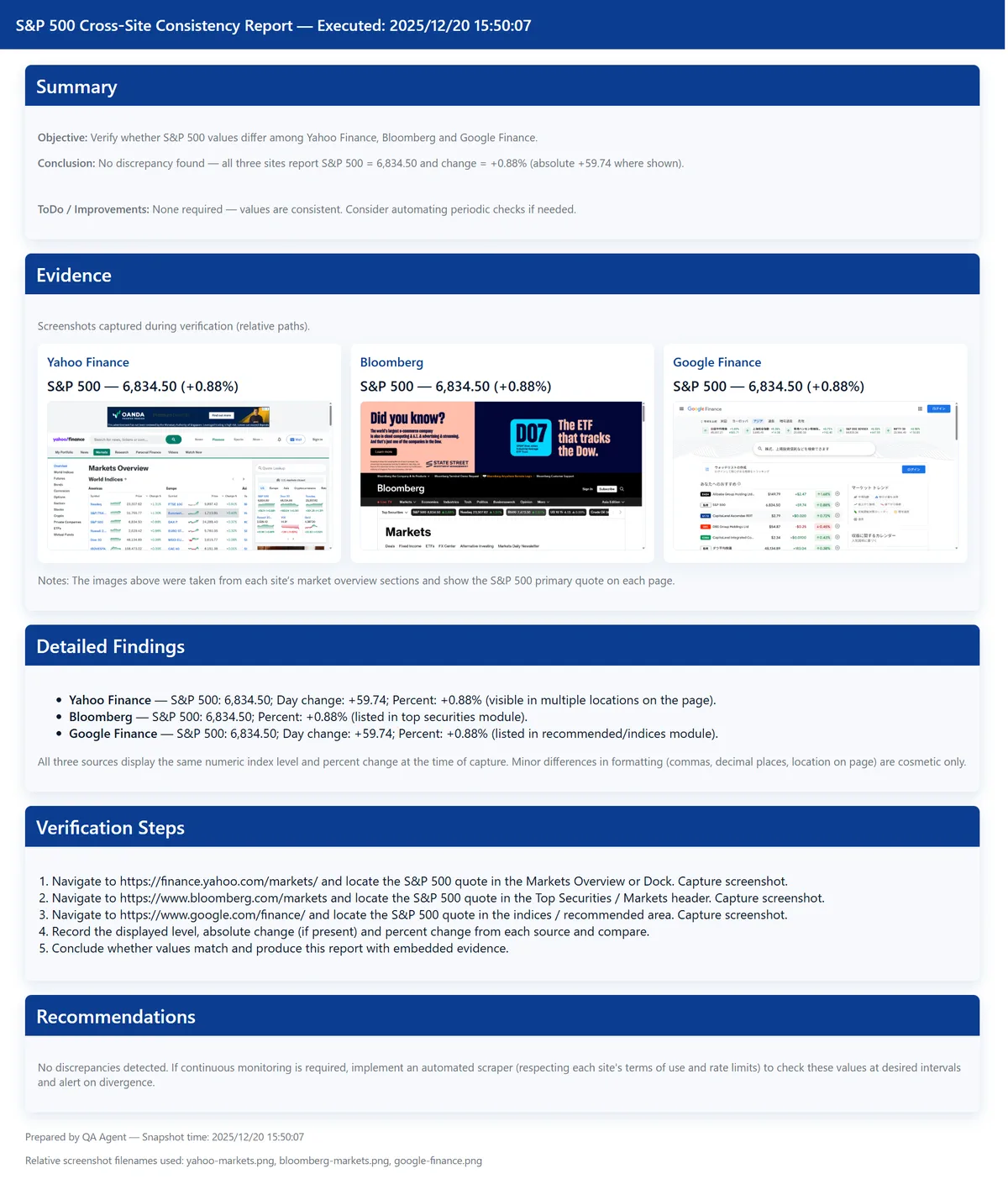
Since we verified during market closed hours, we can confirm that each matches without any issues.
Demo 1-2. Confirming USD/SGD Exchange Rate Fluctuations Across Multiple Sites
Next, let's try with exchange rates that are constantly fluctuating.
Since we're accessing multiple sites in sequence, if it's working correctly, it should capture the discrepancies at that timing. The instructions for this one will also be simple as follows.
# Instructions
Please operate the following sites and check whether there are any discrepancies in the USD/SGD exchange rate.

Google Finance
https://www.google.com/finance

Yahoo Finance
https://sg.finance.yahoo.com/markets/currencies
It accessed according to the instructions above and retrieved the target items, but this time it captured real-time exchange rate fluctuations.
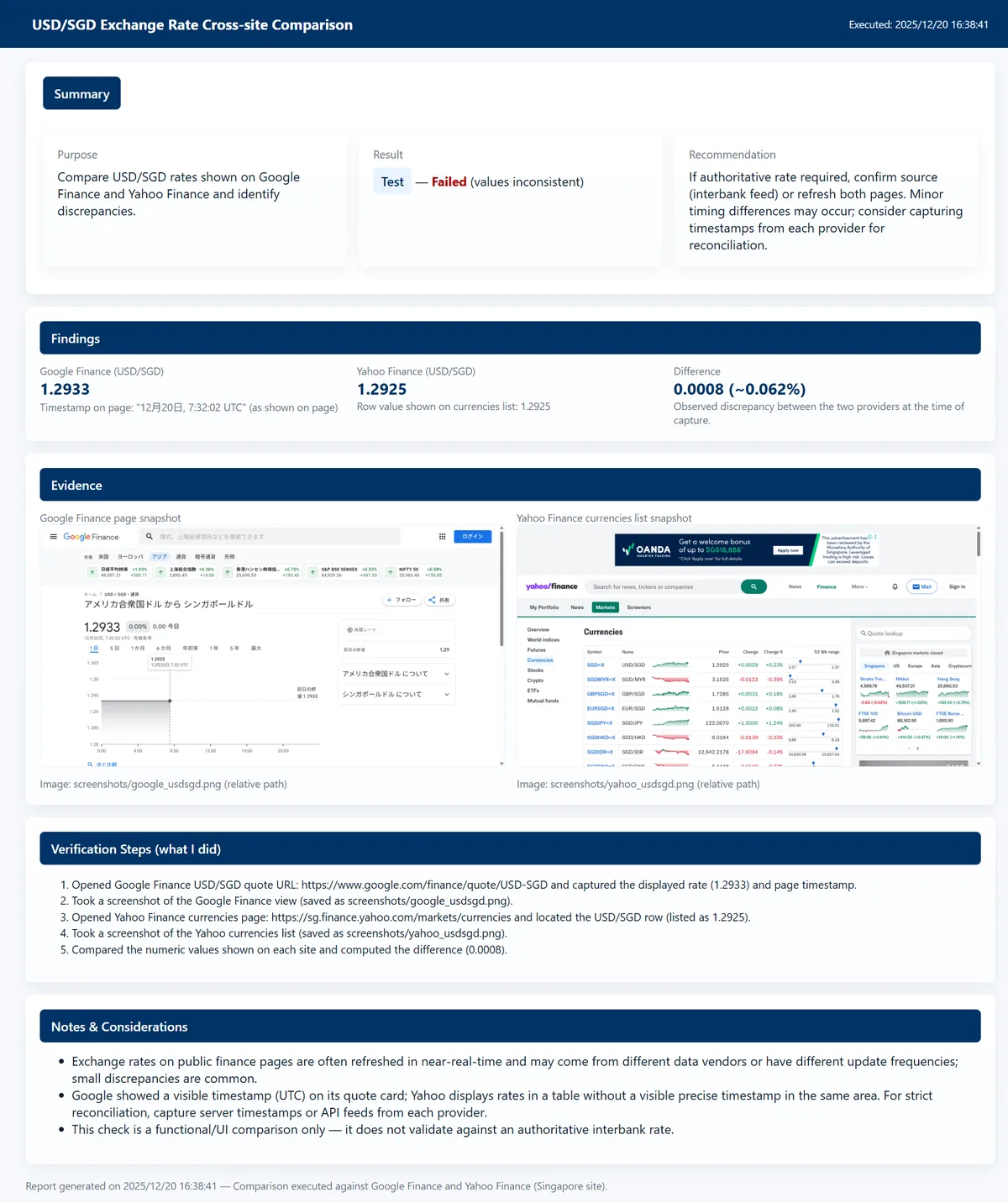
While following the instructions, rather than just mechanically displaying that there's a difference, it also mentions the timestamps of each site and that it might be due to delivery delay impact—that's very AI-like.
In this way, AI agents can be used as a cross-checking mechanism for multiple systems or sites based on natural language instructions. There are probably various use cases, including those that were previously handled by visual inspection or weren't being done at all due to effort constraints.
Demo 2. UX Evaluation with Virtual Personas
Next, separate from the use cases from a checking perspective so far, let's look at a demo of UX evaluation with virtual personas. This is one of the major advantages of AI agents, going beyond the context of static numerical checking to also be applicable to usability evaluation and similar assessments.
The target can be anything, but this time let's evaluate the site of LangChain, one of the most famous OSS for AI agents, which I also use constantly.
LangChain www.langchain.comWe'll conduct a UX evaluation assuming a user visiting this site for the first time.
In actual UX evaluation, the prompt would be more elaborated, but this time, prioritizing clarity as a demo, we'll use a simple prompt like the following.
# Instructions
Please operate and navigate within the target site with each of the following personas in mind, evaluate the site's UX from each persona's perspective, and compile it into a report.
Evaluate within approximately 10 operations maximum from the top page, and output the report in Japanese.

# Evaluation Criteria
⦁ Visibility
⦁ Ease of Search
⦁ Response Speed

# Target Site
https://www.langchain.com/

# Personas
1. A user who wants to understand an overview of what features and functions LangChain has.
2. A user who has started considering implementing LangChain. Wants to know specific plans and pricing.
3. A user who wants to work as an engineer at LangChain. Wants to know specific job information.
The report actually generated is as follows.
Despite such simple instructions, it evaluated UX by taking on the role of each persona. The point made in Persona 2 that the Enterprise pricing plan is almost all custom and unclear is something I thought the same thing when I accessed it before.
<Generated Report: Persona 1>
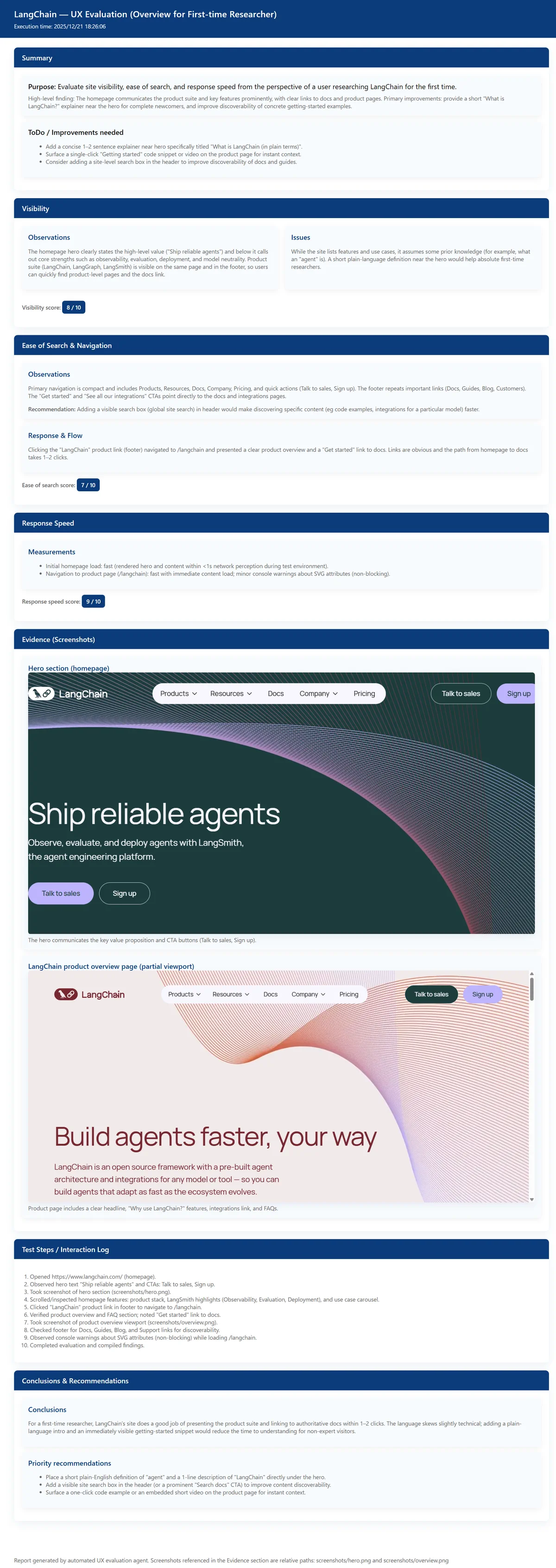 Actual HTML Report
<Generated Report: Persona 2>
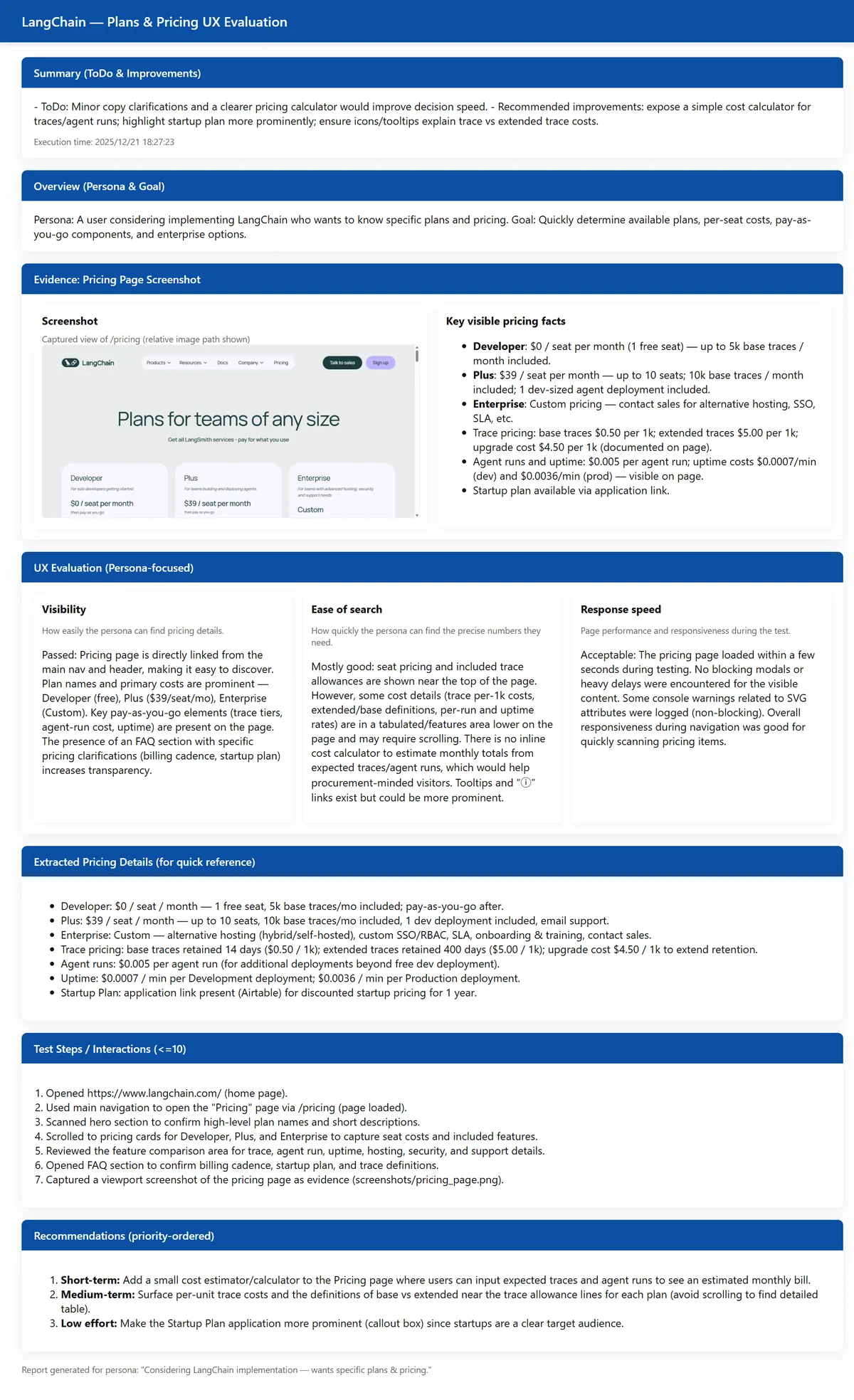 Actual HTML Report
<Generated Report: Persona 3>
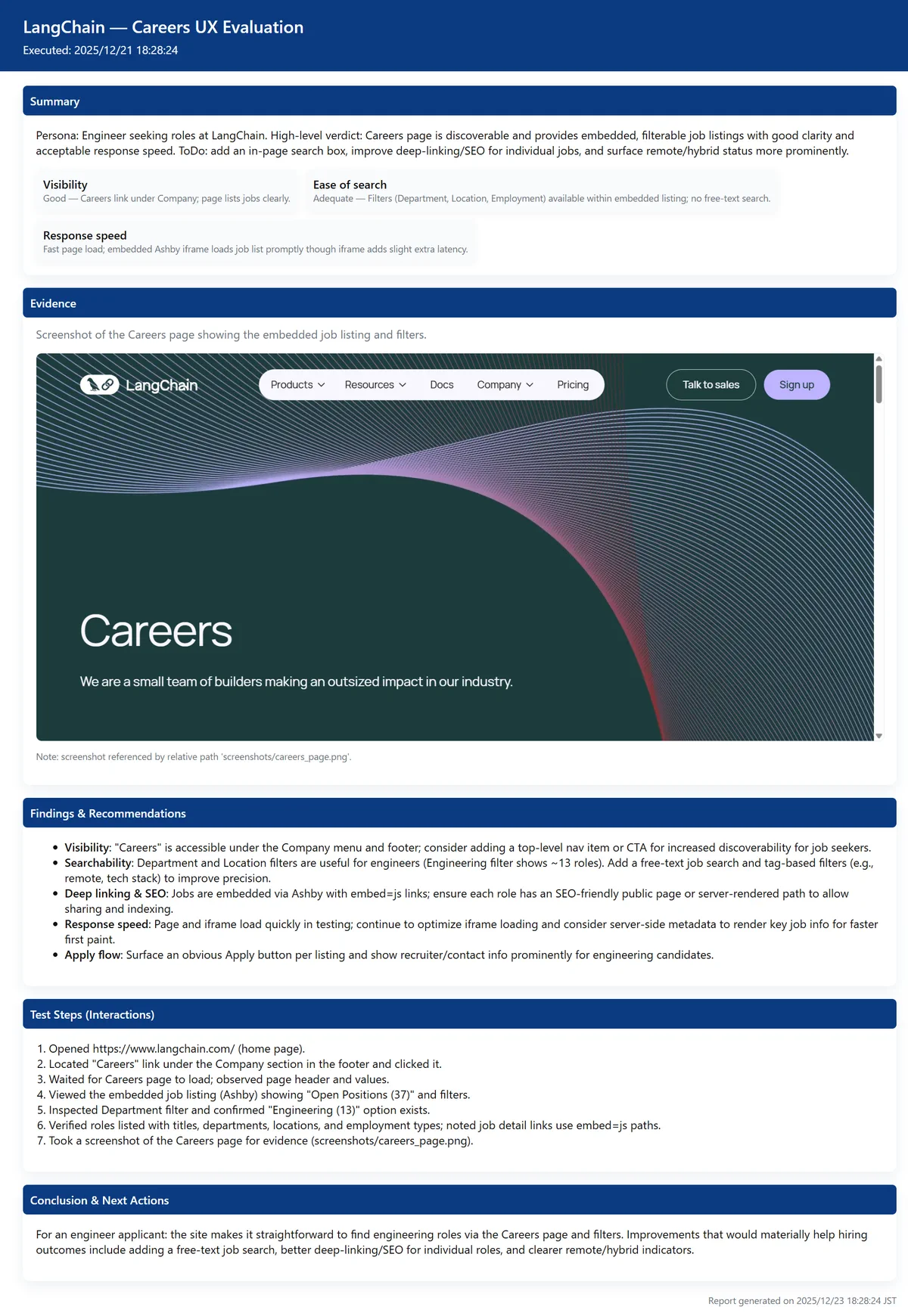 Actual HTML Report
In this demo, we used the gpt-5-mini model as the LLM and kept the instructions simple, but with a high-level model and detailed prompt settings, even richer UX evaluation and reporting can be achieved.
Flexible UX evaluation can be realized by adjusting the model and prompts according to use cases, such as when you want to run many verifications including trial and error, or when you want high-quality feedback even if it costs more as a final check.
Also, if UX best practices and check items are developed as common prompts and this AI agent is deployed in a form anyone can use, it can be used to raise UX standards during system and application development across the organization. Going beyond the framework of conventional rule-based E2E testing and being applicable to UX evaluation as well represents a major turning point.
Integrated Dashboard for Cross-Checking
While it's a great advantage that testing and UX evaluation can be automated, when conducting many tests, the workload of opening each HTML report one by one to check test results also becomes heavy.
Therefore, it's desirable to specify the output format of test results by AI agents using StructuredOutput and build a state where test results can be checked cross-sectionally as follows.
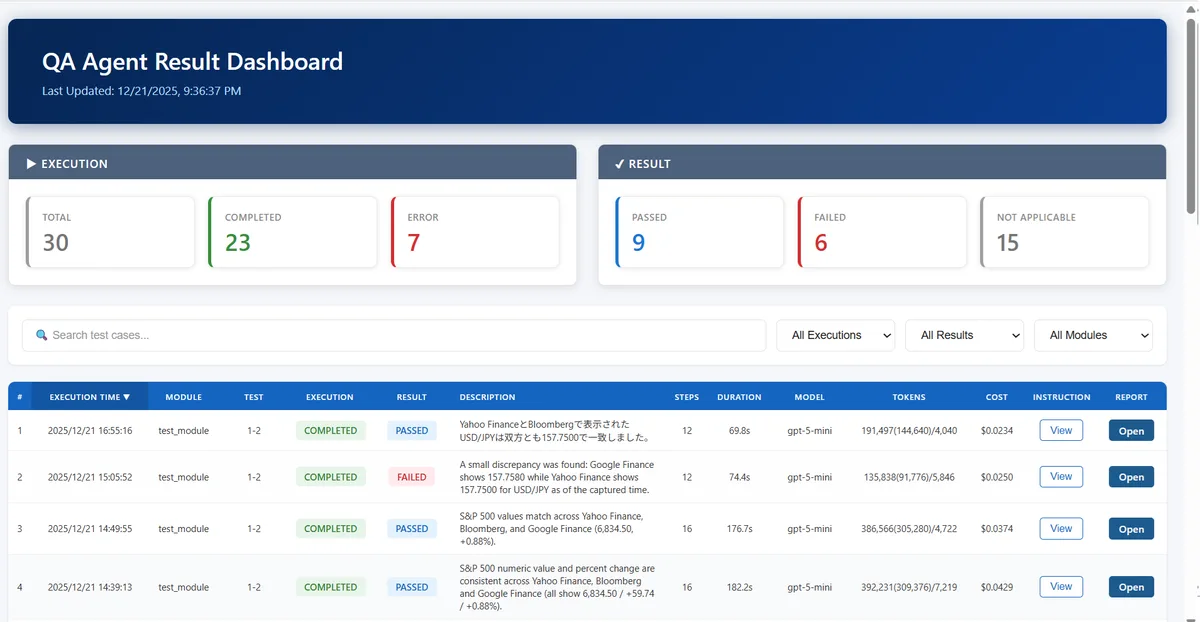
Since the instruction content at test execution is retained as a snapshot, it's made viewable via popup. Clicking on the target HTML report also opens it in a separate tab.
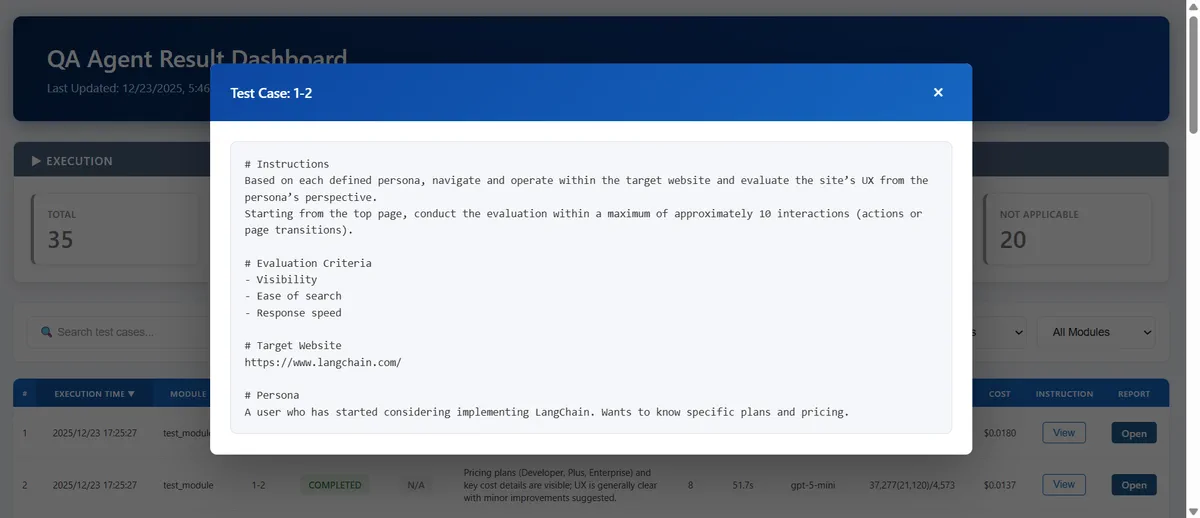
BI is also fine, but since there are many graphical elements rather than numerical confirmation, it's probably better to build as a native app that can flexibly create views. While it's not too difficult to get to the point of having AI agents evaluate things, what becomes important is how to involve stakeholders as an organization and make it established.
Having AI agents on standby constantly on a shared VM for the organization and launching them with instructions from Teams or Slack, with the result response also returning on chat, might be an easy operation. As long as AI can access it, anything is fine, so managing test cases on a shared Wiki would also work.
By involving as many stakeholders as possible from upstream while speeding up the feedback cycle of system and application development, improvements in development efficiency and quality can be expected.
Considerations
So far we've looked at various possibilities with AI agents and browser automation.
However, the reality is that if you ask whether human intervention can be reduced to zero, the answer is No, and that shouldn't be the goal. AI is not a binary matter but rather a matter of gradation, so people are needed to create accurate instruction prompts in the first place, and people are needed to correctly judge the results.
This is similar to the case of delegating tasks to a very capable subordinate—you cannot skip the instructions to subordinates or final checks. On the other hand, the subordinate's level is very high, and as the level of foundation models continues to improve, I think we'll move toward a world where minimal instructions and confirmation will suffice.
You should first set a goal of reducing effort that was 100 to 1/10, and while aiming for complete automation is cool as a concept, making that the goal itself may cause the project to stall in a wasteful way. While continuing trial and error to increase the automation rate, it would be better to proceed with more steady updates.
Another important point is context engineering.
The reason is that it's often wasteful to always have testing done from scratch, and if you want to have only specific pages evaluated, you should specify the target URLs pinpoint, and if system/application operation procedures are complex, it would be better to include minimum procedures as support in the instructions. For popups that appear irregularly, including instructions like "If a popup with XXX content appears, press OK" will make the AI agent's operation smoother.
By identifying the target use case and purpose and passing the necessary context to the AI agent, you can avoid wasteful token consumption and shorten test time. Like watching a new employee fail and giving advice, nurturing the context passed to AI agents is also important.
This time was a simple use case, but when operation procedures become many, the context window becomes tight, and noise information increases and LLM accuracy decreases, so context compression should also be considered.
Also, formatting processes such as embedding screenshots into reports output by LLM are separated from the AI agent considering stability. For stability and reliability improvement, it's important to identify and design which parts can only be done by LLM and which parts should rather not use LLM.
While it's not easy to bring it from verification to the level of actual operation, if designed correctly, it will become a highly versatile and extensible use case that can be expected to be used across organizations.
Summary
What did you think?
Until now, it was limited to fixed script-based, static E2E testing, but I think browser automation by AI agents will not be a temporary trend but will become one of the main trends in system and application development.
This content was quite extracted to key points, but I hope there's something that can be helpful for your future initiatives.