Next-gen browser automation and quality assurance powered by AI agentsAIエージェントによる次世代のブラウザ操作自動化と品質チェック自動化

*Note: The following text does not contain any AI-generated output. Everything has been written by the author.

Introduction

The term "Agentic AI" is already becoming commonplace, and the use of generative AI is transitioning from the PoC phase to full-scale implementation. Major companies have already put general-purpose applications into practice, and from here on, how well you can select appropriate use cases will determine the outcome.

Being technically interesting alone is obviously not enough—it is necessary to set appropriate issues and solve them in order to build AI agents that provide essential value.

In this article, I would like to write about a specific use case for AI agent utilization: the use of AI agents in UAT and UX evaluation, which are always challenges in system and application development, while including actual demonstrations.

System and Application Development Accelerating Even More with the Rise of AI

With the establishment of cloud services, various low-code/no-code environments, and the rise of AI coding, the speed of system and application development continues to increase.

I myself have had more opportunities to develop systems and applications alone that previously would have required a team.

Honestly, it's not difficult to just create something that works reasonably well, but the bottleneck is the evaluation. For scripts, AI can handle code bug checking and automatic test case generation to some extent, so that's not much of a problem. However, the operational feel and display items of actual systems and applications—the parts related to UI—need to be evaluated by humans as UAT.

Anyone who has been involved in system and application development will understand this well, but business users are very busy, so even when you request UAT, it's often difficult to get them to respond. While you ideally want various stakeholders to check usability aspects as well, in reality, only some people partially check, and due to insufficient UAT, various modification requests often emerge immediately after release.

From the development side's perspective, they want the user side to ensure UAT quality, but from the user side's perspective, UAT is a very heavy burden amid their busy daily work, so honestly, they want the development side to ensure quality as much as possible (they want to minimize UAT).

In my work, I often build BI systems, and especially with BI, reports are displayed by selecting various conditions from dropdowns. Therefore, when there are multiple dropdowns such as display target items, types, and date selection, the combinations are extensive, making it impossible to manually check all of them. In reality, it's limited to spot checks with combinations of some boundary values.

In an era where a system once released would be used unchanged for many years, it was correct to invest significant personnel and effort in UAT even at great cost. However, in today's rapidly changing business environment where agile development is mainstream, the number of releases is very high, so it's not possible to invest heavily in UAT each time.

In this situation, it's not realistic for business users to simply work hard on UAT every time, so how much quality can be ensured without burdening business users becomes important.

You might think, "Can't we just write E2E test programs with RPA or browser automation tools?" However, in agile-style situations where business/system requirements and UI are frequently updated, the shelf life of E2E tests and regression tests created with great effort becomes very short. Conversely, when changes are significant, it's not uncommon to end up in a counterproductive situation where maintaining and managing existing test scripts requires even more effort.

As the rise of AI further accelerates the development of systems and applications including AI implementation, how to resolve the UAT bottleneck in quality assurance will be one of the major themes going forward.

Browser Automation with AI Agents

This initiative aims to utilize AI agents in the UAT process to significantly reduce the effort that has been required until now, while also improving quality by including checks that were beyond human capability.

As development cycles accelerate, it becomes difficult to continue managing rule-based test scripts, and it's also difficult for business users to allocate significant effort to UAT, so we have AI agents handle as much as possible.

First of all, the fundamental difference from conventional logic-based E2E testing with RPA and similar tools is that AI agents can handle UIs they've never seen before.

For example, if one of the business requirements is "to be able to log into the system with ID/password and view the sales trends of your company for this fiscal year," previous automation required specifying all target selectors, UI elements, and operation procedures in advance. However, with AI agents, they check whether business requirements can be achieved while actually operating the browser without prior knowledge.

In other words, this simulates and checks the situation where a user encountering the system for the first time can achieve their goals while looking at the screen.

Also, rather than mechanically checking according to pre-specified procedures, AI agents operate the browser dynamically according to the displayed screen, just like humans, so they can check from the same perspective as business users. Even if the UI changes, it doesn't immediately result in an error.

The second major advantage is that anyone can write test cases in natural language (text). Until now, testing was positioned as the job of QA personnel, or at least engineers, and project members could only partially check deliverables at each phase within limited effort.

On the other hand, with AI agents, anyone can have AI substitute for testing through text instructions, so people in roles such as business users, project managers, and architects can check areas of concern at any time without worrying about effort.

When each stakeholder documents their concerns in text, that itself becomes a test case, enabling checks from multiple perspectives and expected quality improvement.

In an environment where business changes are fast and it's becoming difficult to identify all business requirements from the start, if AI agents can operate deliverables at each development phase and check them from each stakeholder's perspective, quality can be built in from the upstream phases.

Also, from the engineer's side, there are more opportunities to detect early on content that was missing from business requirements or processing that requires exception handling, which is a significant benefit in terms of communication and development efficiency improvement.

By utilizing AI agents, in addition to being able to handle UIs they've never seen before, the fact that anyone can write and execute test cases in natural language becomes a significant new advantage.

Use Case Considerations

For someone who has long been involved in rule-based automation including RPA, the ability of AI agents to dynamically operate browsers represents a major turning point. In addition to the test automation described above, the following use cases can also be considered.

UX Evaluation and Report Generation

Taking advantage of the characteristic of being able to automatically operate browsers, it can be used not only for so-called E2E testing but also for UX evaluation including screen design.

AI agents can evaluate the UX of systems and applications based on instruction content and output improvement points as reports, such as whether logos and corporate colors are consistent overall, and whether button placement and navigation are intuitively understandable from the user's perspective.

What becomes particularly powerful here is UX evaluation using virtual personas. While actual users of systems and applications are diverse, the personnel and effort available for UAT are inevitably limited, which creates the challenge that evaluation perspectives tend to be biased.

As one approach to this challenge, we recreate the perspectives of people who would normally find it difficult to participate in UAT using AI and have it evaluate UX. We have it evaluate UX from perspectives such as executives, field employees, new employees, people who are not good with IT, and depending on the application, students, to highlight "what is difficult to understand for whom."

People involved in development have difficulty maintaining the perspective of a third party without prior knowledge since it's a system they're building themselves, but UX evaluation using virtual personas can remove such subjectivity and incorporate more objective opinions.

Furthermore, if the perspectives of experts strong in UX design are documented as check criteria, development teams can always test with a professional perspective. Similarly, by defining legal and compliance perspectives, it becomes possible to have AI agents perform primary checks of various rules that should be complied with.

For organizations of a certain scale, it would be desirable for UX design teams and legal teams to prepare these perspectives as common assets and deploy them to each development team. This can be expected to raise the quality standards of the entire organization regardless of individual projects.

In this way, it can be applied not only to quality assurance through automated testing (defense) but also to quality improvement through UX evaluation (offense).

Cross-System and Application Checking

This applies to single systems and applications as well, but a use case that is quite field-oriented is cross-checking of multiple systems and applications.

The reason is that as data utilization progresses, while the source data comes from the same system, multiple BI dashboards and systems/applications are created based on it according to different business requirements and user characteristics.

What often becomes a problem here is cases where, although the source data should be the same, the displayed values don't match between systems. The source data is the same, but various transformations occur in the process until display on each system's UI, and sometimes unintended bugs are included, resulting in different values being displayed depending on the system or application.

When this happens, communication inconsistencies occur among stakeholders, such as "The sales figures don't match between this system and that BI" or "Client information that should have been newly contracted isn't appearing in some systems," affecting trust in data utilization itself.

In such cases, having AI operate multiple systems and applications cross-sectionally to automatically check for numerical discrepancies is an effective measure.

Since each system is constantly being updated, having this AI agent run on a schedule for monitoring purposes can detect early cases where only a specific system's values are significantly off.

With a single system, it's actually difficult to confirm whether values are correct, but by implementing such mutual checking frameworks, quality assurance across the entire system and application environment can be expected.

To give an even more field-oriented use case, it can also be used for comparison between current and new systems during existing system replacement. It means it can be used to check whether there are discrepancies in displayed values while absorbing UI differences between the currently operational system and the new system scheduled for release.

Until now, testers had no choice but to set the same conditions on screen for both the current and new systems and visually check the displayed items, and could only partially perform representative and boundary value checks. This too can now be automated by AI agents, removing the constraint of effort.

Exception Detection (Monkey Testing)

This is in a sense the most AI-like use, but since AI, unlike humans, can run processes without effort constraints, it can be used for monkey testing. Monkey testing, derived from the image of a monkey randomly hitting a keyboard, is a testing method that ignores specifications and procedures, performing random operations to discover bugs and vulnerabilities unexpected by developers.

E2E testing is only testing of procedures defined as tests, so it cannot test operations that were not anticipated by developers in the first place. Actual users may use the system in cases not anticipated by developers, such as button press combinations not anticipated by developers, or browser refresh/restart during processing.

Taking advantage of the benefit of being usable without regard to effort, including nighttime, using AI agents for monkey testing can improve the quality of exception handling.

The above are just examples, and there are probably many use cases that I haven't anticipated yet, but the fact that AI can now automatically operate browsers based on natural language instructions holds great potential for productivity improvement and automation environment construction in enterprises.

Implementation Overview

For this implementation, we use PlayWright MCP as the browser automation tool.

microsoft/playwright-mcp github.com/microsoft/playwright-mcp

In reality, MCP is not required, and it's fine to connect PlayWright directly as a tool with AI.

However, given the rapid turnover of tools and models in recent years, it's better to keep switching costs low, so using MCP is one option. Also, there are browser automation tools other than PlayWright, so PlayWright is not necessarily required.

Whether to use MCP and which tool to use is not a fundamental issue, so you should choose what's appropriate at the time.

This is connected to a ReAct agent to automatically operate the browser based on text instructions.

If you just want to make it work, this is all you need, but especially for enterprise use, there are two points that must absolutely be addressed.

Whitelist Registration

Those with sharp intuition may have already noticed, but while it might be fine for personal use, having AI automatically operate browsers in organizational use can be a very risky action if done without restrictions.

With RPA or conventional test scripts, they only execute what's predetermined, so they're safe in a sense, but the flexibility of AI becomes a drawback from a security perspective, as it might perform operations that are normally prohibited on the browser.

This is similar to how giving various permissions to a new employee might result in them doing things that are actually prohibited without knowing the company's information policies.

What should definitely be done is whitelist registration. In the case of system and application evaluation, the URLs to access are limited, so you register only specific URLs in the whitelist so that the AI agent can only access them. PlayWright has an allowed-origins parameter, and by registering specific URLs in this parameter, you can prevent the AI agent from accessing any other URLs (it will fail at the point of attempting access).

If possible, it's better to prepare a dedicated account and grant minimum permissions, and for a more secure environment, you could virtualize and apply IP restrictions to the execution environment itself.

However, as those who regularly use LLMs for development will understand, compared to models from early days, recent LLMs are very smart, so if you define prohibitions in the prompt, they won't generally take bold actions that deliberately create security risks.

Using it in an unattended state is obviously unacceptable, but as long as you're using LLMs from de facto standard vendors, there's not much need to be overly nervous. Simple whitelist registration can significantly reduce risks, so at minimum, this should definitely be implemented.

MFA/SSO Support

In recent systems and applications, rather than simple ID/password login, cases requiring MFA (multi-factor authentication) or SSO authentication have increased.

If MFA is required for the system to be operated, you cannot log in just by launching a browser and operating it automatically, so similar to RPA, this becomes one major hurdle in browser automation.

On this point as well, PlayWright provides realistic and secure means. With PlayWright, by specifying --cdp-endpoint, you can connect to a browser that is already running.

CDP (Chrome DevTools Protocol) is an official protocol for controlling browsers from the outside, and PlayWright uses this mechanism to operate existing browser sessions (although it says Chrome, it's available for any Chromium-based browser, so Edge works too).

This method does not bypass or disable MFA itself. Rather, a human logs into the browser normally beforehand, passes MFA legitimately, and keeps that browser running. PlayWright then connects to that browser.

This is essentially the same as operating a logged-in PC from the side, and the range of operations the AI agent can perform is also limited to the permissions that browser and account originally have.

Since you need to launch the browser and authenticate in advance, it requires an extra step, but if AI were to substitute for MFA/SSO authentication without human involvement, the meaning of authentication itself would be lost, so it's best to implement this as a form of prior authorization by humans.

Browser Operation and Reporting Demo by AI Agent

Demo 1. Cross-Checking Multiple Sites

First, I would like to demonstrate cross-checking of multiple systems and applications.

For internal use, I think the main use cases would be cross-checking your company's systems and applications or comparison between current and new systems during system renewal, but for this demo, we'll use public sites to make it easier to understand.

In this demo, we'll use public sites as stand-ins for internal systems and applications, but essentially the only difference is whether there's a login or not, so the essential points are the same.

Demo 1-1. Confirming Current S&P500 Value Consistency Across Multiple Sites

Let's have the AI agent operate multiple financial sites and check whether the current S&P500 values are consistent with each other. Expecting the AI agent to dynamically check the sites, we'll go with simple instructions like the following.

# Instructions
Please access the following 3 sites and check whether there are any discrepancies in the S&P500 values.

Yahoo Finance
https://finance.yahoo.com

Bloomberg
https://www.bloomberg.com/markets

Google Finance
https://www.google.com/finance/

The instructions above were all we provided, with no prior information about the screen structure of the target sites. When the AI agent was launched, it opened the browser itself, accessed the specified sites in order, and generated the following report.

Since we instructed in the common prompt to also output screenshots as evidence and operation procedures, the content has high transparency.

Demo 2: S&P500 Cross-Check Report Actual HTML Report

Since we verified during market closed hours, we can confirm that each matches without any issues.

Demo 1-2. Confirming USD/SGD Exchange Rate Fluctuations Across Multiple Sites

Next, let's try with exchange rates that are constantly fluctuating.

Since we're accessing multiple sites in sequence, if it's working correctly, it should capture the discrepancies at that timing. The instructions for this one will also be simple as follows.

# Instructions
Please operate the following sites and check whether there are any discrepancies in the USD/SGD exchange rate.

Google Finance
https://www.google.com/finance

Yahoo Finance
https://sg.finance.yahoo.com/markets/currencies

It accessed according to the instructions above and retrieved the target items, but this time it captured real-time exchange rate fluctuations.

Demo 2: Exchange Rate Fluctuation Check Report Actual HTML Report

While following the instructions, rather than just mechanically displaying that there's a difference, it also mentions the timestamps of each site and that it might be due to delivery delay impact—that's very AI-like.

In this way, AI agents can be used as a cross-checking mechanism for multiple systems or sites based on natural language instructions. There are probably various use cases, including those that were previously handled by visual inspection or weren't being done at all due to effort constraints.

Demo 2. UX Evaluation with Virtual Personas

Next, separate from the use cases from a checking perspective so far, let's look at a demo of UX evaluation with virtual personas. This is one of the major advantages of AI agents, going beyond the context of static numerical checking to also be applicable to usability evaluation and similar assessments.

The target can be anything, but this time let's evaluate the site of LangChain, one of the most famous OSS for AI agents, which I also use constantly.

LangChain www.langchain.com

We'll conduct a UX evaluation assuming a user visiting this site for the first time.

In actual UX evaluation, the prompt would be more elaborated, but this time, prioritizing clarity as a demo, we'll use a simple prompt like the following.

# Instructions
Please operate and navigate within the target site with each of the following personas in mind, evaluate the site's UX from each persona's perspective, and compile it into a report.
Evaluate within approximately 10 operations maximum from the top page, and output the report in Japanese.

# Evaluation Criteria
⦁ Visibility
⦁ Ease of Search
⦁ Response Speed

# Target Site
https://www.langchain.com/

# Personas
1. A user who wants to understand an overview of what features and functions LangChain has.
2. A user who has started considering implementing LangChain. Wants to know specific plans and pricing.
3. A user who wants to work as an engineer at LangChain. Wants to know specific job information.

The report actually generated is as follows.

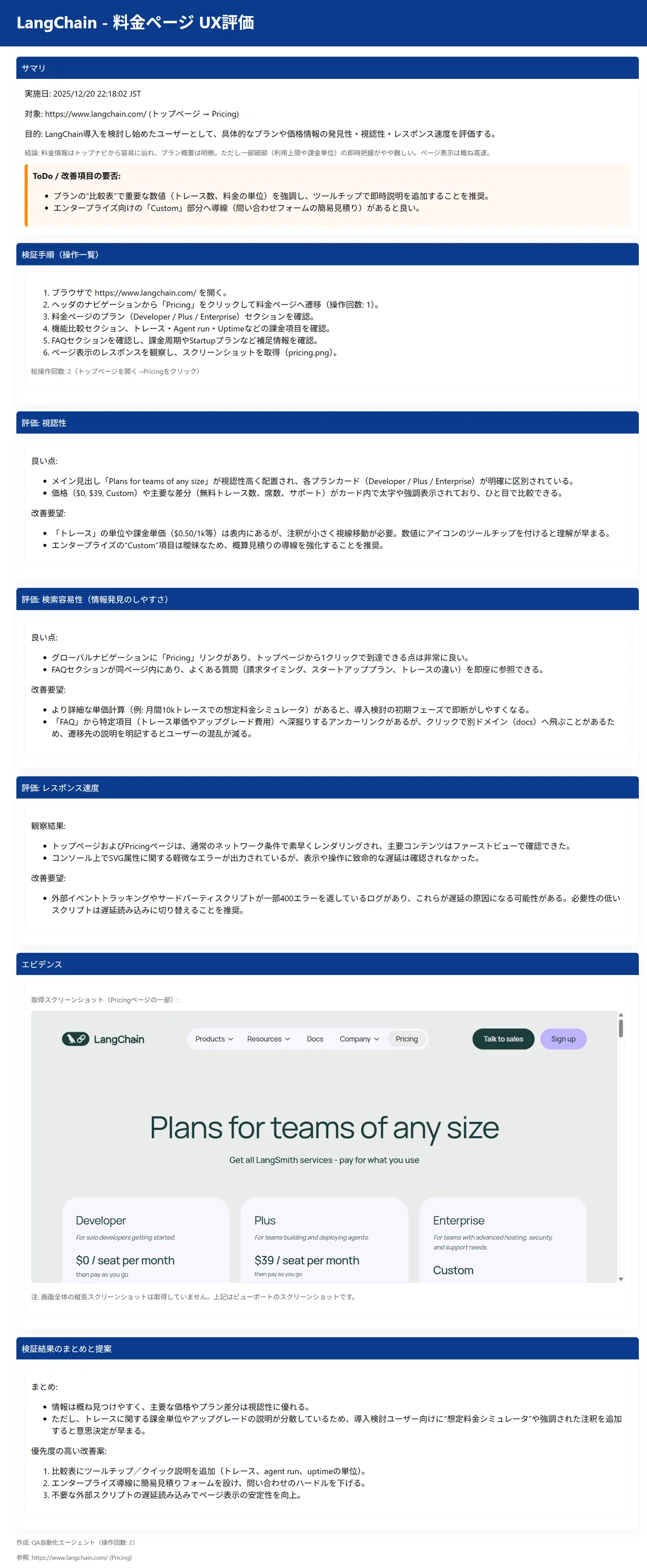
Despite such simple instructions, it evaluated UX by taking on the role of each persona. The point made in Persona 2 that the Enterprise pricing plan is almost all custom and unclear is something I thought the same thing when I accessed it before.

<Generated Report: Persona 1> Demo 3: UX Evaluation Persona 1 Actual HTML Report

<Generated Report: Persona 2> Demo 2: UX Evaluation Persona 2 Actual HTML Report

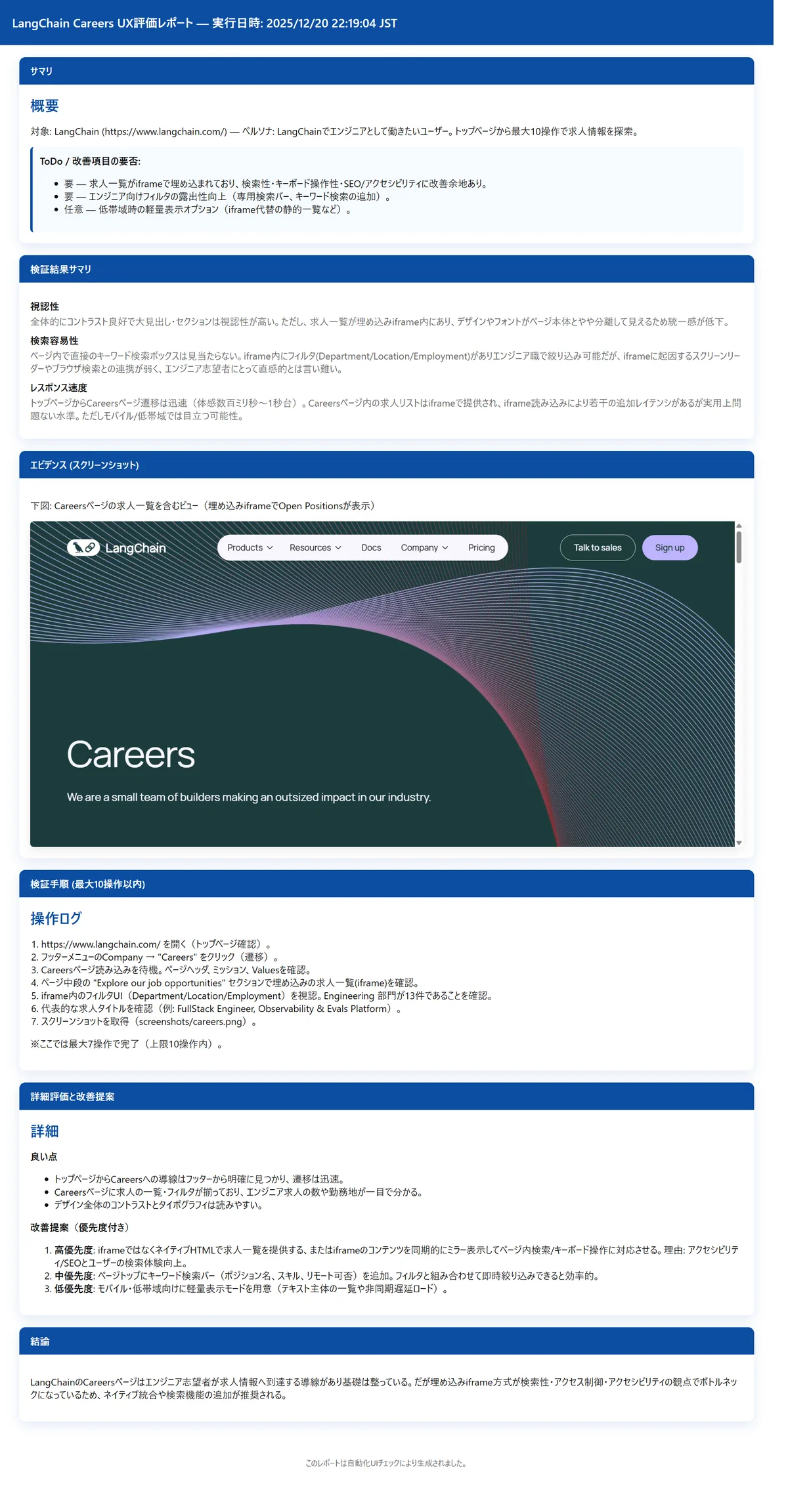
<Generated Report: Persona 3> Demo 3: UX Evaluation Persona 3 Actual HTML Report

In this demo, we used the gpt-5-mini model as the LLM and kept the instructions simple, but with a high-level model and detailed prompt settings, even richer UX evaluation and reporting can be achieved.

Flexible UX evaluation can be realized by adjusting the model and prompts according to use cases, such as when you want to run many verifications including trial and error, or when you want high-quality feedback even if it costs more as a final check.

Also, if UX best practices and check items are developed as common prompts and this AI agent is deployed in a form anyone can use, it can be used to raise UX standards during system and application development across the organization. Going beyond the framework of conventional rule-based E2E testing and being applicable to UX evaluation as well represents a major turning point.

Integrated Dashboard for Cross-Checking

While it's a great advantage that testing and UX evaluation can be automated, when conducting many tests, the workload of opening each HTML report one by one to check test results also becomes heavy.

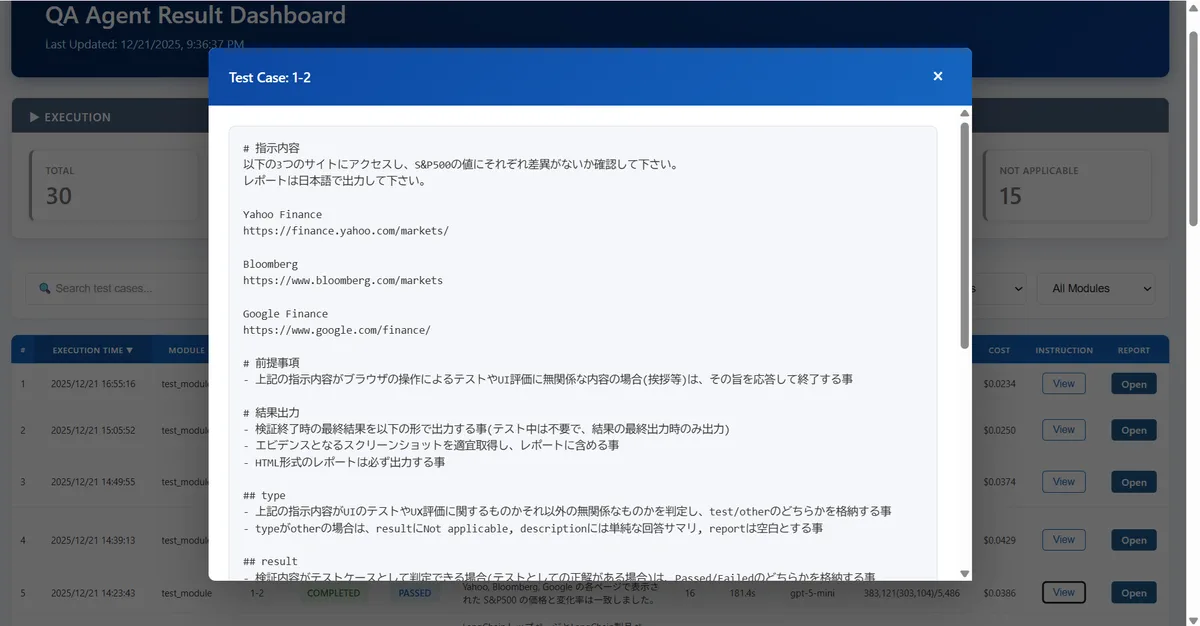
Therefore, it's desirable to specify the output format of test results by AI agents using StructuredOutput and build a state where test results can be checked cross-sectionally as follows.

BI is also fine, but since there are many graphical elements rather than numerical confirmation, it's probably better to build as a native app that can flexibly create views. While it's not too difficult to get to the point of having AI agents evaluate things, what becomes important is how to involve stakeholders as an organization and make it established.

Having AI agents on standby constantly on a shared VM for the organization and launching them with instructions from Teams or Slack, with the result response also returning on chat, might be an easy operation. As long as AI can access it, anything is fine, so managing test cases on a shared Wiki would also work.

By involving as many stakeholders as possible from upstream while speeding up the feedback cycle of system and application development, improvements in development efficiency and quality can be expected.

Considerations

So far we've looked at various possibilities with AI agents and browser automation.

However, the reality is that if you ask whether human intervention can be reduced to zero, the answer is No, and that shouldn't be the goal. AI is not a binary matter but rather a matter of gradation, so people are needed to create accurate instruction prompts in the first place, and people are needed to correctly judge the results.

This is similar to the case of delegating tasks to a very capable subordinate—you cannot skip the instructions to subordinates or final checks. On the other hand, the subordinate's level is very high, and as the level of foundation models continues to improve, I think we'll move toward a world where minimal instructions and confirmation will suffice.

You should first set a goal of reducing effort that was 100 to 1/10, and while aiming for complete automation is cool as a concept, making that the goal itself may cause the project to stall in a wasteful way. While continuing trial and error to increase the automation rate, it would be better to proceed with more steady updates.

Another important point is context engineering.

The reason is that it's often wasteful to always have testing done from scratch, and if you want to have only specific pages evaluated, you should specify the target URLs pinpoint, and if system/application operation procedures are complex, it would be better to include minimum procedures as support in the instructions. For popups that appear irregularly, including instructions like "If a popup with XXX content appears, press OK" will make the AI agent's operation smoother.

By identifying the target use case and purpose and passing the necessary context to the AI agent, you can avoid wasteful token consumption and shorten test time. Like watching a new employee fail and giving advice, nurturing the context passed to AI agents is also important.

This time was a simple use case, but when operation procedures become many, the context window becomes tight, and noise information increases and LLM accuracy decreases, so context compression should also be considered.

Also, formatting processes such as embedding screenshots into reports output by LLM are separated from the AI agent considering stability. For stability and reliability improvement, it's important to identify and design which parts can only be done by LLM and which parts should rather not use LLM.

While it's not easy to bring it from verification to the level of actual operation, if designed correctly, it will become a highly versatile and extensible use case that can be expected to be used across organizations.

Summary

What did you think?

Until now, it was limited to fixed script-based, static E2E testing, but I think browser automation by AI agents will not be a temporary trend but will become one of the main trends in system and application development.

This content was quite extracted to key points, but I hope there's something that can be helpful for your future initiatives.

We also provide consulting services, so if you'd like to hear more details, please go here.

QA Agent Service
Autofusion Service QA Agent Implementation Support We support the implementation of browser automation and quality checking with AI agents Learn More

※以下の文章にAIの出力は含んでいません。全て著者が執筆したものになります。

はじめに

「Agentic AI」という言葉が既に一般的になりつつあり、生成AI活用はPoCフェーズから本格的な活用フェーズへと移行が進んでいます。汎用的な領域は各社既に実践しており、ここから勝負を決めるのはどれだけ適切なユースケースを選定できるかという事になります。

技術的に面白いというだけでは当然NGで、適切なイシューの設定とその解決により、本質的な価値を提供するAIエージェントの構築を進めていく必要があります。

今回はAIエージェント活用の具体的なユースケースとして、システムやアプリケーション開発において必ず課題になる、UAT・UX評価におけるAIエージェントの活用について、実際のデモを交えながら書いていきたいと思います。

AIの台頭によりますます加速するシステム・アプリケーション開発

クラウド、各種ローコード・ノーコード環境の整備に加え、AIコーディングの台頭により、システム・アプリケーション開発の速度は速くなる一方です。

私自身、今までであればチームを組んで開発していたような規模のシステムやアプリを1人で開発する機会も多くなりました。

正直、それなりに動く物を作るだけであれば難しくはないのですがボトルネックになるのはその評価です。スクリプトに関しては、コード自体のバグチェックやテストケースの自動生成もAIである程度対応できるためあまり問題にはならないのですが、実際のシステム・アプリケーションの操作感や表示項目など、いわゆるUIに関わる部分は、UATとして人間が評価する必要があります。

システム・アプリケーションの開発に携わった事がある人ならよくわかると思いますが、業務ユーザーの方々は非常に忙しいので、UATを依頼してもなかなか対応してもらえなかったり、本来は様々なステークホルダーの方に使い勝手の面も含めチェックして欲しいものの、実際の所は、一部の方が部分的にしかチェックしておらず、UATの甘さによりリリース直後に様々な改修要望が出るという事もよくあります。

開発側の視点からすると、UATの箇所はユーザー側で担保して欲しいと思う所ではありますが、ユーザー側の視点としても、日々の業務が忙しい中でのUATは非常に負荷が高いため、極力開発側で品質は担保しておいて欲しい(UATは軽くしたい)というのが正直な所だと思います。

私は業務上、BIを構築する事も多いのですが、特にBIの場合は、プルダウン等で様々な条件を選択してレポートを表示させるという形になります。そのため、例えば表示対象項目や種別、日付選択など複数のプルダウンがあった場合、その組み合わせは多岐に渡るため、それらを全て手動でチェックするという事はできず、実際にはいくつかの境界値の組み合わせでの抜き打ちチェックに留まります。

一度リリースしたシステムをそのまま何年も使い続けるという時代であれば、かなりの人員と工数を割いてでも、UATにコストをかけるというのは正しかったのですが、目まぐるしくビジネス環境が変化し、アジャイル型の開発が主流である現代においては、リリースの回数が非常に多くなるため、1回当たりのUATに毎回大きなコストをかける事はできません。

この状況の中で、業務ユーザーがとにかくUATを毎回頑張るという事は現実的ではないため、業務ユーザーに負荷をかけずにどれだけ品質を担保できるかという事が重要になってきます。

RPAやブラウザ操作ツールでE2Eテストのプログラムを書いて自動化すればいいのでは?と思うかもしれませんが、アジャイル型で業務・システム要件やUIが頻繁に更新される状況においては、一度苦労して作ったE2Eテストや回帰テストの賞味期限自体も非常に短くなってしまいます。逆に、変更が大きい場合、既存のテストスクリプトの修正・管理自体に更に工数がかかってしまうという本末転倒な事態になる事も少なくありません。

AIの台頭により、AI実装を含むシステム・アプリケーションの開発が更に加速していく中、品質保証におけるUATのボトルネックをどう解消していくかが今後の大きなテーマの1つになります。

AIエージェントによるブラウザ操作の自動化

このUATの工程にAIエージェントを活用し、これまでかかっていた工数を大幅に下げると共に、人間ではできなかった範囲のチェックも含め、品質を向上させようというのが今回の取り組みです。

開発サイクルが高速化する中、ルールベースのテストスクリプトを管理し続ける事も、業務ユーザーがUATに大きな工数を割く事も難しいため、AIエージェントに可能な限り対応させます。

まず第一に、従来のRPAなどのロジックベースによるE2Eテストとの本質的な違いは、AIエージェントの場合、初めて見るUIにも対応できるという事です。

例えば、業務要件の一つが「システムにID/パスワードでログインして、自社の今年度の売上の推移が見れる事」という場合、これまでの自動化では、事前に対象のセレクタやUI要素、操作手順も全て指定する必要がありましたが、AIエージェントの場合、事前知識なしで、実際にブラウザを操作しながら業務要件が達成できるかをチェックしてくれます。

これは要するに、初めてそのシステムを触るユーザーが、画面を見ながら自分の目的を達成できるかという状況を疑似的に再現してチェックしてくれるという事です。

また、事前に指定された手順で機械的にチェックしていくわけではなく、人間と同様に実際にブラウザを操作しながら、表示されている画面に応じて動的に操作していくので、業務ユーザーと同等の視点でチェックする事ができます。UIが変わっても、即エラーになるという事もありません。

2つ目の大きな利点は、テストケースを自然言語(テキスト)で誰でも書けるという事です。これまでのテストは、QA担当、少なくともエンジニアの仕事という位置付けで、プロジェクトメンバーは限られた工数の中で、フェーズ毎の成果物を部分的にチェックするという形しか取れませんでした。

一方、AIエージェントの場合、テキストの指示で誰でもAIにテストを代替させられるため、業務ユーザーやプロジェクトマネージャー、アーキテクトといったロールの人も、任意のタイミングで自分が気になった箇所を工数を気にせずに確認する事ができます。

それぞれのステークホルダーが自分の気になっている観点をテキストで残しておくと、それ自体がテストケースになるので、多角的な観点でのチェックが可能となり、品質の向上が期待できます。

ビジネス環境の変化が速く、業務要件を最初から全て洗い出すという事が難しくなっている中、開発フェーズごとの成果物をAIエージェントに操作させながら、それぞれのステークホルダーの観点でチェックしていくという事ができれば、上流フェーズからの品質の作り込みが可能となります。

また、エンジニア側からしても、業務要件から漏れていた内容や、例外対応が必要な処理を早期に検知できる機会が増えるため、コミュニケーション・開発効率の向上の点でも大きなメリットとなります。

AIエージェントを活用する事によって、初めて見るUIにも対応できる上に、テストケースを誰でも自然言語で書いて実行できるという事が、これまでにはない大きなメリットになります。

ユースケース検討

長くRPAを含むルールベースの自動化に携わっていた人間からすれば、AIエージェントがブラウザを動的に操作できるという事は大きな転換点であり、上記のようなテストの自動化に加えて、以下のようなユースケースの検討もできます。

UX評価・レポート生成

ブラウザを自動操作できるという特性を活かし、いわゆるE2E的なテストに留まらず、画面デザインを含めたUXの評価にも利用できます。

ロゴやコーポレートカラーが全体として一貫しているか、ユーザー目線で見たときにボタンの配置や導線が直感的に理解できるかなど、指示内容に基づいてAIエージェントがシステム・アプリケーションのUXを評価し、改善ポイントをレポートとして出力できます。

ここで特に強力になるのが、仮想ペルソナによるUX評価です。システム・アプリケーションの実際のユーザーは多様である一方、UATを実施できる人員や工数はどうしても限られてしまうため、評価視点が偏りやすいという課題があります。

この課題に対する一つのアプローチとして、本来であればUATへの参加が難しい人たちの視点をAIで再現し、UXを評価させるという方法を取ります。役員相当、現場社員、新入社員、ITが苦手な方、アプリケーションによっては学生といった視点でUXを評価してもらい「誰にとってどこが分かりにくいのか」を浮き彫りにします。

開発に携わっている人間は、自分たちが作っているシステムであるため、前提知識のない第三者の視点を持ち続けることがどうしても難しくなりますが、仮想ペルソナによるUX評価は、そうした主観を外し、より客観的な意見を取り込む事ができます。

さらに、UXデザインに強い専門家の視点をチェック観点として残しておけば、開発チームはいつでもプロの視点を借りてテストすることができます。同様に、法務やコンプライアンスの観点を定義しておくことで、AIエージェントに遵守すべき各種ルールの一次チェックを実施させるといった使い方も可能になります。

少し規模の大きい組織であれば、UXデザインチームや法務チームがこれらの観点を共通アセットとして整備し、各開発チームに展開する形が望ましいでしょう。個々のプロジェクトによらず、組織全体の品質水準を底上げが期待できます。

このように、自動テストによる品質担保(守り)だけでなく、UX評価を通じた品質改善(攻め)にも応用できます。

システム・アプリケーションの横断チェック

単一のシステム・アプリケーションもそうなのですが、かなり現場目線のユースケースとしてあるのが、複数のシステム・アプリケーションの横断的なチェックです。

というのも、データの利活用が推進されていくと、元データは同一のシステムであるものの、それを元に複数のBIダッシュボードやシステム・アプリケーションがそれぞれの業務要件・利用者の特性に合わせて作成されていきます。

ここでしばしば問題になるのが、元データは同一のはずなのに、システムによって表示されている数値が一致しないというケースです。元データは同一なのですが、各システムのUIに表示されるまでの過程で様々な変換が入り、時には本来想定していないバグも含まれることで、結果的に、システム・アプリケーションによって表示されている値が異なってしまうという事です。

こうなると「こちらのシステムとあちらのBIで売上の数値が合わない」「新規で契約されたはずのクライアント情報が一部のシステムに出ていない」といった形で、関係者間でコミュニケーションに不整合が起きてしまい、データ利活用そのものへの信頼性に影響が出てしまいます。

こういったケースで、複数のシステムやアプリケーションを横断的にAIに操作させて、数値の差異を自動チェックさせるというのは有効な手段となります。

各システムは常にアップデートされるため、このAIエージェントを監視目的でスケジュール稼動させておくと、特定のシステムだけ値が大きくずれているというようなケースも早期に検知できます。

単一のシステムだと、実は数値が合っているかという事を確認するのは難しいのですが、このように相互チェックの枠済みを入れていく事で、システム・アプリケーション環境全体の品質担保が期待できます。

更に現場目線のユースケースで言えば、既存システムのリプレイス対応における現新比較でも利用できます。既に運用中の現行システムとリリース予定の新システムで、UIの差異を吸収しながら、表示されている値に差異がないかという事のチェックに利用できるという事です。

これまでは、テスト担当者が現行システムと新システムでそれぞれ同一の条件を画面上で設定をして、表示された項目の目検チェックをするしかなく、代表的な箇所や境界値チェックを部分的に実施するしかなかったのですが、これもAIエージェントによって工数の制約を外して自動化できるという事です。

例外検知(モンキーテスト)

これはある種一番AIらしい使い方なのですが、AIは人間と違って工数の制約を外して処理が回せるため、モンキーテストに利用する事ができます。モンキーテストとは猿が適当にキーボードを叩く様子に由来し、仕様や手順を無視して、ランダムに操作を行うことで、開発者の想定外のバグや脆弱性を発見するテスト手法です。

E2Eテストは、あくまでテストとして定義された手順のテストなので、そもそも開発者も想定していなかった操作のテストはできません。開発者が想定していなかったボタンの押下組み合わせ、処理の途中でのブラウザ更新・再起動など、実際の利用者は開発者が想定していないケースで利用する事があります。

夜間も含め工数を無視して利用できる利点を活かし、AIエージェントをモンキーテストに利用する事で、例外系処理の品質を高めていく事ができます。

上記はあくまで一例で、おそらくまだまだ私も想定していない様々なユースケースがあると思いますが、自然言語の指示を元にAIがブラウザを自動で操作できるようになったという事は、エンタープライズでの生産性向上・自動化環境の構築においても大きなポテンシャルを秘めていると言えます。

実装概要

今回、ブラウザの自動操作ツールとしてはPlayWright MCPを使います。

microsoft/playwright-mcp github.com/microsoft/playwright-mcp

実際のところ、MCPは必須ではなくPlayWrightをそのままツールとしてAIと繋いでも大丈夫です。

ただ、近年のツールやモデルの移り替わりの速さを踏まえると、極力スイッチチングコストは低くしておいたほうが良いため、MCPを使うというのも一つだと思います。また、PlayWright以外のブラウザの自動操作ツールもあるため、必ずしもPlayWrightである必要もありません。

MCPにするのか、どのツールにするのかはあまり本質的な問題ではないので、その時々で適切なものを選べば良いと思います。

これをReActエージェントと繋いで、テキストの指示書に基づきブラウザを自動操作させます。

単純に動作させるというだけであればこれだけで良いのですが、特にエンタープライズでの利用においては、必ずやっておかなければならないポイントが2点あります。

ホワイトリストの登録

勘の良い方は既に気付いたかもしれないですが、個人利用であればともかく、組織利用においてAIにブラウザを自動操作させるというのは、野放しでやってしまうと非常にリスクの高い行為となり得ます。

RPAやいわゆる従来型のテストスクリプトであれば、決められた事しか実行しないためある種安全ですが、AIの柔軟性がセキュリティ的な観点においては仇となり、ブラウザ上で本来禁止されている操作をしてしまう可能性があるためです。

これは新入社員に色々と権限を渡してしまうと、社内の情報規程を知らずに本来禁止されている事を実施してしまうのと同様の話です。

確実にやっておくべき事はホワイトリストの登録です。システムやアプリケーション評価の場合、アクセスすべきURLは限られているため、特定のURLだけにAIエージェントがアクセスできるようにホワイトリストに登録しておきます。PlayWrightにはallowed-originsパラメータがあり、このパラメータに特定のURLを登録すると、そのURL以外にはAIエージェントはアクセスできないようにする事ができます(アクセスしようとした段階で落ちる)。

可能であれば専用アカウントを用意して、最小権限を付与させたほうが良いですし、よりセキュアな環境でやるのであれば、VM化して実行環境自体にIP制限をかけるという事も一つでしょう。

ただ、普段から開発でLLMを利用している人達はわかると思いますが、初期の頃のモデルに比べ、最近のLLMは非常に賢いので、禁止事項としてプロンプトに定義しておけば、あえてセキュリティリスクを侵すような大胆な処理を勝手にするというような事はあまりありません。

手放しの状態で利用するのは当然NGですが、デファクトになっているベンダーのLLMを利用している限りは、必要以上に神経質になりすぎる必要もあまりありません。シンプルなホワイトリストの登録でかなりのリスクが逓減できるので、少なくともこちらは確実に実施しておいたほうが良いでしょう。

MFA/SSO対応

近年のシステム・アプリケーションではID/パスワードによる単純なログインではなく、MFA(多要素認証)やSSOによる認証が必須となっているケースが増えています。

操作対象のシステムでMFAが必須の場合、単純にブラウザを起動して自動操作するだけではログインできないため、RPA等の場合も同様ですが、ここがブラウザ自動化における一つの大きなハードルになります。

この点についても、PlayWrightには現実的かつセキュアな手段が用意されており、PlayWrightでは--cdp-endpoint を指定することで、既に起動しているブラウザに後から接続するという使い方が可能です。

CDP(Chrome DevTools Protocol)とは、ブラウザを外部から操作するための公式なプロトコルで、PlayWrightはこの仕組みを利用して既存のブラウザセッションを操作します(Chromeとついていますが、Chromiumベースのブラウザであれば利用可能であるためEdgeも可)。

この方法はMFA自体を回避・無効化するものではなく、あらかじめ人間が通常通りブラウザでログインを行い、MFAを正規に通過した状態のブラウザを起動しておき、そのブラウザに対してPlayWrightが接続するという形です。

これは、ログイン済みのPCを横から操作しているのと本質的には同じで、AIエージェントができる操作範囲も、そのブラウザ・そのアカウントが元々持っている権限の範囲に限定されます。

事前にブラウザを立ち上げて認証しておく必要があるため、一手間必要にはなりますが、MFA/SSO認証を人を介さずにAIが代替してしまうとそもそもの認証の意味がなくなってしまうため、人間による事前承認の位置付けとして実施するのが良いかと思います。

AIエージェントによるブラウザ操作・レポーティングデモ

デモ1. 複数サイトの横断チェック

まずは、複数システム・アプリケーションの横断チェックのデモをやっていきたいと思います。

社内利用の場合は自社システム・アプリケーションの横断チェック、システム刷新における現新比較がメインのユースケースになると思いますが、今回はデモとしてわかりやすくするために公開サイトを使っていきます。

今回は公開サイトを社内システム・アプリケーションに見立ててデモを行いますが、実質的にはログインがあるかないかだけの違いだけなので、本質的なポイントは同じになります。

デモ1-1. 複数サイトでのS&P500の現在値一致確認

複数の金融系サイトをAIエージェントに操作させ、S&P500の現在値が相互に一致しているか確認してみましょう。 AIエージェントが動的にサイトをチェックする事を期待し、指示内容は以下のように簡単なもので行きます。

#指示内容
以下の3つのサイトにアクセスし、S&P500の値にそれぞれ差異がないか確認して下さい。
レポートは日本語で出力して下さい。

Yahoo Finance
https://finance.yahoo.com

Bloomberg
https://www.bloomberg.com/markets

Google Finance
https://www.google.com/finance/

指示内容は上記のみで、対象サイトの画面構成含め前情報は全くない状態でしたが、AIエージェントを起動すると、自身でブラウザを立上げて指定されたサイトに順番にアクセスし、以下のレポートを生成しました。

エビデンスとなるスクリーンショットや操作手順も出力するように共通プロンプトで指示しているので、透明性の高い内容になっています。

<生成されたレポート> デモ2: S&P500横断チェックレポート 実際のHTMLレポート
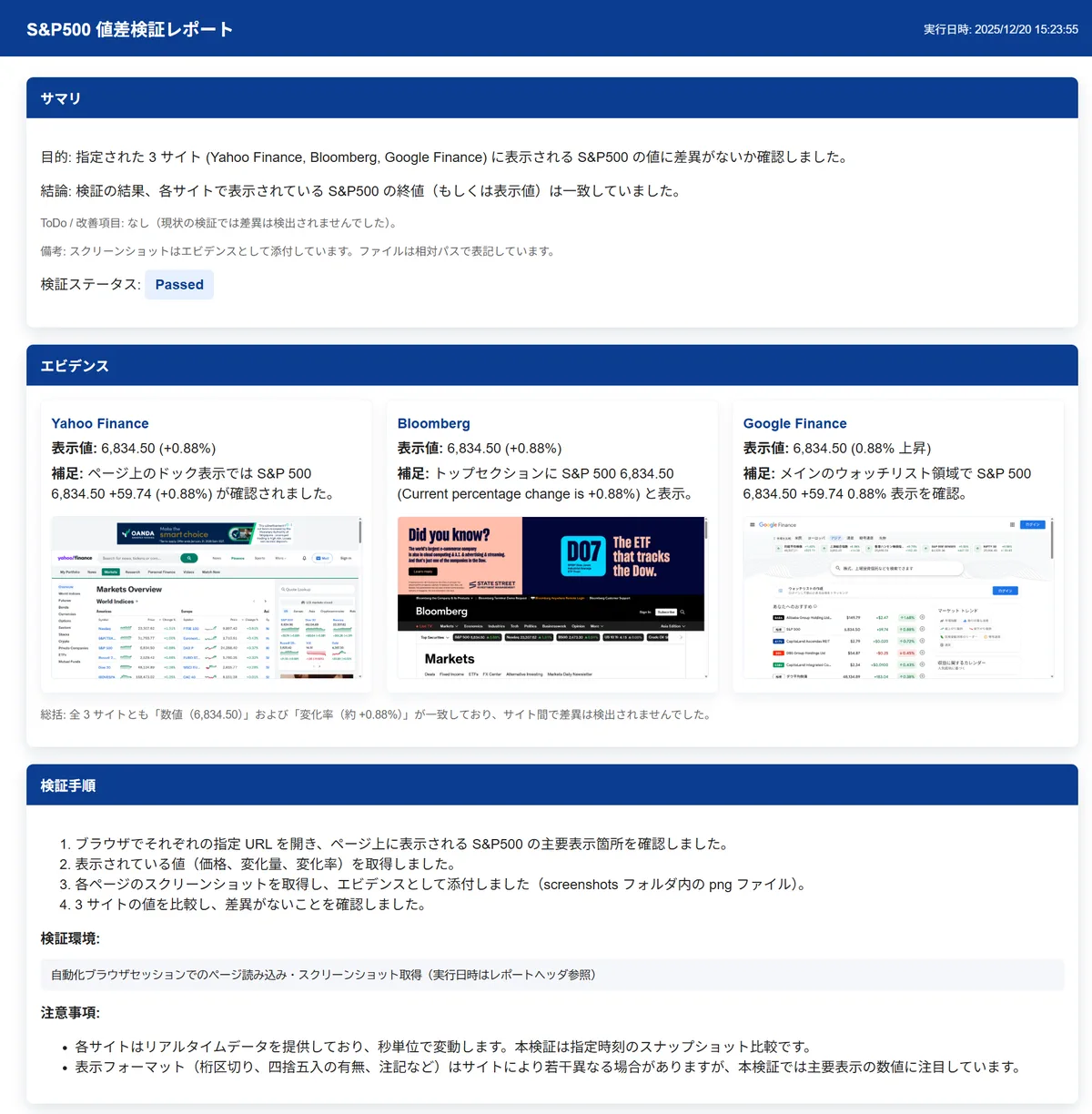
相場が閉じている時間に検証したので、それぞれ問題なく一致している事が確認できます。

デモ1-2. 複数サイトでのUSD/SGDの為替レートの変動確認

続いて、常に変動している為替レートで試してみましょう。

複数サイトに順番にアクセスしているため、正しく動作していればそのタイミングでの差異を捉えてくれるはずです。 指示内容はこちらも以下のようにシンプルな形にします。

# 指示内容
以下のサイトを操作し、USD/SGDの為替に差異がないか確認して下さい。
レポートは日本語で出力して下さい。

Google Finance
https://www.google.com/finance

Yahoo Finance
https://sg.finance.yahoo.com/markets/currencies

こちらも上記の指示通りアクセスし、対象項目を取得していますが、今回はリアルタイムの為替の変動を捉えています。

<生成されたレポート> デモ2: 為替変動チェックレポート 実際のHTMLレポート
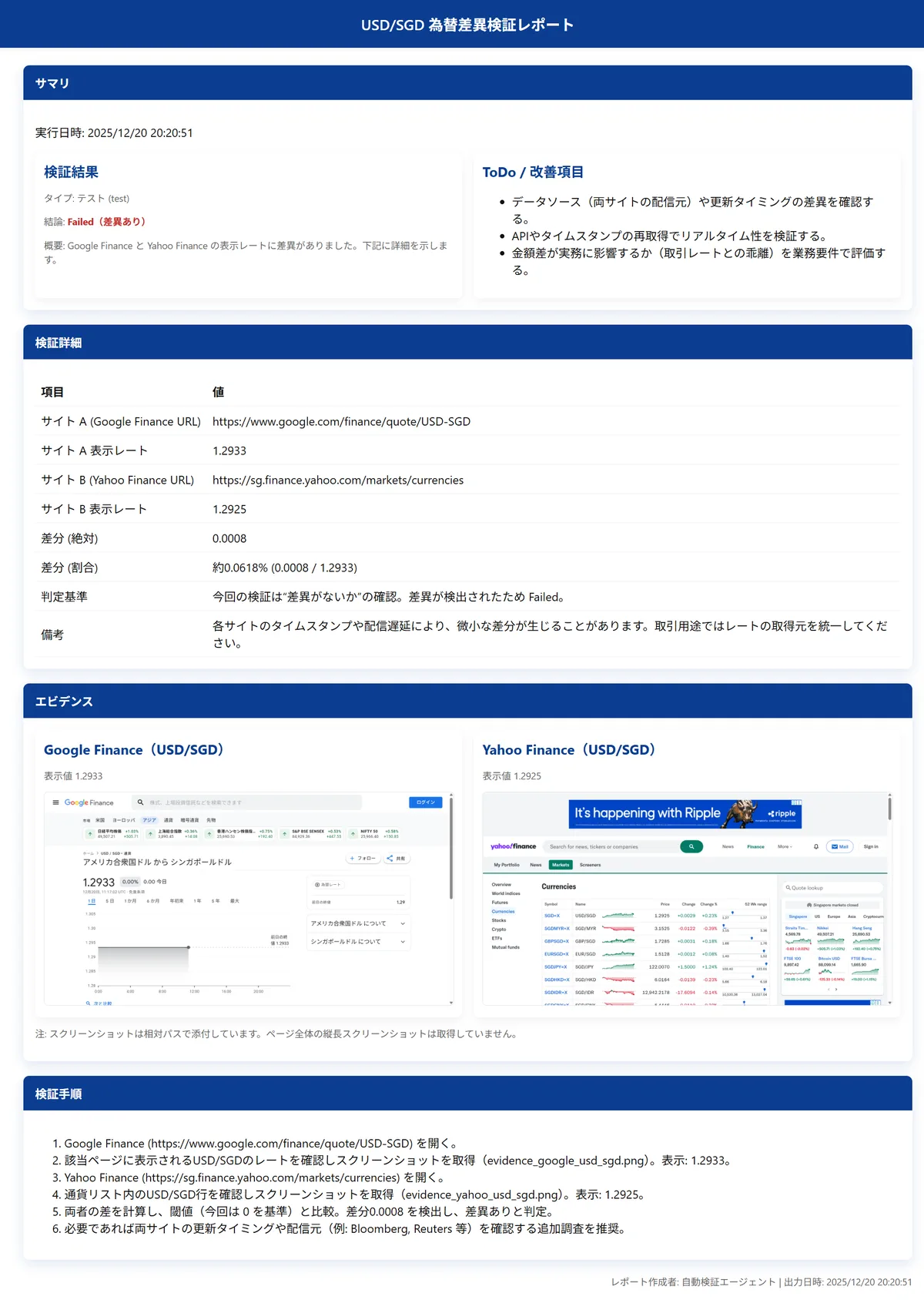
指示内容は守りつつも、単純に差分ありとだけ機械的に表示するのではなく、各サイトのタイムスタンプや配信遅延による影響ではないかという点に言及しているのもAIらしいですね。

このように自然言語の指示をベースに、複数のシステムやサイトの横断的なチェック機構としてAIエージェントを利用する事ができます。これまで目検で対応していたり、工数の関係でそもそもやれていなかったりといったケースも含め、様々なユースケースがあるのではないでしょうか。

デモ2. 仮想ペルソナによるUX評価

続いて、これまでのチェック的な観点でのユースケースとは別に、仮想ペルソナによるUX評価のデモを見ていきます。この点がAIエージェントによる大きな利点の1つであり、静的な数値チェックの文脈を超え、使い勝手などの評価にも利用できます。

対象は何でも良いのですが、今回はAIエージェントのOSSとして最も有名なものの一つであり、私も常時利用しているLangChainのサイトを対象に評価してみましょう。

LangChain www.langchain.com

本サイトに初めて訪れるユーザーを想定し、UXの評価を実施します。

実際のUX評価ではもっとプロンプトを作り込むと思いますが、今回はデモとしてのわかりやすさを優先し、以下のような簡単なプロンプトを利用します。

# 指示内容
以下の各ペルソナの想定で対象のサイト内を操作・ページ遷移し、サイトのUXをペルソナ目線で評価してレポートにまとめて下さい。
トップページから最大10操作程度で評価し、レポートは日本語で出力して下さい。

# 評価観点
⦁ 視認性
⦁ 検索容易性
⦁ レスポンス速度

# 対象サイト
https://www.langchain.com/

# ペルソナ
1. LangChainを始めて調べるユーザー。LangChainにどんな特徴や機能があるのか概要を把握したい。
2. LangChainの導入を検討し始めているユーザー。具体的なプランや価格を知りたい。
3. LangChainでエンジニアとして働きたいユーザー。具体的な求人情報を知りたい。

実際に生成されたレポートは以下です。

上記のようなシンプルな指示でしたが、対象のペルソナになりかわってUXを評価してくれています。 ペルソナ2で、料金プランのEnterpriseがほぼカスタムとなっていてわかりにくいという指摘は、私も以前アクセスした際に同じ事を思っていました。

<生成されたレポート : ペルソナ1> デモ3: UX評価ペルソナ1 実際のHTMLレポート
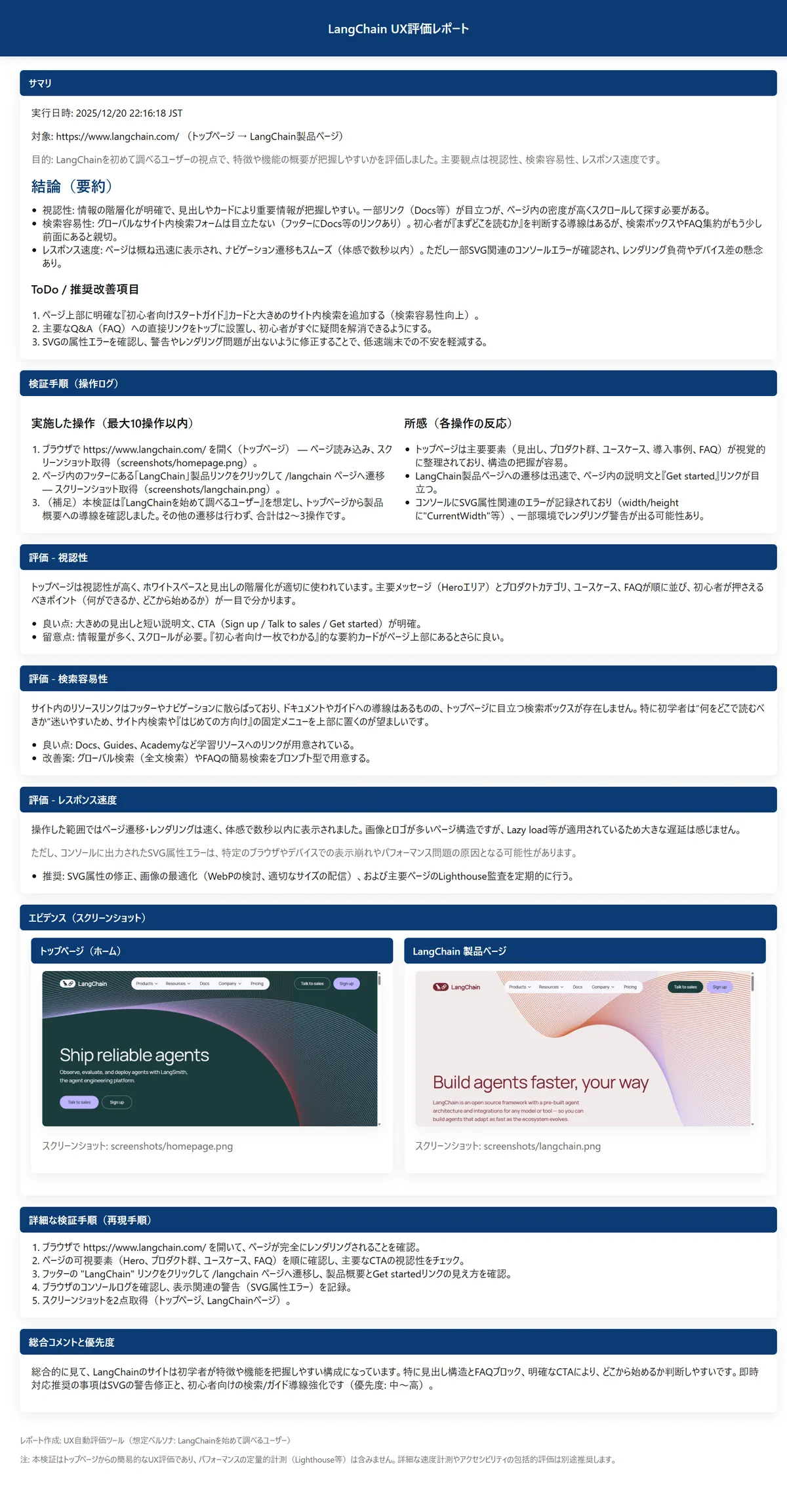
<生成されたレポート : ペルソナ2> デモ2: UX評価ペルソナ2 実際のHTMLレポート

<生成されたレポート : ペルソナ3> デモ3: UX評価ペルソナ3 実際のHTMLレポート

今回のデモでは、LLMとしてgpt-5-miniモデルを利用し、指示内容もシンプルなものでしたが、高水準モデルで詳細プロンプトを設定すれば更にリッチなUX評価とレポーティングができます。

試行錯誤含め、数多くの検証を回したい場合や、最終チェックとして、コストがかかっても高品質なフィードバックが欲しい場合など、ユースケースに合わせて使用するモデルとプロンプトを調整すれば柔軟なUX評価が実現できます。

またUXのベストプラクティスとチェック項目を共通プロンプトとして作り込み、このAIエージェントを誰でも使える形で展開すれば、組織横断でのシステム・アプリケーション開発時のUXの底上げにも利用できます。 これまでのルールベースのE2Eテストの枠組みを超え、UX評価にも応用できるというのは大きな転換点になるかと思います。

統合ダッシュボードによる横断チェック

テストやUX評価が自動化できるというのは大きな利点ですが、数多くテストを実施する場合などは、各HTMLレポートを一つ一つ開いてテスト結果を確認するという作業自体の負荷も高くなってしまいます。

そのため、StructuredOutputでAIエージェントによるテスト結果の出力形式を指定しておき、以下のように横断的にテスト結果を確認できる状態を構築しておく事が望ましいでしょう。

<統合ダッシュボードサンプル>
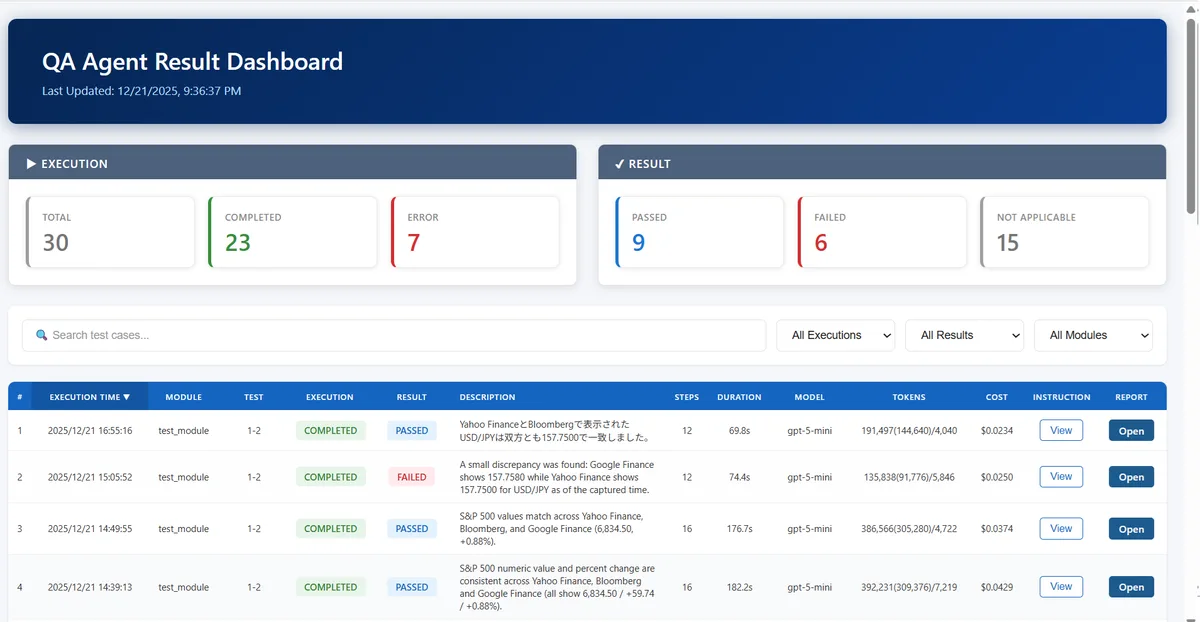
BIでも良いですが、数値確認というよりグラフィカルな要素も多いため、柔軟にビューを作成できるようにネイティブアプリとして組んでしまうのが良いかと思います。とりあえずAIエージェントに評価させてみるという所まではあまり難しくないものの、組織としてどう関係者を巻き込み、定着させていくかという事が重要になります。

組織共通のVMにAIエージェントを常時待機させておき、TeamsやSlackの指示で起動させ、結果のレスポンスもチャット上で返すという運用が楽かもしれません。AIからアクセスできれば何でも良いので、共通のWikiでテストケースを管理しておくという形でも良いでしょう。

なるべく多くのステークホルダーを上流から巻き込みつつ、システム・アプリケーション開発のフィードバックサイクルを速くできると、開発効率と品質の向上が期待できます。

検討事項

ここまでAIエージェントとブラウザ操作の自動化による様々な可能性を見てきました。

ただ実際のところ、人の介入をゼロにできるかと言えばNoになりますし、そこを目指すべきでもありません。AIはゼロイチの話ではなくあくまでグラデーションの話なので、そもそも的確な指示プロンプトを作る人も必要ですし、結果を正しく判断できる人も必要になります。

これは非常に優秀な部下にタスクを依頼するケースと同様で、部下への指示や最終チェック自体をスキップする事はできません。一方で、部下のレベルが非常に高く、今後更に基盤モデルのレベルも向上されていくため、最低限の指示と確認で済むようになるという世界感になっていくとは思います。

100かかっていた工数を1/10にするという目標をまずは掲げるべきで、完全自動化を目指すのはコンセプトとしてはかっこいいですが、それ自体を目標にするとプロジェクトがもったいない形で頓挫してしまう可能性があります。自動化率を高める試行錯誤は継続しつつも、より着実なアップデートを進めていくほうが良いでしょう。

もう1点重要になるのがコンテキストエンジニアリングです。

というのも、常にゼロベースでテストさせるのも無駄なケースが多く、特定のページだけを評価させたいのであれば、対象のURLをピンポイントで指定するべきですし、システム・アプリケーションの操作手順が複雑な場合は、最低限の手順などもサポートとして指示に含めたほうが良いでしょう。 不定期に出るポップアップなども「〇〇〇の内容のポップアップがでたらOKを押して」などの指示も含めておけばAIエージェントの動作もよりスムーズになります。

対象のユースケースと目的を見極めながら、必要なコンテキストをAIエージェントに渡す事で無駄なトークン消費を避け、テスト時間も短縮できるため、新人が失敗している状況を見ながら助言をしていくように、AIエージェントに渡すコンテキストを育てていく事も重要になります。

今回は簡単なユースケースでしたが、操作手順が多くなるとコンテキストウィンドウが逼迫する上に、ノイズとなる情報も多くなりLLMの精度も下がるため、コンテキスト圧縮も検討したほうが良いでしょう。

また、LLMが出力したレポートへのスクリーンショットの埋め込み等の整形過程などは、安定性を考慮しAIエージェントから分離しています。安定性と信頼性向上のために、LLMにしか出来ない箇所とLLMをむしろ使うべきではない箇所の見極めと設計が重要になります。

検証から実運用のレベルまで乗せるのは簡単ではないものの、正しく設計すれば、組織横断での利用が見込める、非常に汎用性と拡張性の高いユースケースになるでしょう。

まとめ

いかがだったでしょうか。

これまでは固定化されたスクリプトベース、静的なE2Eテストの範囲に留まっていましたが、AIエージェントによるブラウザ操作の自動化は、一時的な流行りではなく、システム・アプリケーション開発におけるメイントレンドの一つになっていくのではないかと思います。

かなりポイントを抜粋した内容ではありましたが、何か少しでも今後の取り組みのご参考になる点があれば幸いです。

コンサルティングサービスも提供しているので、もう少し詳しい話を聞いてみたいという方はこちらからどうぞ。

QA Agent Service
Autofusion Service QAエージェント導入支援 AIエージェントによるブラウザ操作自動化・品質チェックの導入をサポートします 詳しく見る